24
9.10 The Display Module supports data logging of the information that it normally
has available for viewing. The unit retains 255 datalogs which are stored in a
FIFO (first in, first out) manner. When 255 logs are stored, the oldest log is
purged and the newest added. The oldest data is stored as log no. 255 and the
newest as no. 1; there is also a copy of the current values available as datalog
0. The datalogs can be accessed by the special PC terminal program supplied
with the unit or by a special Modbus command sent by the user-supplied PLC
or computer system. More detailed information is provided on the terminal CD.
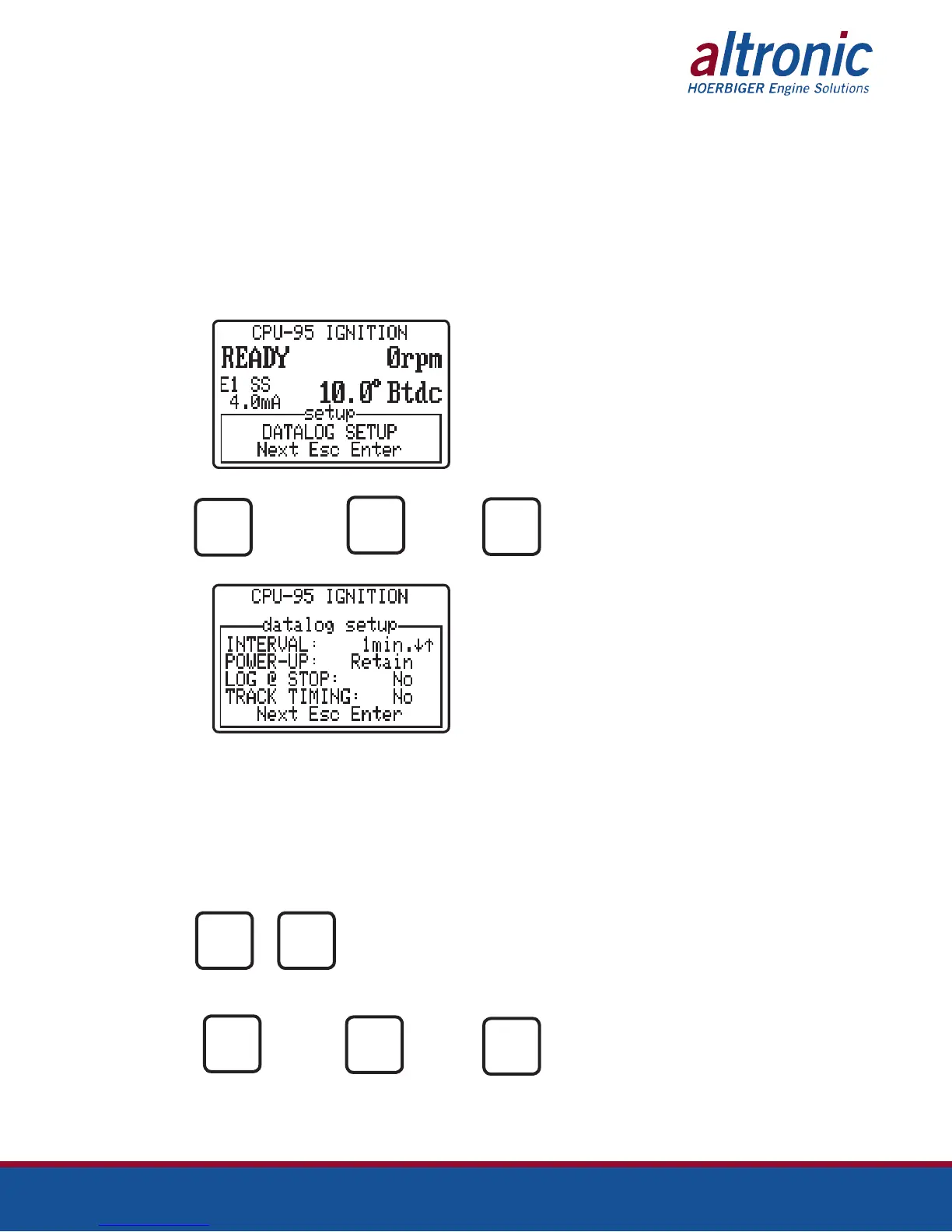
The DATALOG SETUP menu appears after the COMMUNICATION SETUP
menu. If datalogs are not being used, press the NEXT key to proceed to the
CYLINDER LABELS menu.
AT
PRESS TO PRESS TO PRESS TO
ENTER THE GO TO THE EXIT
DATALOG NEXT MENU
MENU
ESC
AT
Datalogging has the following setup parameters:
INTERVAL: Frequency of datalogging events.
POWER-UP: If selected Retain, the datalogs will be retained upon power up.
LOG@STOP: If selected yes, a data log will be taken when the ignition is
stopped.
TRACK TIMING: If selected yes, a data log will be taken any time the timing
is changed.
PRESS TO
MODIFY
THE VALUE
PRESS TO PRESS TO PRESS TO
ADVANCE TO GO TO THE EXIT
THE NEXT NEXT MENU
SELECTION
ESC
It is possible to setup the system so that any change to the ignition
timing will trigger a datalog event (an exception report). Exception
reports are automatically generated for alarms or shutdowns.
ENTER
NEXT
ENTER
NEXT


 To Next Page