Section 3 • Programming Instructions
39
ACTION
AUDIBLE
INDICATOR
VISUAL INDICATOR
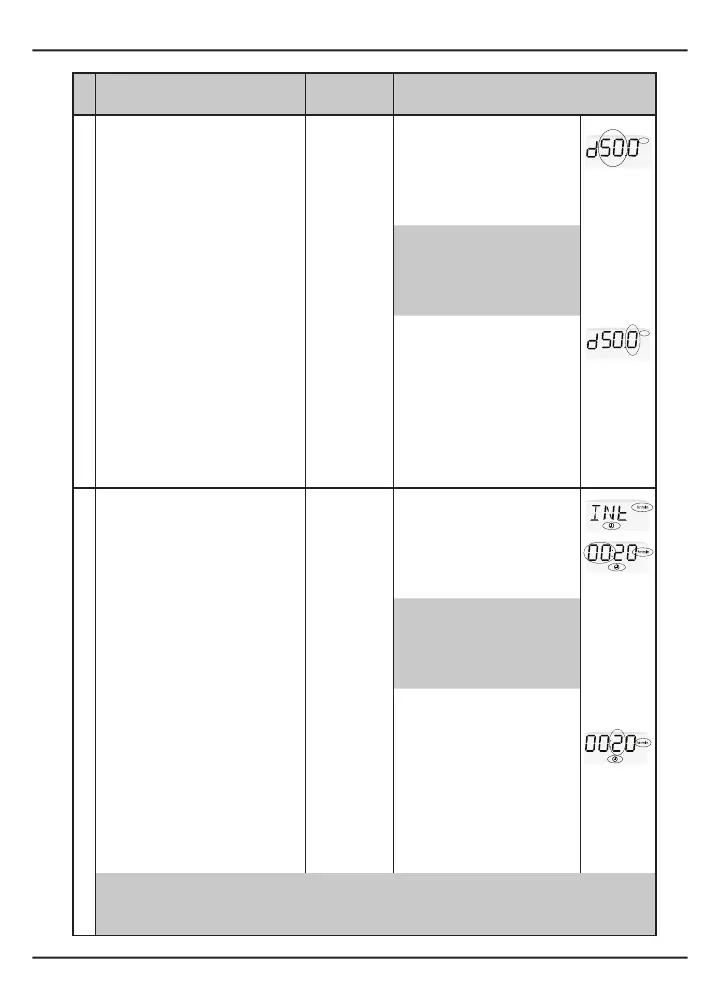
4 Setdosevolume:
(A) Press and release the RUN/
PAUSE button to increase the
number or press and release the
BOLUS button to decrease the
number.
Letter “d,” number left of
decimalpoint,and“ml”ash.
(B) When the desired number
appears in the display, press and
hold the RUN/PAUSE button until
one beep is heard to accept the
setting.
One beep NOTE: Dose volume is
displayed in ml.
(C) Repeat steps 3(A) and 3(B) to set
the digit to the right of the decimal
point.
Letter “d” is displayed, and
number to the right of the
decimalpointand“ml”ash.
Dose volume is established.
(D) If during programming, you
need to move backwards in the
display to a previous setting, press
and hold the BOLUS button until
one beep is heard.
Each time the BOLUS button
is pressed, the display moves
backward one screen to enable
review or correction.
5 Setdoseintervaltime:
(A) Press and release the RUN/
PAUSE button to increase the
interval time or press and release the
BOLUS button to decrease the dose
interval time.
“INT” is displayed for two
seconds to indicate that the
pump is in dose interval mode.
“hr:min”andclockiconsand
thehourssectionash.
(B) When the desired dose interval
time appears in the display, press
and hold the RUN/PAUSE button
until one beep is heard to accept
the setting.
One beep
NOTE: Dose interval time is
displayed in hours and minutes
(hh:mm).
(C) Repeat steps 4(A) and 4(B) to set
the digits in the minutes.
“hr:min”,clockicon,and
numbers in the minute section
ash.
Dose interval time is
established.
(D) If during programming, you
need to move backwards in the
display to a previous setting, press
and hold the BOLUS button until
one beep is heard.
Each time the BOLUS button
is pressed, the display moves
backward one screen to enable
review or correction.
NOTE:Ifdosevolumeissetto“0,”thisstepwillbeskipped.
NOTE: Theminimumdoseintervalisdependentonthedosevolumeset.Themaximumdoseinterval
is24:00(hh:mm).
ml
ml


 To Next Page