Section 7 • Alarms and Signals
53
PRIORITY STATUS ICON
VISUAL
INDICATOR
AUDIBLE
INDICATOR
COMMENTS
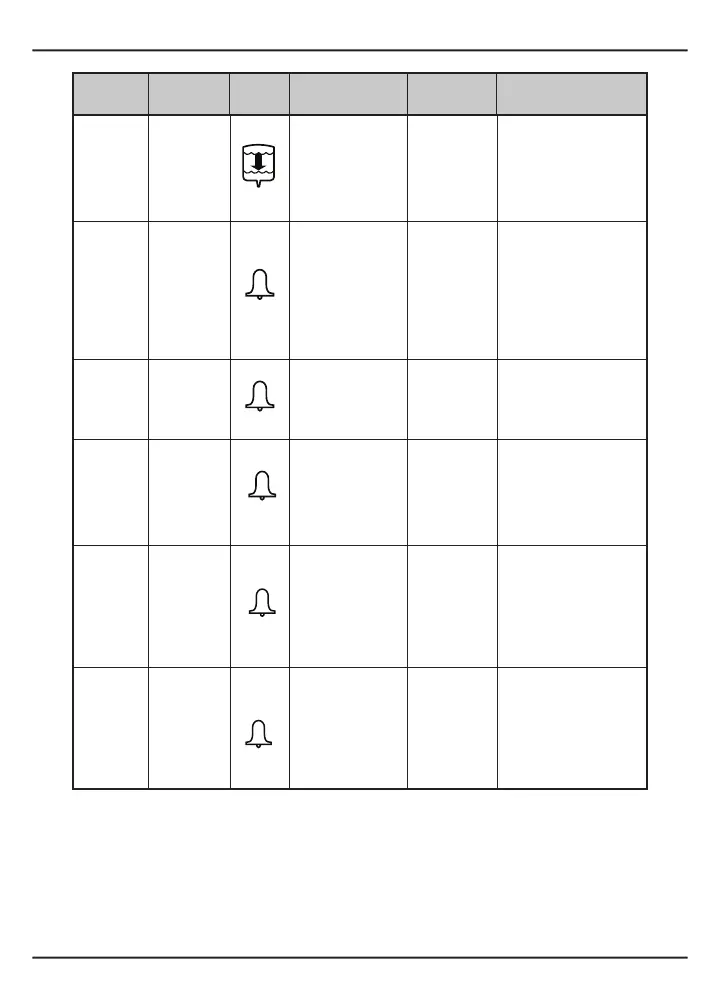
High
Infusion
complete
Bagiconashesin
the display
One long
tone followed
by three
shortbeeps;
repeats every
four minutes
The “infusion complete”
alarm will sound every
four minutes in pause or
run mode.
High
Occlusion
alarm
“OCL”
“OCL” and
alarm icon are in
the display
Delayed 3
minutes;
Constant
beepingonly;
clears itself
if source of
occlusion is
removed
Press the RUN/PAUSE
button to silence the
alarm. Press the RUN/
PAUSE button to restart
the pump. If unable
to resolve (silence) the
alarm, contact Summit
Medical Products, Inc.
High Malfunction
Alarm icon and
“CASS” are in the
display
Constant tone
Immediately close the
tubing clamp. See Section
8 - “Troubleshooting”
High Malfunction
Alarm icon and
“MA1” are in the
display
Constant tone
Press the RUN/PAUSE
button to silence the
alarm. Gently press on
top of the cassette to
ensure proper placement.
Resume infusion.
High Malfunction
Alarm icon and
“EE1,” “EE2,”
“EE3,” “EE4,”
“EE5,” “EE6” or
“EE7” are in the
display
Ten short
beeps
Immediately close the
tubing clamp and turn
off the pump. Contact
Summit Medical
Products, Inc. by calling
the toll-free number on
the pump.
High Malfunction
Alarm icon and
“CPU,” “RA” or
“RO” are in the
display
Constant tone
Immediately close the
tubing clamp and turn
off the pump. Contact
Summit Medical
Products, Inc. by calling
the toll-free number on
the pump.
NOTE: Alarmscannotbedisabledormodied.
NOTE: When batteries are removed the alarms are cleared. When pump is powered on,
it will detect any alarm conditions that are still present.


 To Next Page