Transmission
units
To remove the Transmission Unit
1.
Tum
the ignition
off
and remove the key;
2.
Tum
the fuel off;
3.
Remove the spark plug lead;
4.
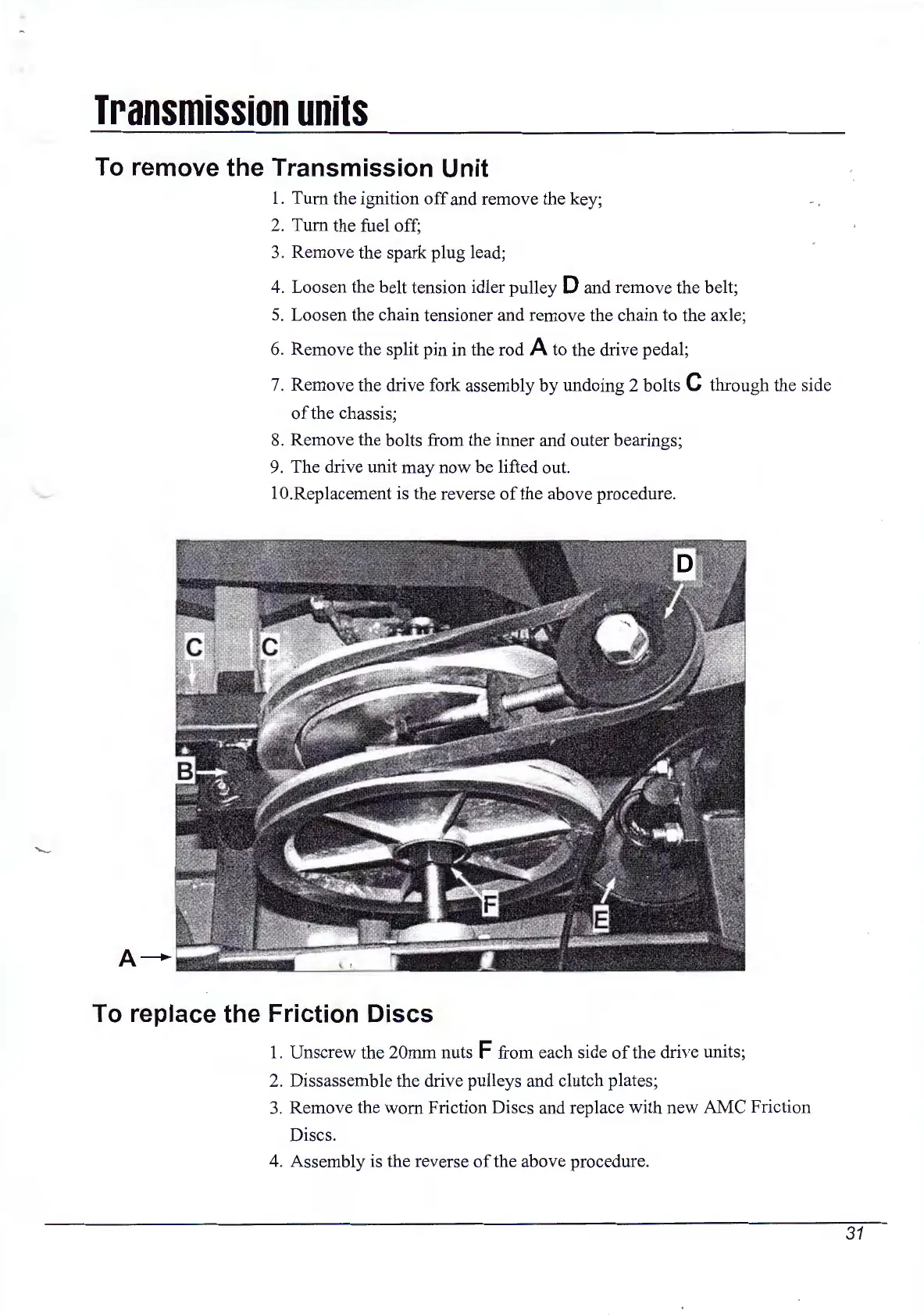
Loosen the belt tension idler pulley D and remove the belt;
5.
Loosen the chain tensioner and remove the chain to the axle;
6. Remove the split pin in the rod
A to the drive pedal;
7.
Remove the drive fork assembly
by
undoing 2 bolts C through the side
of
the chassis;
8.
Remove the bolts from the inner and outer bearings;
9. The drive unit may now be lifted out.
1 O.Replacement is the reverse
of
the above procedure.
To replace the Friction Discs
1.
Unscrew the 20mm nuts F from each side
of
the drive units;
2.
Dissassemble the drive pulleys and clutch plates;
3.
Remove the worn Friction Discs and replace with new AMC Friction
Discs.
4.
Assembly is the reverse
of
the above procedure.
-
31



 To Next Page