17
Playback
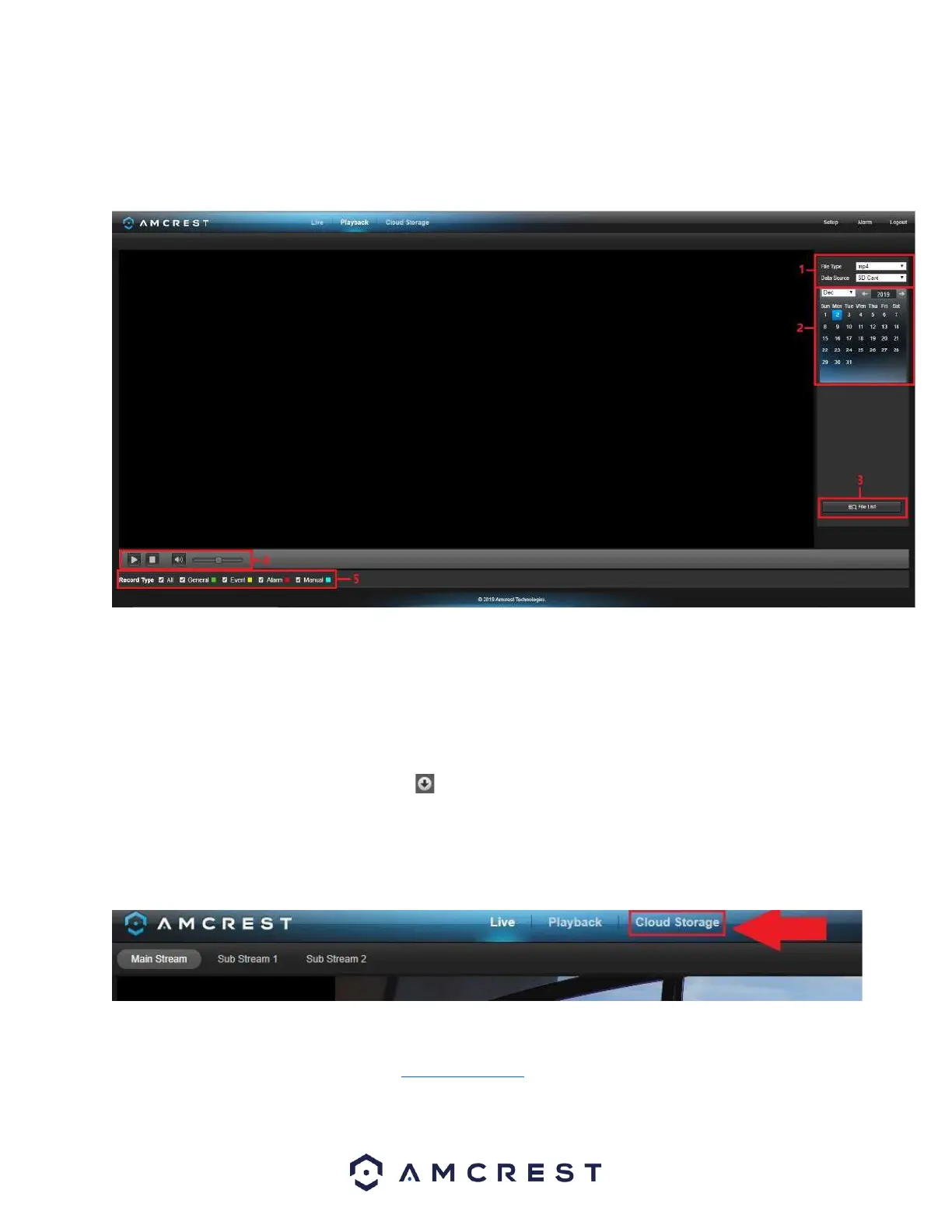
The Playback tab allows the user to playback the camera’s recorded video. Below is a screenshot of the Playback
tab:
This is the interface for the playback menu. There are 5 main sections:
1. File Menu: This panel allows the user to select a file type and data source.
2. Calendar: This panel allows the user to pick a date that they would like to playback video from. When a date has
recorded footage available, it is green. The current date is blue, unless it has recorded footage, then it’s a lighter
green.
3. File List: This button allows the user to open or download a recording from a list of all recorded video for a specific
date range. To download a recording, press the button.
4. Playback Bar: These options allow the user to play, stop, and adjust the audio levels of a recording.
Cloud Storage
The Cloud Storage tab allows the user quick access to the Amcrest Cloud website.
At this website (amcrestcloud.com) users can register for new accounts as well as view or modify existing
accounts.
For more information on Amcrest Cloud visit: amcrest.com/cloud














 To Next Page