Installation
Page 3-7
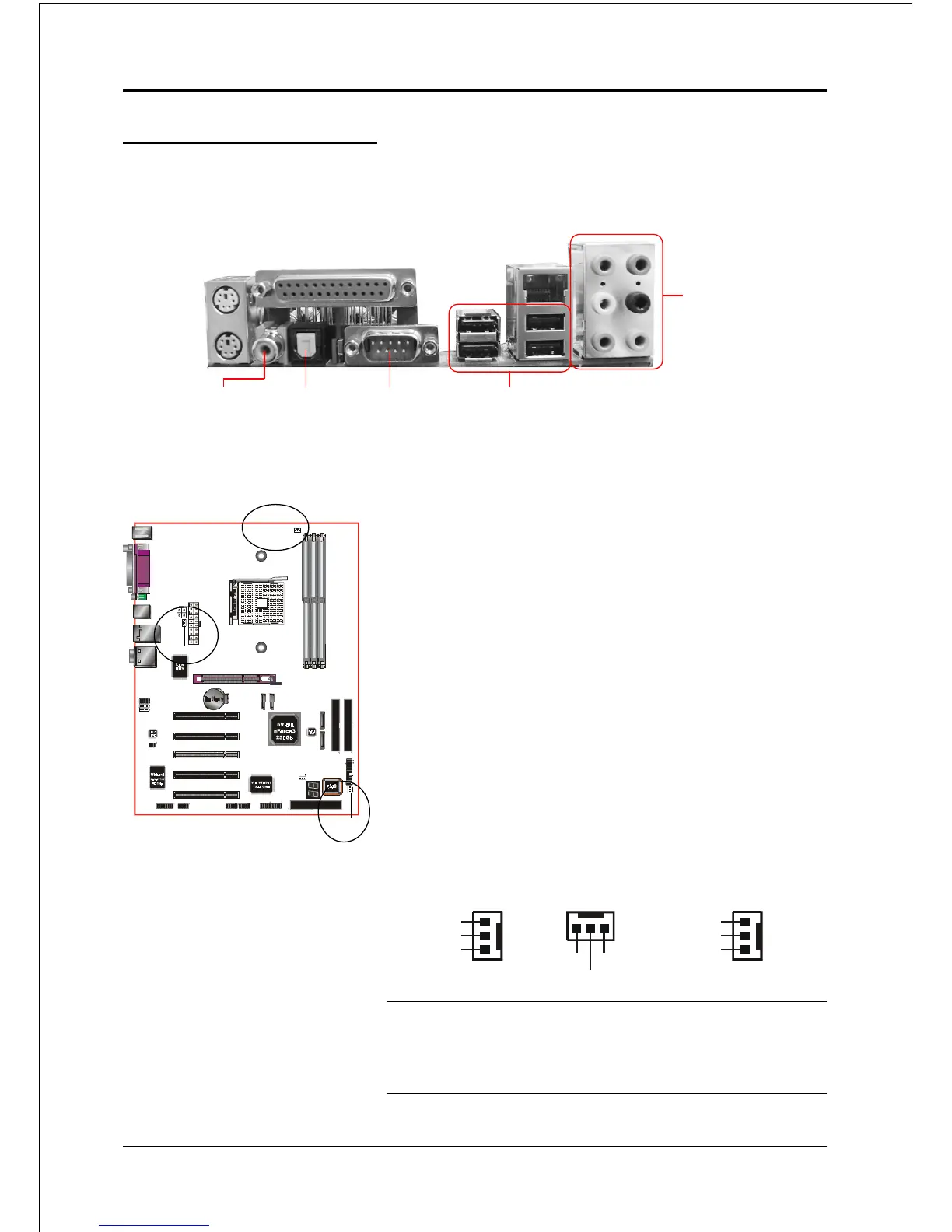
JCPU_FAN / JPWR_FAN / JSYS_FAN:
CPU/Power/Chassis Fan Power Connectors
JCPU_FAN: The CPU must be kept cool by using a
heatsink with fan assembly.
JPWR_FAN: If you are installing an additional fan
in the unit, connect to this fan
connector.
JSYS_FAN: The chassis fan will provide adequate
airflow throughout the chassis to
prevent overheating the CPU.
Figure 10 - I/O Ports
JCPU_FAN
JSYS_FAN
JCPU_FAN
JSYS_FAN
JPWR_FAN
JPWR_FAN
3-5 Device Connectors
The I/O back panel for this mainboard is shown below. When installing the
mainboard into the computer case, use the bundled I/O shield to protect this back
panel.
Ground
+12V
Sense
This mainboard is equipped with intelligent fan
speed control. Refer to the PC Health Status
submenu of the BIOS.
USB2.0 x 4 ports
Parallel Port
PS/2
Mouse
PS/2
Keyboard
RJ45
LAN
COM1S/PDIF-out
Coaxial Jack
S/PDIF-out
Optical
(Optional)
7.1 Audio Channel
Ground
+12V
Sense
Ground
+12V
Sense



 To Next Page