4
7 ElectronicallyControlledLightSwitchandAutomaticLightOff
ThecabinetlightcanbeswitchedonfromtheIC+controllerviatheintegratedlightbuttonorsimplybyopeningthedoor.TheIC+
willdisplayalightbulbicontoindicatethatthelightisoninsidethecabinet.
TheAutomaticLightOfffeatureofIC+enablestheusertosaveenergy.Theamountoftimethelightwillstayoncanbesetfrom1
minuteto60minutesorcanbesetformanualshutoffonly.Asdefault,theautomaticlightofffeatureisdisabled.
PushtheintegratedlightbuttononIC+toturnthelightoffmanually.
Back‐to‐backlightcontrolisprovidedasanoptionalfeature.
NOTE:WhenusinganoccupancysensorinconjunctionwithIC+,theAutomaticLightOfffeaturemustbeenabled.
8 HACCPRecording
IC+controllerrecordstheairtemperatureatpresettimeintervalswhichbydefaultissetto30minutes.Inadditiontotheair
temperatureIC+recordsallthealarmsanddooropenings.
TheHACCPdatacanbepreviewedontheIC+display.Todoso,pushtheMENUbuttonandgotoHACCPPreview→PreviewEvents,
selectanyoftheeventsinthelisttoviewthedetailsrelatedtothatevent.
TodownloadthedataviaUSB,insertaUSBdriveintheUSBportandfollowthepromptsonthedisplay.
IfIC+controllerisconnectedtoaninternetenabledWi‐Finetwork,itcanbesetuptosendperiodice‐mailscontainingtheHACCP
data,see“Wi‐FiConnectivityandRemoteNotification”chapterofthismanual.Anon‐demandHACCPe‐mailoptionisavailablein
theIC+menuatHACCPPreview→SendEmailHACCP.
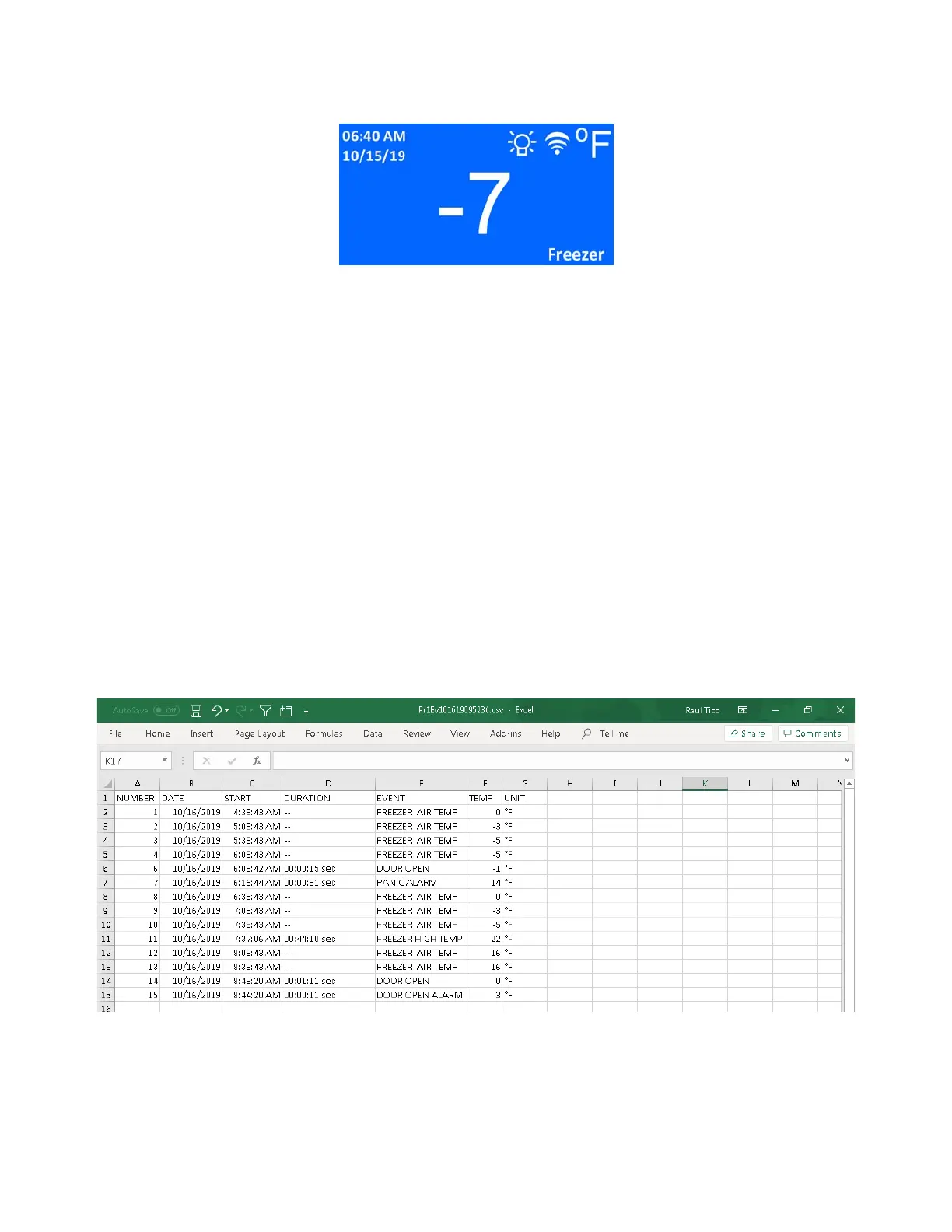
Theretrieveddatawillbeina.csvformatfilethatcanbeopenedwithMicrosoftExcelorothercompatiblesoftware.Thenameof
thefilewillincludethedateandtimewhenthefilewasretrieved.
SampleHACCPfile:
9 Wi‐FiConnectivityandRemoteNotification
IC+isequippedwithaWi‐FimodulewhichenablesittoconnecttothelocalWi‐Finetworkforthepurposeofsendingremote
notificatione‐mailsforallthealarmsandsendinge‐mailscontainingHACCPdataattachments.
FollowthestepsbelowtoconnecttheIC+toWi‐Fiandtosetitupforremotenotifications:


 To Next Page