5
IC+ Setup Tool
1. IfmultipleIC+controllersaretobeconnectedtothesameWi‐Finetwork,youmustsetadifferentserialnumberforeach
controllerinordertodifferentiatebetweenthem.Todoso,entertheIC+menu,gotoSettings(defaultpasscodeis7055)→
About→SerialNumber.Whendonepress“MENU”buttonrepeatedlytoexitthesettingsmenu.
Note:Whenassigningdifferentserialnumbersforeachcontroller,makeanoteoftheserialnumberswiththelocationfor
laterreference.
2. OnaBluetoothenableddevicedownloadIC+SetupToolapp,availableforIOSandAndroiddevices.
3.
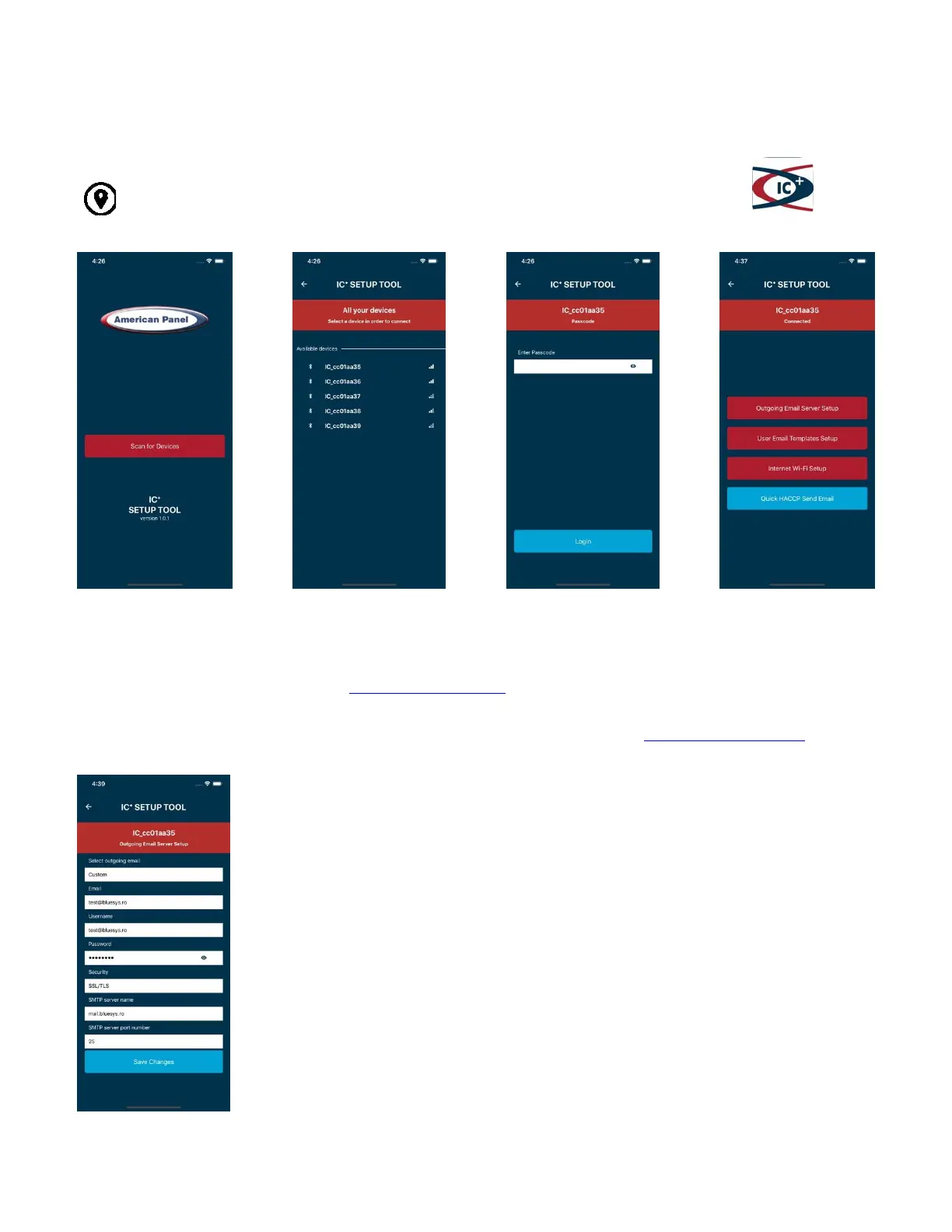
EnablethelocationfeatureonyourdeviceandopenIC+SetupToolapp.
IC+controllerwillneedane‐mailaccountsetupsoitallowsIC+toaccessitandsende‐mails.Forthispurpose,AmericanPanel
CorporationprovidesagenericGmailaccounticpluswalkin@gmail.com;however,werecommendreplacingthisaccountwithanew
onethatisownedandmaintainedbytheenduser.
AmericanPanelCorporationisnotresponsibleforthefunctionalityofthegenericaccount,icpluswalkin@gmail.comandit
reservestherighttomodifyordiscontinuetheaccountwithoutadvancenotice.
8.OutgoingEmailServerSetup
Inthe“Selectoutgoingemail”chooseoneoftheavailableoptions,fillintherequiredinformation,and
press“SaveChanges”whendone.
Availableoptions:
Default–selectthisoptionifyouchoosetokeepthegenericemailaccountprovidedbyAmerican
PanelCorporation.NoSMTPserversettingrequired.
or
Custom–selectthisoptionifyouwishtoconfiguretheSMTPsettingsforapreferredemailaccount
or
Gmail,Yahoo,orAOL–selectthisoptiontoconfiguretheSMTPsettingsforapreferredexistingemail
accountatoneoftheemailserversmentionedabove
Note:WhenusingaYahooorAOLyoumustgenerateanapppassword,youcandosofromthe
securitysettingsoftheYahooorAOLemailaccount,andthenenterthatpasswordinthePassword
field,seefigureontheleft.
Note:WhenusingGmail,youmustturnonaccesstolesssecureappsfromthesecuritysettingsof
theGmailaccount.OnlyafterthatIC+willbeabletoaccesstheaccount.
4.Press“ScanforDevices” 5.Selectfromthelist 6.DefaultPasscodeis“7055” 7.Press“OutgoingEmail
ServerSetup”


 To Next Page