6
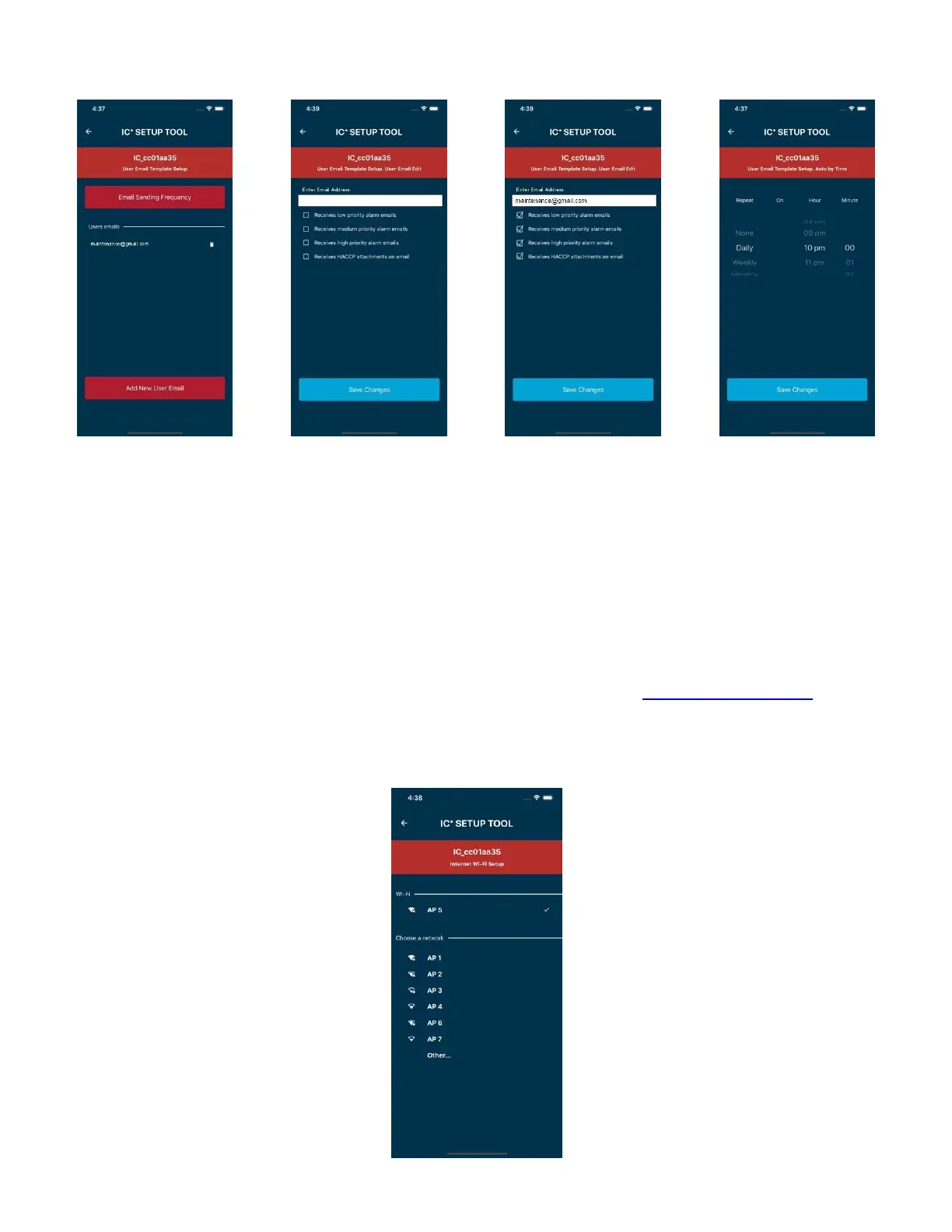
9.UserEmailTemplatesSetup
HighPriorityAlarms:PowerFailure,PanicAlarm,DefectiveTemp.Probe
MediumPriorityAlarms:HighTemp.Alarm,LowTemp.Alarm
LowPriorityAlarms:DoorOpenAlarm
Note:ICplussupportsupto5emailrecipients.
TIP:ToreceivealarmsviaSMStextmessagesuseemailtotextgateway.Inthe“EnterEmailAddress”fieldatstep11,seeabove,
enterthe10‐digitcellphonenumberyouwantthealarmstobetextedtofollowedbytheemaildomaincorrespondingtothe
cellphonecarrier.Forexample,toreceivetextsonaT‐Mobilenumber(123)4567890,enter1234567890@tmomail.net.Tofindout
theemaildomainforyourspecificcarriersearchontheinternetfor“Emailtotextgatewaylist”orcontactyourcellphonecarrier.
14.InternetWi‐FiSetup
ChooseaWi‐Finetworkfromthelist,enterthepassword,andpressconnect.
10.Press“AddNewUser
Email”
11Entertheemailaddressof
thepersonthatwillreceivethe
notifications.
12.Selectthetypeofalarmsor
emailsthatthisuserwill
receive.Press“SaveChanges”
whendone.
13.Sethowoftentoreceive
theHACCPreportemail.


 To Next Page