7-6 | 5830 Moisture Analyzer
Moisture Generator
Removing the moisture generator
1. Remove the top cover from the analyzer.
2. Remove the cover for the oven assembly. Facing the front of the 5830
analyzer, the moisture generator is located left- center on the sample
manifold plate, underneath the pressure transducer, between the
flowmeter and the sensor assembly. See Figure 7-2.
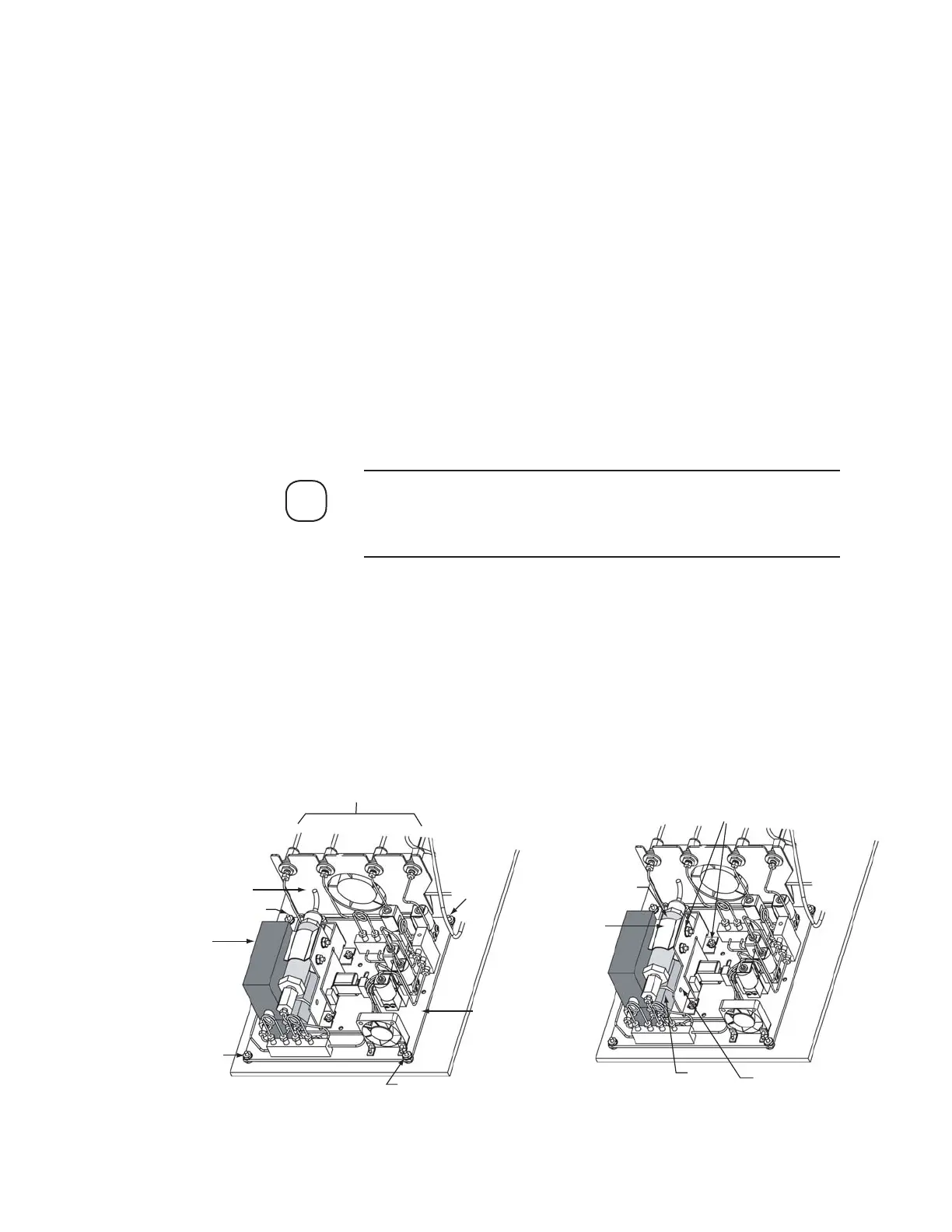
3. Disconnect the 1/16 inch fittings on all four sample tubes, which are
located on the bracket in the center of the sample oven (Figure 7-5).
4. Remove the four nuts that secure the sample manifold plate (the
square aluminum mounting plate, located in the front section of the
oven), and gently lift the manifold out of the oven (Figure 7-5).
All of the wiring connections should still be intact at this time; you
will need to rest the sample manifold plate on top of the analyzer to
remove the moisture generator.
5. Carefully, disconnect the 1/16 inch fitting on the pressure transducer.
6. Carefully, disconnect both 1/16 inch fittings on the moisture generator.
7. Remove the nuts holding the mounting bracket for the moisture gen-
erator. The moisture generator bracket, containing both the generator
and the pressure transducer, can now be lifted from the sample mani-
fold plate (Figure 7-5).
NOTE
Pressure
Transducer
Moisture
Generator
Mounting
Bracket
Nuts
Clip
Mass Flow
Meter
Bracket
4 Sample Tubes
Sample Manifold
Plate
Nut
Nut
Nut
Nut
Figure 7-5.
Model 5830 moisture
generator.


 To Next Page