7-10 | 5830 Moisture Analyzer
Dryers
Removing the dryers
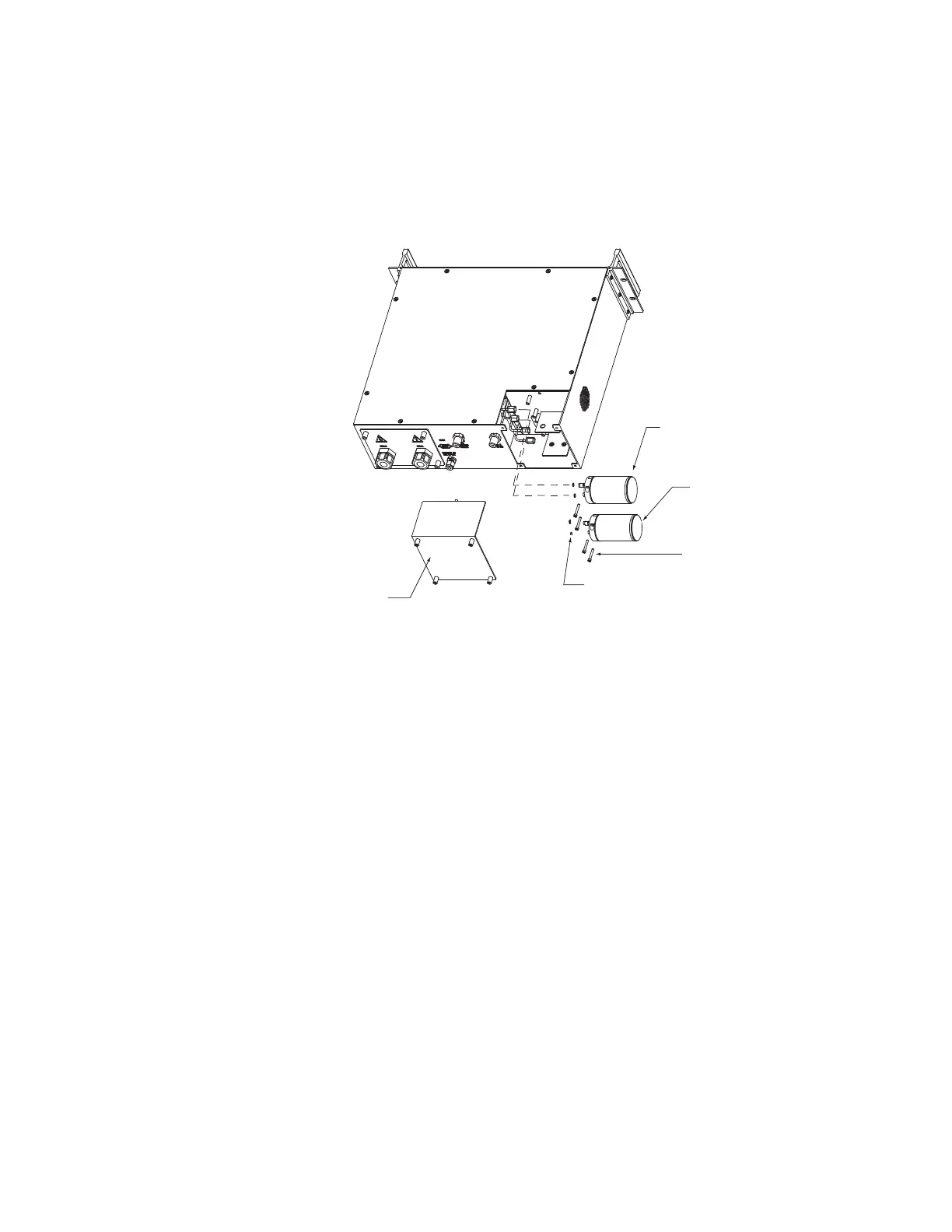
1. At the rear of the analyzer, locate the dryer compartment on the right-
hand side (Figure 7-8).
2. Use a 7/64” hex wrench to loosen the four captured screws on the
compartment cover.
3. Remove the cover from the analyzer.
4. The sample system (reference) dryer is located in the top position, and
the zero dryer is located in the bottom position.
5. Taking one dryer at a time, remove the mounting screws that pass
through the top of the dryer body and set them aside.
6. Loosen the 1/8 inch VCR fittings on the dryer and remove the dryer
from the analyzer. Discard the used VCR gaskets from the fittings.
Dryer Compartment
Cover
1/8" VCR Gasket
(2 ea dryer)
Dryer Mounting Screws
(2 each)
Zero Dryer
(bottom dryer)
Sample System Dryer
(top dryer)
Figure 7-8.
Model 5830 dryers.


 To Next Page