7-16 | 5830 Moisture Analyzer
Pilot Valve Manifold
The Pilot Valve Manifold assembly is found on the side of the Power Sup-
ply PCB (Figure 7-9).
Removing the pilot valve manifold
1. Using a 7/64” hex wrench, loosen the two captured screws that hold
the pilot valve manifold assembly to the sample manifold plate (Figure
7-6)
2. Disconnect the pilot valve receptacle plugs (Figure 7-9).
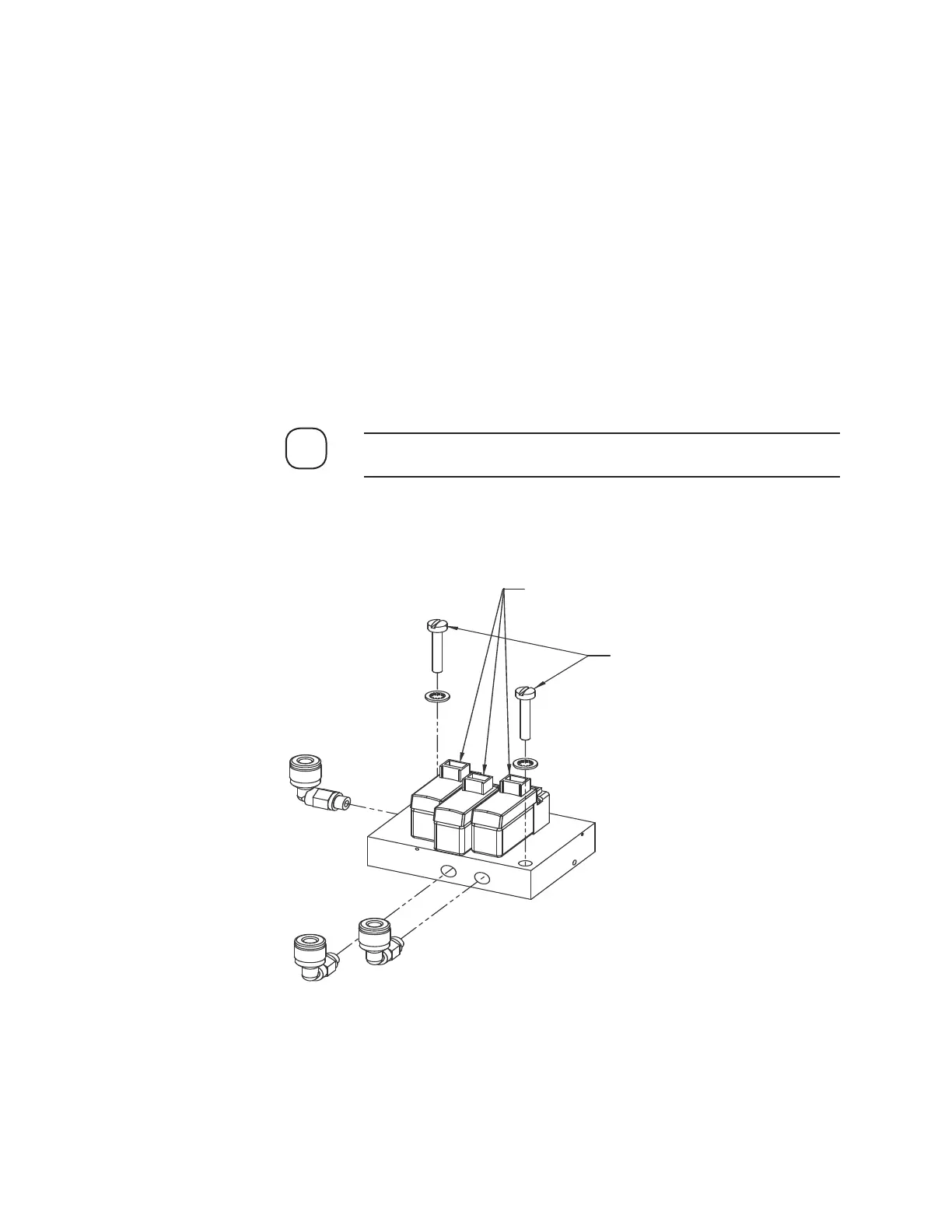
3. Use a screwdriver to remove the two (2) screws at the side of the
manifold (Figure 7-12).
The mounting screws for the two manifolds are different size.
2. Detach the tubing from the manifold by holding the tubing retaining
NOTE
Receptacle Plug
Screws
(Use Slotted
Screwdriver)
Figure 7-12.
Model 5830 pilot valve
manifold.


 To Next Page