IMPORTANT
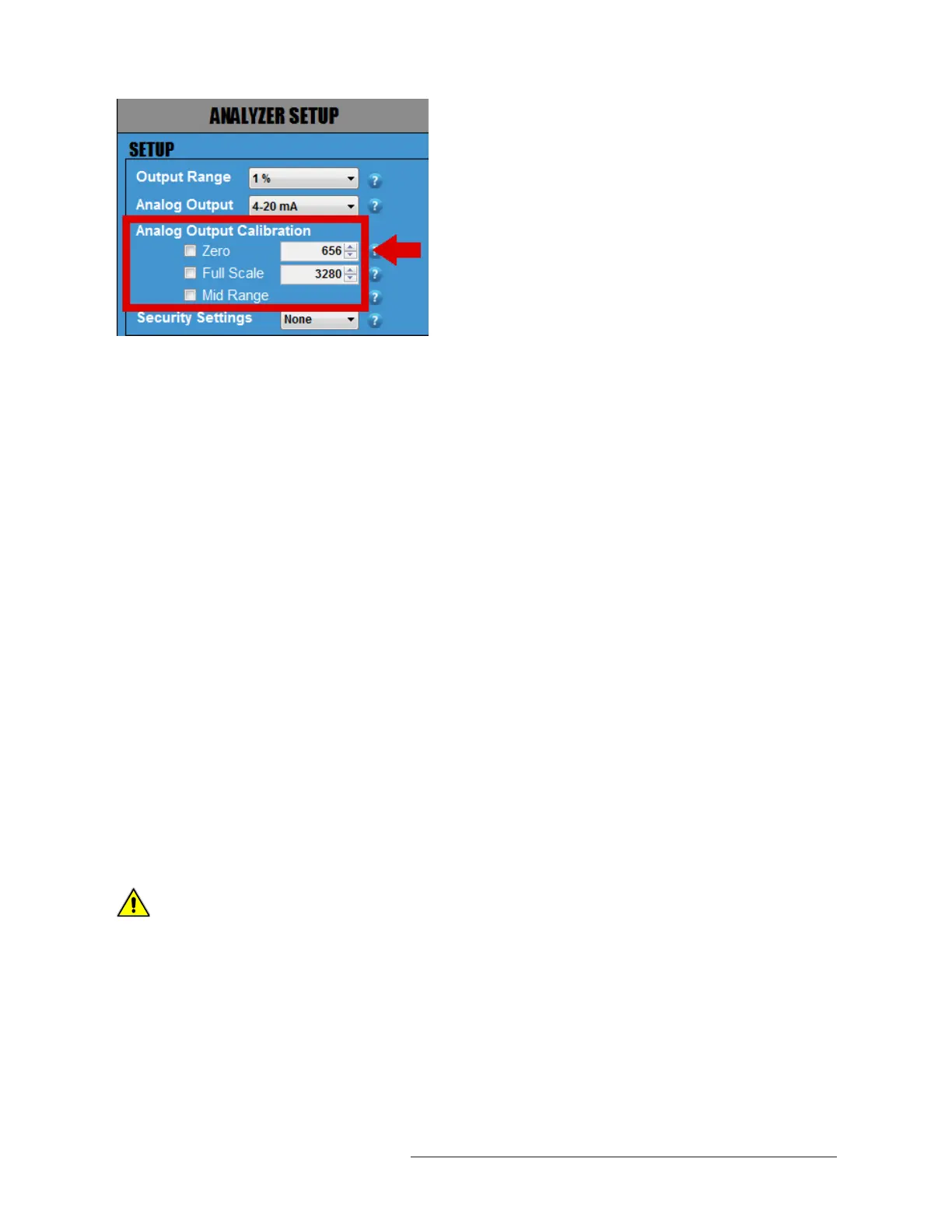
Whenever you change the ANALOG OUTPUT from 4–20mA to1–5 VDC or vice versa, you will need to
complete the following steps to verify your ANALOG OUTPUT. Remove any analog output wires from the
Analyzer connection point!
1. Attach a multimeter to the Green Analog Out Terminal Connector of your Analyzer. Make sure
your multimeter is set appropriately, either current for 4–20mA or voltage for 1–5 VDC .
2. Click on the square box next to ZERO to confirm that your multimeter is displaying either 4.00mA or
1.000VDC (the number of digits displayed on the screen will depend on the multimeter that you
use). If the reading of the multimeter does not match the reading of the Analyzer, use the UP and
DOWN ARROWS to the right of ZERO to adjust the values until the reading of the multimeter is
either 4.00mA or 1.000VDC.
3. Once this is completed, click on the square box next to FULL SCALE to confirm that your multimeter
is displaying either 20.00mA or 5.00VDC. If the reading of the multimeter does not match the
reading of the Analyzer, use the UP and DOWN ARROWS to the right of FULL SCALE to adjust the
values until the reading of the multimeter is now either 20.00mA or 5.00VDC .
4.. Repeat Step 2 (ZERO) and Step 3 (FULL SCALE) again until you can confirm that your multimeter is
displaying 4.00mA or 1.000VDC for ZERO and 20.00mA or 5VDC for FULL SCALE.
5. Last, click on MID RANGE. This will check the linearity. There are no values to adjust as this is just
a midpoint validation.
6. Once you have completed this section, disconnect the multimeter.
The values of the analog output SPAN and ZERO values must be set so that the analog output reflects the
1-5V or 4-20mA output during calibration.
ZERO value for 4ma or 1V output must be set between 500 to 700.
SPAN value for 20mA or 5V output must be set between 3000 to 3500.
If these values are not set correctly, the analog output will not behave correctly on the BX Series Analyzers.
Note: The previous values of SPAN and ZERO min and max values for the BR Series Analyzers are different
than those for the BX Series Analyzers' min and max values.
CAUTION
33



 To Next Page