8
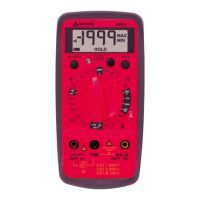
The HOLD feature freezes the display when the button is pressed. The MAX
feature compares and displays the measured maximum value as fast as 30ms with
auto-ranging capability.
HOLD
Press the button momentarily toggles to hold mode for all of the functions.
To release the feature momentarily press the button.
MAX
Press the button for 1 second or more activates the HOLD feature for
the VDC, VAC and ACA functions. To release the HOLD feature press the
button for 1 second or more.
r
Relative zero mode allows the user to offset the meter consecutive measurements
with the displayed reading as the reference value. The display will now show
readings relative to the stored reference value. That is, display = reading - stored
value. Press the r button momentarily to set relative zero mode. To release the
relative zero mode, press the r button momentarily
When the meter is on, the Auto Power Off (APO) feature will switch the meter
into a sleep mode automatically to extend battery life after approximately 30
minutes of no slide-switch nor push button operations. To wake up the meter
from APO, press the buttons momentarily or set the slide-switch to the OFF
position and then slide back on again. Always set the slide-switch to the OFF
position manually when the meter is not in use.


 To Next Page