AD9959/PCB
Rev. 0 | Page 16 of 28
05698-030
Figure 30.
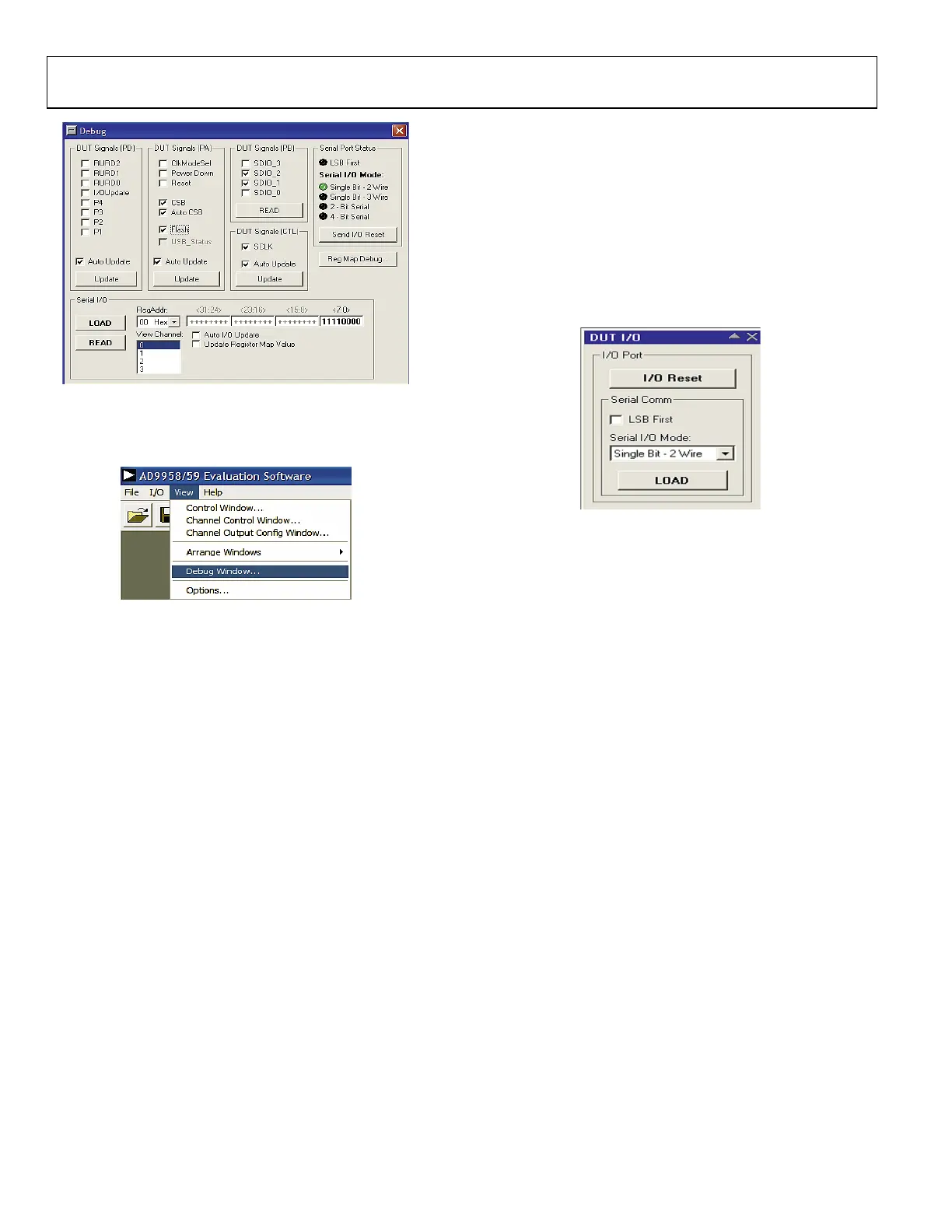
To access the Debug Window, click View and select Debug
Window (see Figure 31).
05698-031
Figure 31.
DUT I/O Box
This dialog box (Figure 32) controls the I/O configuration for
the device. Click I/O Reset to send an I/O reset to the
corresponding serial port state machine. Select LSB First to
change the data format to LSB first from the default setting of
MSB first. Use the Serial I/O Mode drop menu to select the
desired serial I/O mode of operation: Single Bit-2 Wire
(default), Single Bit-3 Wire, 2-Bit Serial, or 4-Bit Serial. For
more information, please refer to the Serial I/O Modes of
Operation section of the AD9959 data sheet.
05698-032
Figure 32.
To access t he DUT I/O box, click I/O button (left of View–see
Figure 31) and select DUT I/O.


 To Next Page
 Loading...