E-18
Measurements
Measurement using TriCheck
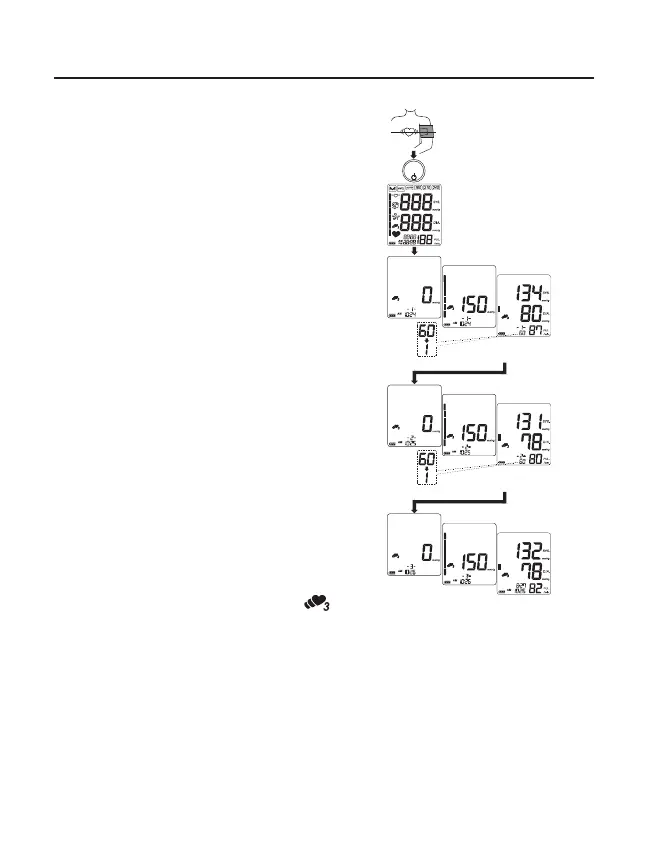
1. Press the START button. All of the
display segments are displayed. Zero (0)
is displayed blinking briey and the rst
measurement starts.
2. When the measurement is complete, the
systolic and diastolic pressure readings
and pulse rate are displayed, then a one-
minute countdown starts for the second
measurement.
3. After one minute, the second
measurement starts.
4. When the measurement is complete, the
average readings of the rst and second
measurements are displayed, then a
one-minute countdown starts for the third
measurement.
5. After one minute, the third measurement
starts.
6. When the measurement is complete,
the average readings of the three
measurements are displayed and stored
in memory.
Notes: During the measurement, the TriCheck
symbol is displayed.
To cancel the measurement, press the START button. In this case, no data is stored in memory.
When the cuff t error symbol appears during the rst measurement, cancel the measurement,
reapply the cuff correctly and start a new measurement.
After measurement, the average data of the three measurements is stored in memory. No data will be
stored, when canceling the measurements, or before completion of the third measurement.
START
At heart level
Press
All of the display
segments displayed
First measurement
Second measurement
Third measurement
Results of the
first measurement
Average of the first and
second measurements
Average of the
One minute after
One minute after


 To Next Page