E-7
Symbols
Symbols that appear on the display
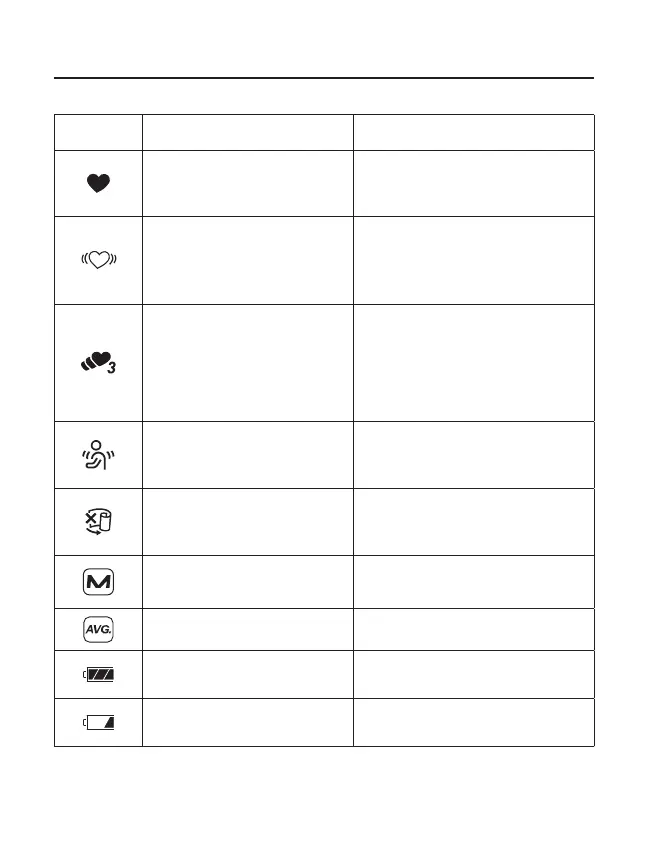
Symbols Function/Meaning Recommended Action
Appears while measurement is
in progress. It blinks when the
pulse is detected.
Measurement is in progress.
Remain as still as possible.
Irregular Heartbeat symbol
(I.H.B.)Appears when an
irregular heartbeat is detected
during measurement
––––––––––––––––
TriCheck mode
Takes three consecutive
measurements automatically
and displays the average
values of the three
measurements.
––––––––––––––––
Appears when a body or arm
movement is detected.
The reading may yield an incorrect
value. Take another measurement.
Remain still during measurement.
Appears during measurement
when the cuff is applied
loosely.
The reading may yield an incorrect
value. Apply the cuff correctly, and
take another measurement.
Previous measurements stored
in memory
––––––––––––––––
Average data
––––––––––––––––
The battery power indicator
during measurement.
––––––––––––––––
The battery is low when it
blinks.
Replace all batteries with new ones
when the mark blinks.


 To Next Page