Section 3–Program Startup and Conguration ATC200-Lite Teletilt
®
Remote Control Downtilt System
3-2 May 2005 Bulletin 639510
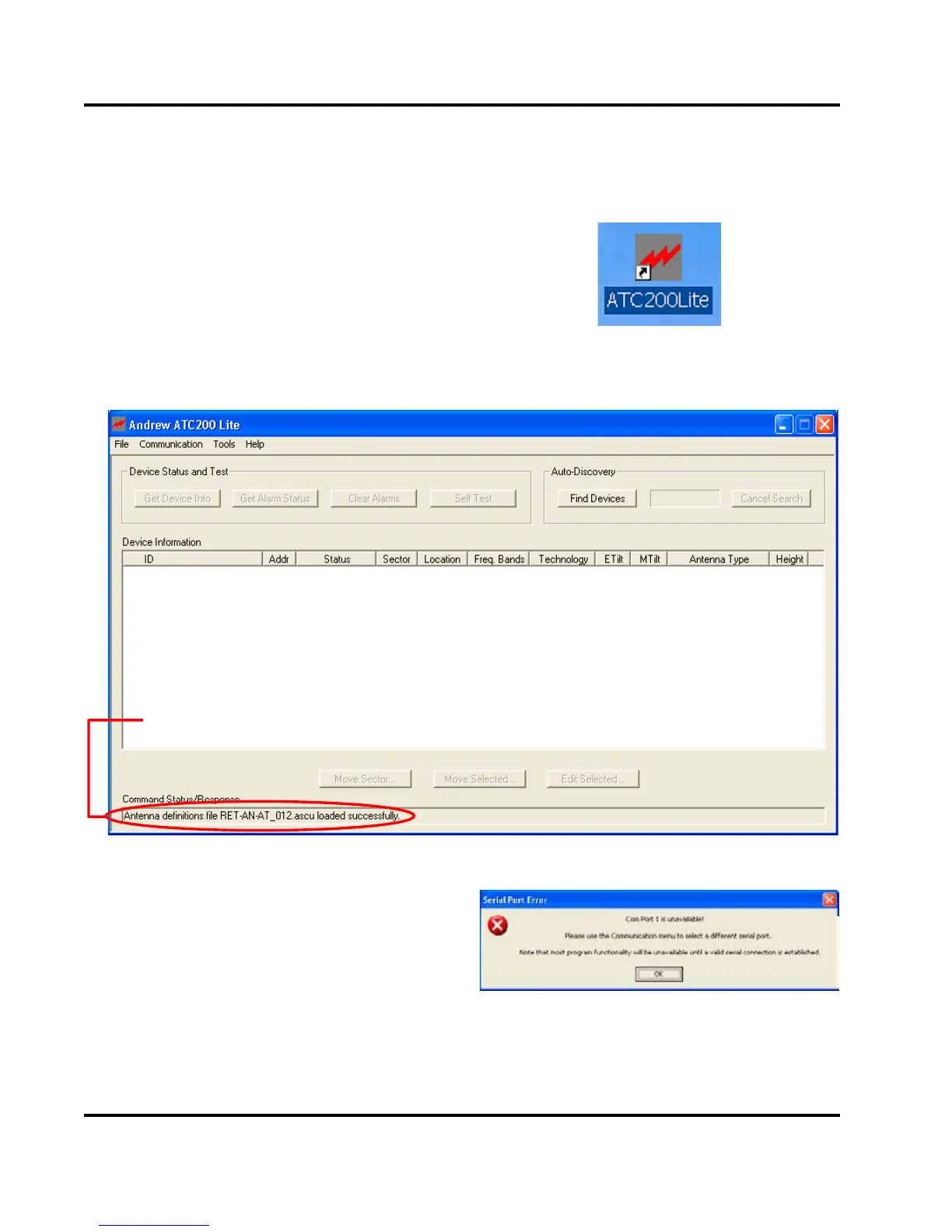
Figure 3-3. ATC200-Lite Main Screen.
3.2 Serial Port Selection at Program Startup
1. The install process places an icon for the program on the desktop (Figure 3-2).
Figure 3-4. Prompt for Serial Port Selection.
Figure 3-2. ATC200-Lite Application Icon.
3. If Serial Port 1 does not exist on the
PC, or if the PC is not allowing serial
port 1 to be accessed by the program,
the program will prompt the user to
select a different serial port (Figure
3-4).
2. Double click on the icon, shown in
Figure 3-2, to start the program. If the
PC is connected to the controller on
serial port 1, and if serial port 1 has
been made available to the program
by the PC, the program will select
that port by default. A successful
connection will display the program’s
main screen (Figure 3-3).
Command Status/Response window displays program activity.


 To Next Page
 Loading...