EN 77 2015/02 Rev. 1.0
OptiFresh Bean
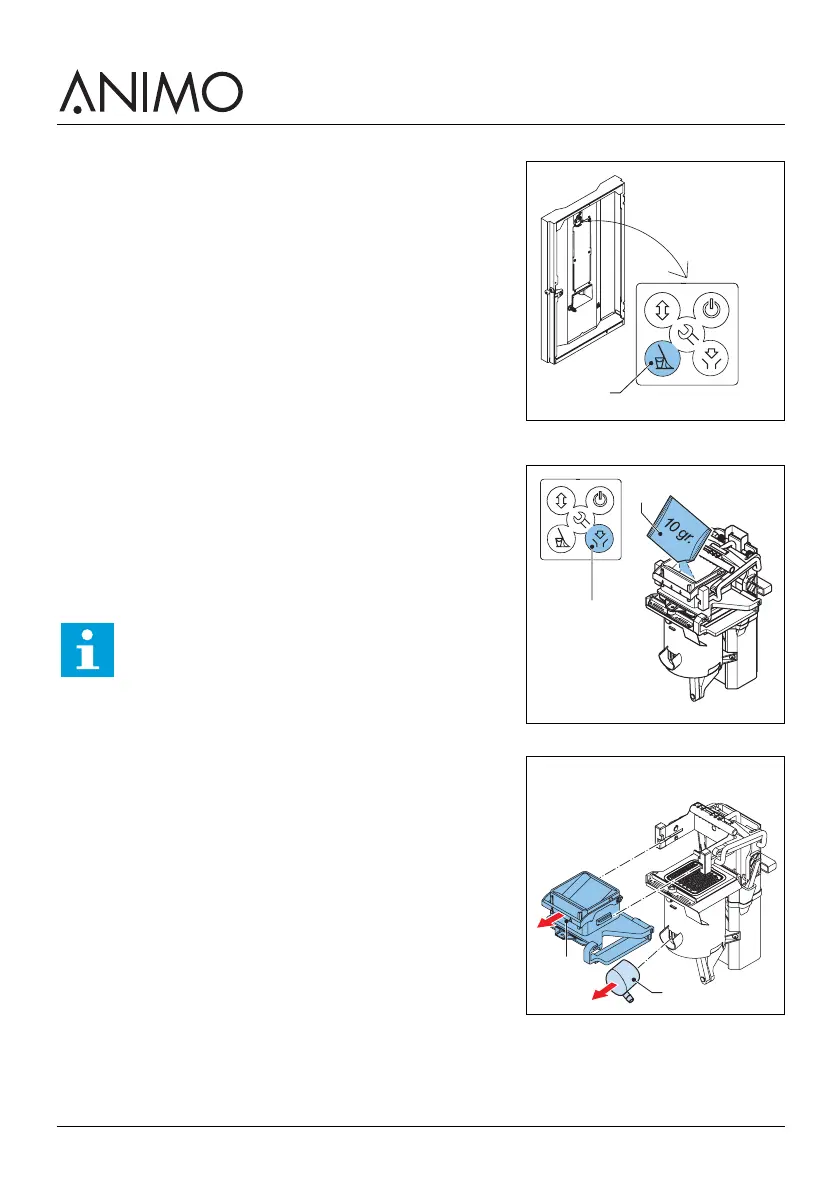
5.2.4 Using the rinsing program
1 Open the machine door.
2 Press the rinsing button (A) from the control panel on the
inside of the machine.
3 Close the machine door.
4 Place a bowl (min. 1.5 l) under the outlet.
5 Follow the instructions on the display.
5.2.5 Using the cleaning program
1 Open the machine door.
2 Put the cleaning product (A) in the brewer chamber.
3 Press the cleaning button (B) from the control panel on the
inside of the machine.
4 Close the machine door.
5 Place a bowl (min. 1.5 l) under the outlets.
6 Follow the instructions on the display.
7 Open the machine door.
8 Remove and clean the brewer chamber (D).
9 Clean the surface of the brewer with the cleaning brush.
A
Note
The cleaning program is in progress and will rinse
the brewer in three cycles. At the end of the cycle,
the brewer chamber moves up.
B
A
E
D













 To Next Page