24
Specifications are subject to change without notice.
February 15, 2017
12. Maintenance
12.1 Replacing the air lters
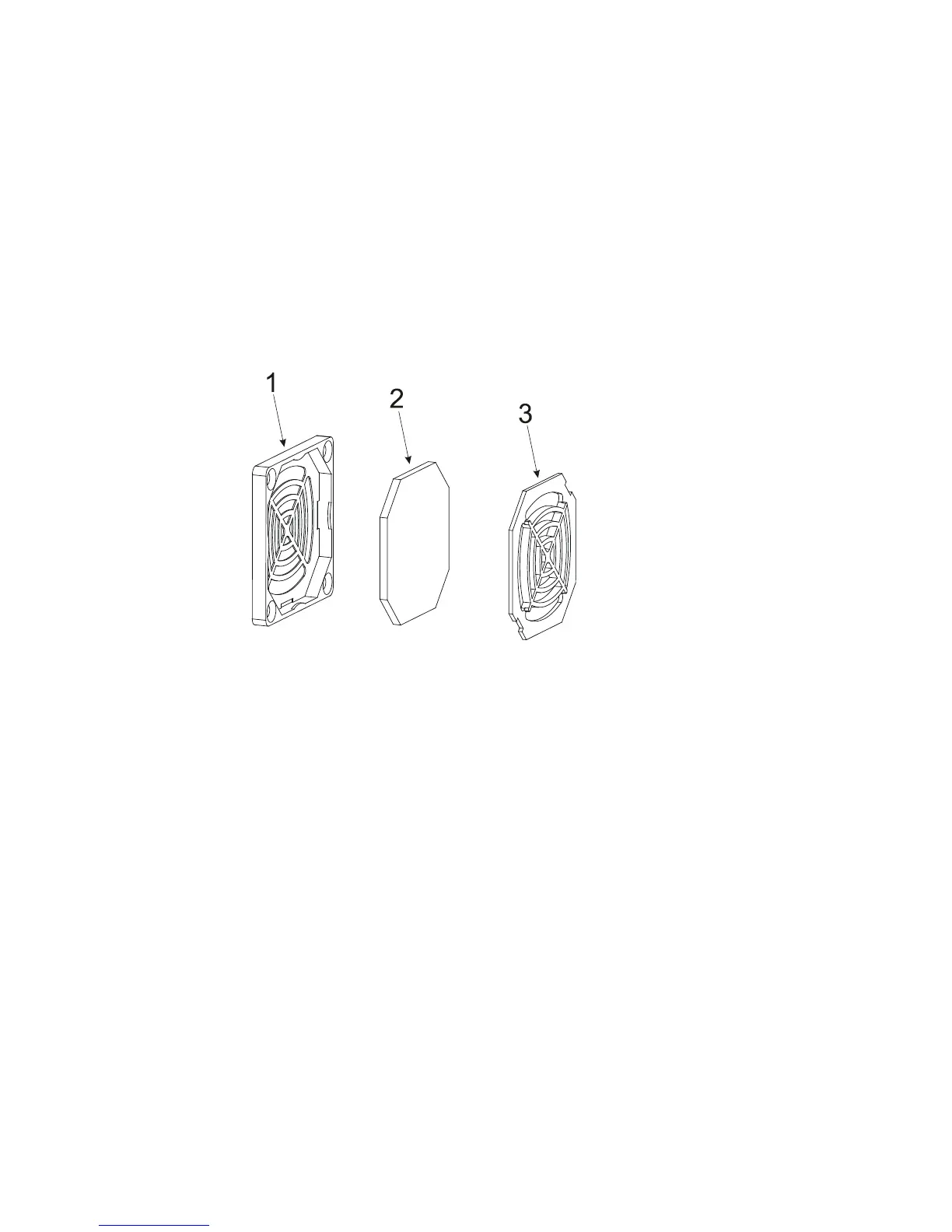
The ArcPower 384 Rack Mount is supplied with 2 air lters placed in front panel of the xture.
To replace the air lters.
1. Disconnect the xture from mains.
2. Remove the protective grid (1) from the front panel by unscrewing the 4 screws.
3. Remove the lter holding section (3)
3. Pull out the air lter (3).
4. Clean or replace the air lter (clean the air lters with a vacuum cleaner or you can wash them and put
back dry).
5. Put the lters cover back to the protective grid and secure them by he lter holding section.
6. Screw up the protective grid (1) to the front panel.
7. Repeat the same procedure for the second fan.
8. Reset the item „Elapsed Time“ in the „Fixture Information“ (Fixture Information--> Air Filters-->Elapsed Time).
12.2 Replacing the main fuse
Only replace the fuse by the one of the same type and rating.
To replace the fuse.
1. Disconnect the xture from mains.
2. Unscrew the fuse holder on the rear panel of the xture with a tting screwdriver from the housing (anti
clockwise).
3. Remove the old fuse from the fuse holder.
4. Install the new fuse in the fuse holder.
5. Replace the fuse holder in the housing and screw it.


 To Next Page