Step 4 Connect the Master instrument RF OUT
-
PUT and the Slave instrument RF OUT
-
PUT to the appropriate connections on the
DUT.
Initiating
Master-Slave
Operation
The following paragraphs describe how to set up
both instruments to perform master-slave opera
-
tions. Use the CW Frequency Mode menu map
(Chapter 4, Figure 4-2) to follow the menu se
-
quences.
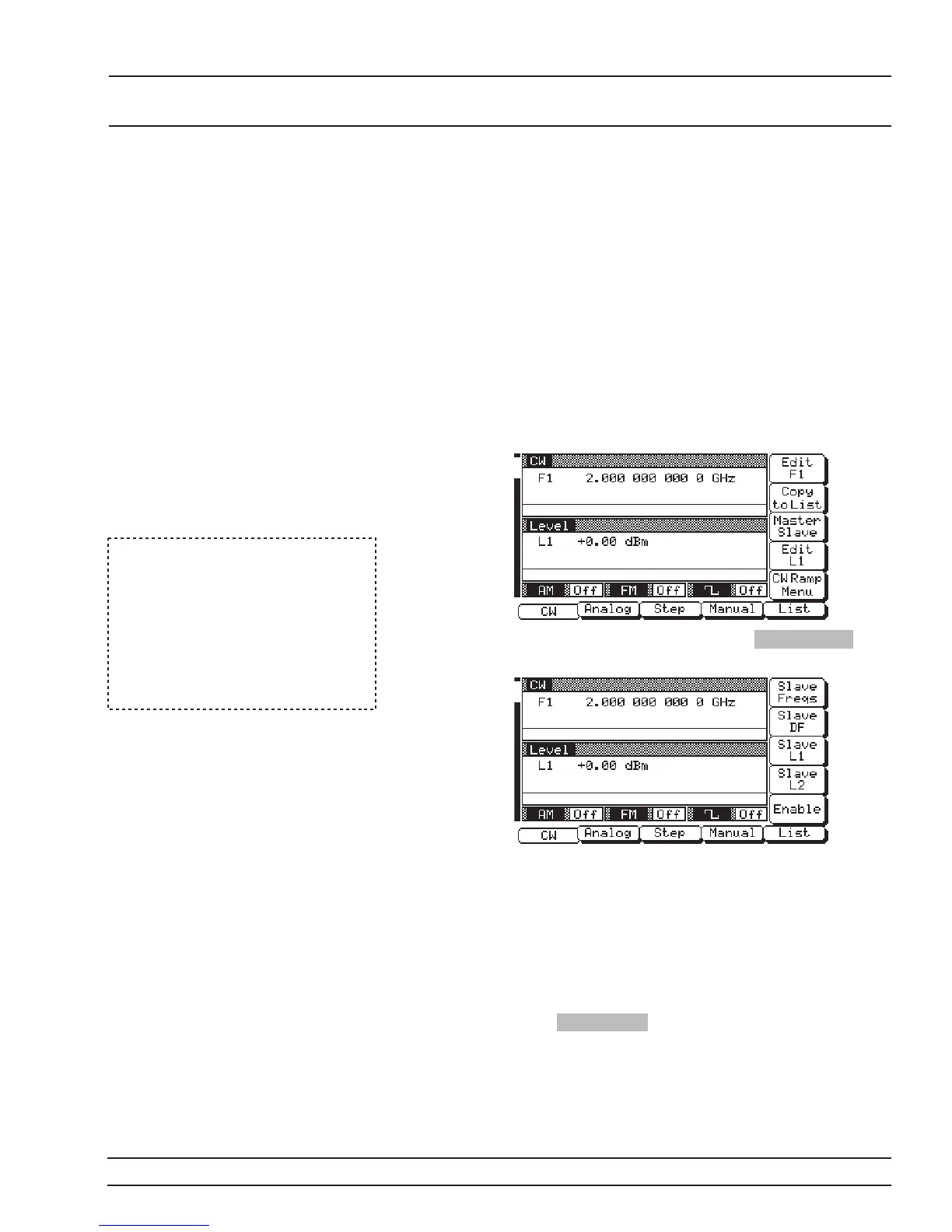
To initiate master-slave operation, turn on both
instruments and place them in CW mode. The CW
Menu (below) is displayed.
On the Master instrument, press Master Slave to
go to the Master-Slave Menu display (below).
This menu lets you perform the following:
q
Go to the Slave Frequencies List menu.
q
Set the dF frequency for the Slave unit.
q
Set the Slave unit’s main power level (L1).
q
Set the alternate sweep power level (L2) for
the Slave unit.
q
Turn master-slave operation on and off.
Press Slave Freqs to go to the Slave Frequencies
List Menu display (next page).
681XXC OM 7-5
USE WITH MASTER-SLAVE
OTHER INSTRUMENTS OPERATION
NOTE
Master-slaveoperationsarealways
initiated in the CW frequency
mode. Once initiated, you then can
change to a sweep frequency mode
of operation by selecting the de-
siredfrequencymodeontheMaster
instrument.





 To Next Page