EN
78
NOTE:
• Fit the adapter cover over the hole when
the air conditioner is not in use.
• For best functionality do not stretch or
bend the hose. Check that there are no
obstacles within 50 centimetres of the air
outlet, otherwise the outlet system will
not work properly.
FIG. 18
HOW TO USE
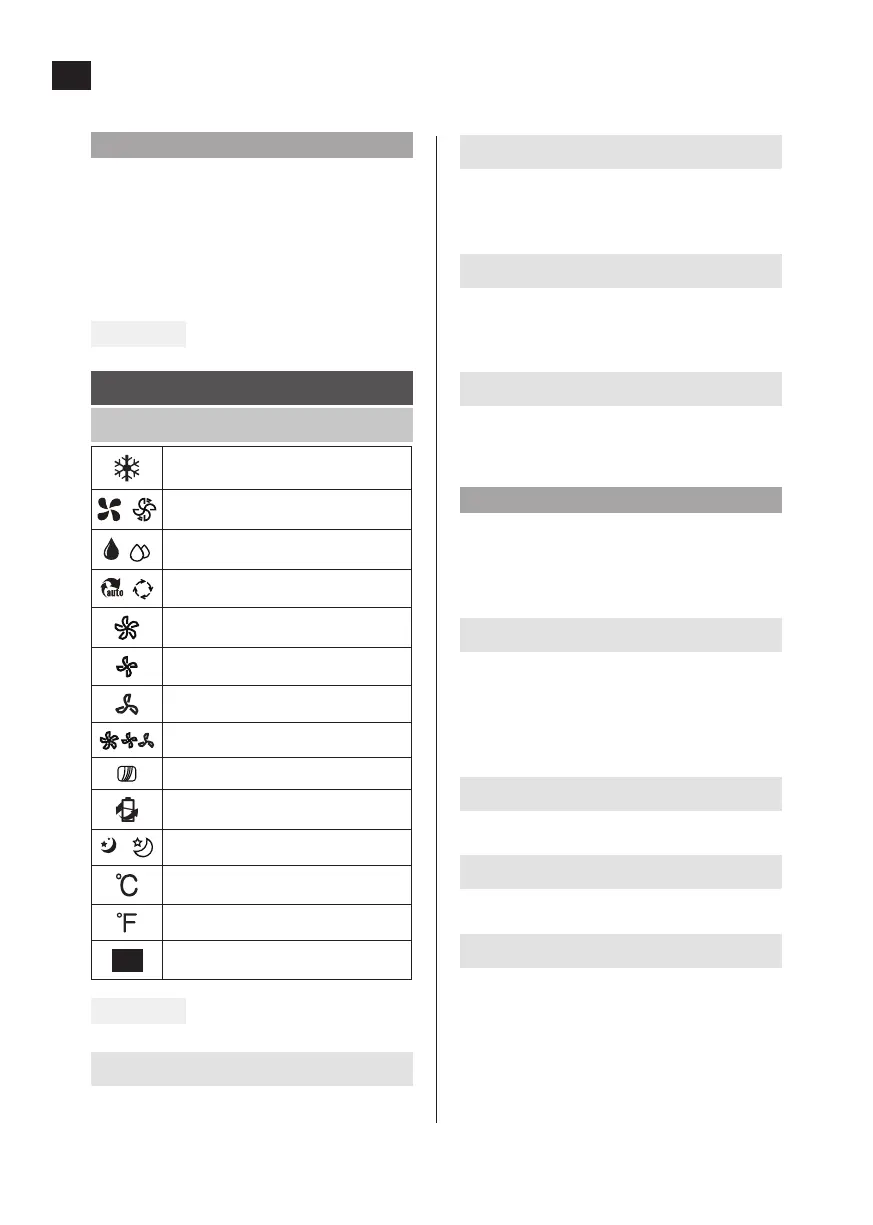
CONTROL PANEL
COOL
FAN
DRY
AUTO
HIGH fan speed
MED fan speed
LOW fan speed
AUTO fan speed
FILTER
Energy Saver Mode
SLEEP function
degrees Celsius
degrees Fahrenheit
Status lights
FIG. 19
SWING
Used to activate automatic deection. Press
once again to stop the air deector at the
required angle.
TIMER
Used together with the + and - buttons to set
start time AUTO ON and stop time AUTO OFF.
The status light indicates the set mode.
MODE
Used to select operating mode. Press repeated-
ly to switch between AUTO, COOL, DRY and FAN
modes. The status light indicates the set mode.
Up (+) and Down (-)
Used to increase/reduce the set point
temperature in steps of 1°C from 17 to 30 °C,
or in steps of 1°F (or 2°F) from 62 to 86°F (or
88°F), or to set the TIMER from 0 to 24 h.
NOTE:
The temperature can be shown in °F or °C. To
change units, press the + and - buttons at the
same time for 3 seconds.
FAN
Used to set the fan speed. Press repeatedly to
switch between LOW, MED, HIGH and AUTO
modes.
The status light indicates the set mode. In
AUTO mode all the status lights are o.
SLEEP (ECO)
Used to activate SLEEP/ECO mode.
ON/OFF
Starts/stops the air conditioning.
Display
Shows the set temperature in °C or °F (no
unit shown for °F on some models) and timer
settings. The room temperature is shown in
DRY and FAN mode. Shows error and warning
codes.


 To Next Page