EasyManua.ls Logo

AnyCubic i3 MEGA - Page 26

AnyCubic i3 MEGA
43 pages
Print Icon
To Next Page IconTo Next Page
To Previous Page IconTo Previous Page
Loading...
20
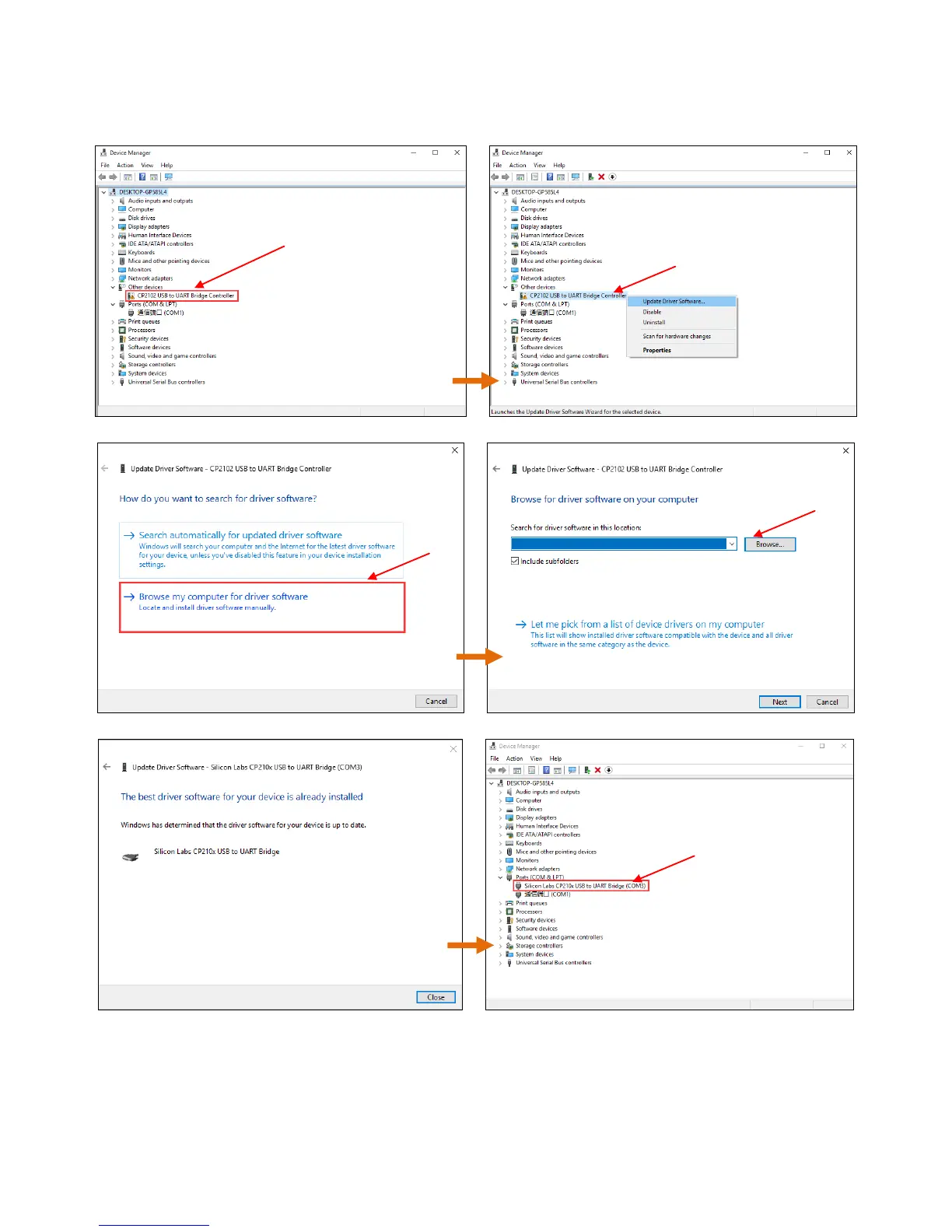
Detailed procedures: right click on Computer---> Properties ---->Device
Manger, and then follow the images in Fig. 21.
(Figure 21)
After successfully installation, the COMx will appear in the Ports of Device Manager.
Here is COM3, 3 is random, customers would have their own number depends on the PC.

Not installed
Right click and
choose update
Find the folder of
CP2102 in SD Card
\Desktop\Mega\ Files_Engish_Mega\Driver_CP2102\win
Click
COM3 appears in
Ports

Other manuals for AnyCubic i3 MEGA

Related product manuals