17
FUNCTIONS SETUP
Basic Functions Setup
1. Press repeatedly to select desired sub-menu to setup.
2. Press
/ to set desired function value.
3. Press [PF1] or [PF2] to save and exit.
CTCSS/DCS Encode/Decode
When the transceiver is edited with this function, only when
CTCSS/DCS signaling is received can the transceiver hear the
calling of the other party. Transceivers that have matched CTCSS/
DCS or do not setup with any signaling can hear your call.
Repeatedly press 1.
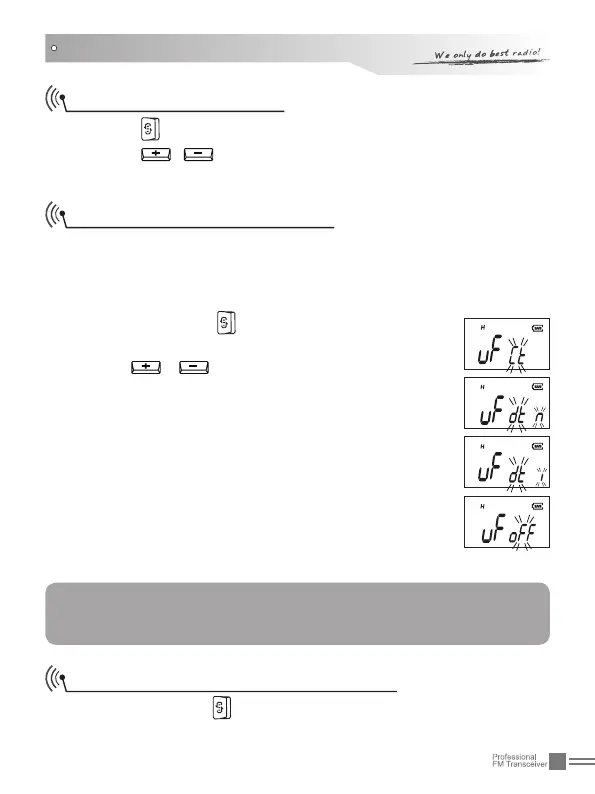
till "UF" icon is displayed on
the LCD.
Press 2.
/ to select CTCSS/DCS encode/
decode or disable this function.
When selecting CTCSS encode/decode, "CT" on the
LCD twinkles.
When selecting DCS positive encode/decode, "DTN"
on the LCD twinkles.
When selecting DCS invert encode/decode, "DTI" on
the LCD twinkles.
When switching off this function, "OFF" on the LCD
twinkles.
Press [PF1] or [PF2] to save and exit.3.
NOTE:
To manually set this function, users need to activate this
function via programming software firstly.
CTCSS/DCS Encode/Decode Setup
Repeatedly press 1. till CT/DT and CTCSS/DCS twinkles on the
LCD.


 To Next Page