3. FIR-T: First digit time setting
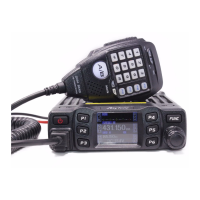
1、 Enter DTMF MENU, choose NO. 3 function menu.
2、 Press 【PUSH】key to enter function setting, the chosen menu value in LCD will turn
to green color.
3、 Turn channel switch to choose group, This radio has 0~1000ms total 11 levels
available.
4、 Press【PUSH】key or【FP3】key to confirm and exit..
4. PRE-T: Pre-loading time setting
1、 Enter DTMF MENU, choose NO. 4 function menu.
2、 Press 【PUSH】key to enter function setting, the chosen menu value in LCD will turn
to green color.
3、 Turn channel switch to choose group, This radio has 100ms~2500ms total 25 levels
available.
4、 Press【PUSH】key or【FP3】key to confirm and exit..
5. DELAY: #. * delay time setting
1、 Enter DTMF MENU, choose NO. 5 function menu.
2、 Press 【PUSH】key to enter function setting, the chosen menu value in LCD will turn
to green color.
3、 Turn channel switch to choose group, This radio has 0~1000ms total 4 levels
available.
4、 Press【PUSH】key or【FP3】key to confirm and exit..
6. D-FUN: D function key setting
1、 Enter DTMF MENU, choose NO. 6 function menu.
2、 Press 【PUSH】key to enter function setting, the chosen menu value in LCD will turn
to green color.
3、 Turn channel switch to choose group, This radio has D~16S total 17 levels
available.
4、 Press【PUSH】key or【FP3】key to confirm and exit..
7. DISP: Code display setting
1、 Enter DTMF MENU, choose NO. 7 function menu.
2、 Press 【PUSH】key to enter function setting, the chosen menu value in LCD will turn
to green color.
3、 Turn channel switch to choose setting:
ON: When transmitting DTMF code, LCD displays corresponding setting.



 To Next Page
 Loading...