6
2. Introduction to INNI 3D Printer
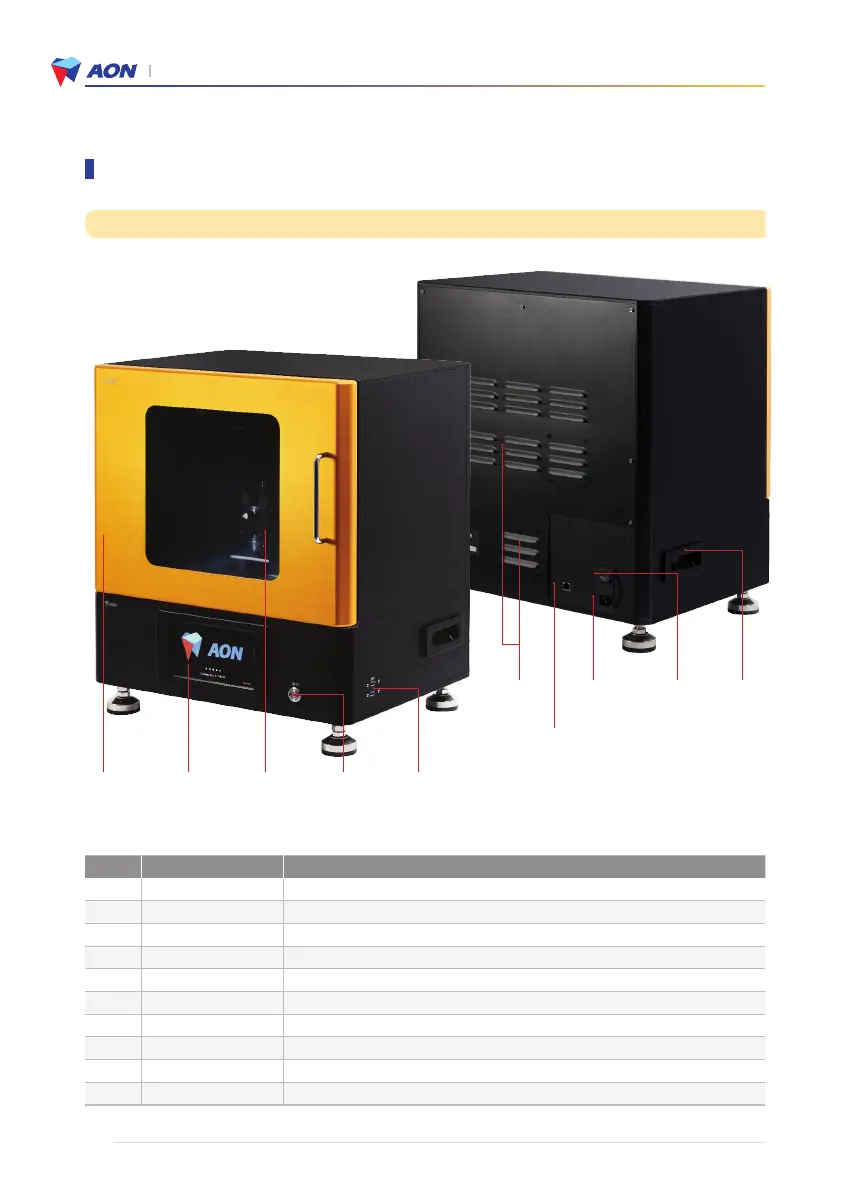
NO Name Description
1 LCD console LCD touch screen panel
2 Power button Power switch next to the LCD console
3 Main door Outward swinging door; blocks UV rays during printing
4 USB ports Connection for a USB memory stick or external hard drive
5 Ethernet port Connection for a computer (recommended)
6 Main power switch Main switch for the power source to the printer
7 Power socket 220V connection socket
8 Handle Used for lifting and moving the printer
9 Air vents Ventilation openings
10 Main door panel For viewing the printing process
Outer components
③
Main door
①
LCD console
⑩
Main door panel
⑨
Air vents
⑦
Power socket
⑥
Main power
switch
⑤
Ethernet port
⑧
Handle
②
Power button
④
USB ports
List of components


 To Next Page