14
3. INNI 3D Printer Usage Guide
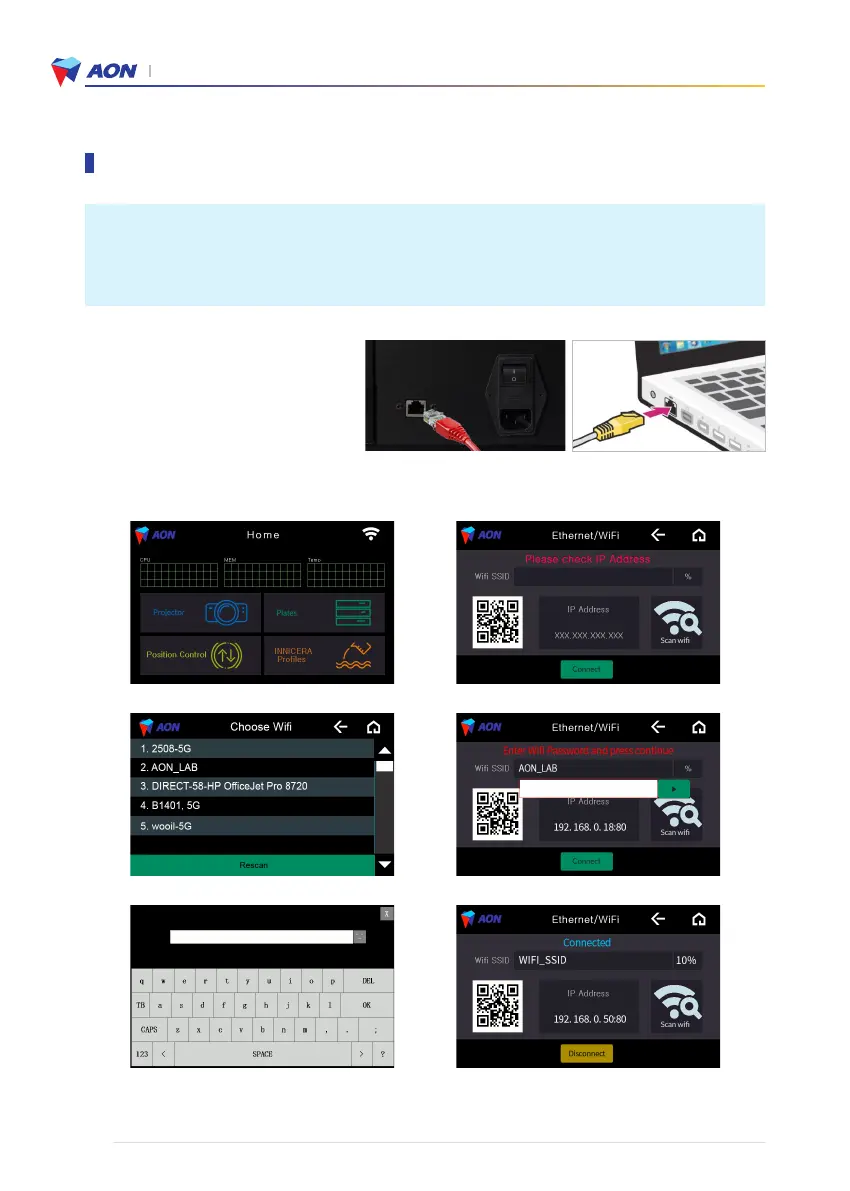
Use an Ethernet(Wired) connection when connecting the 3D printer and the PC.
• You may then add a secondary Wi-Fi network connection.
Note : Using a wired network as you primary printer-to PC connection is recommended at all times since
printer errors may occur due to a weak or lost Wi-Fi signal.
6. Press the play button or ‘Connect’.
1. Press the wi-fi icon to begin. 2. Press on ‘Scan wifi’.
3. Choose an available wi-fi network. 4. Touch the blank to fill in the password.
5. Enter the password for the network.
Wired network connection (Ethernet)
Connect the cable to the Ethernet ports on
the PC and on the back of the printer.
Wireless network connection (Wi-Fi)
Setting up the network (Access to AON Slicer)


 To Next Page