16
3. INNI 3D Printer Usage Guide
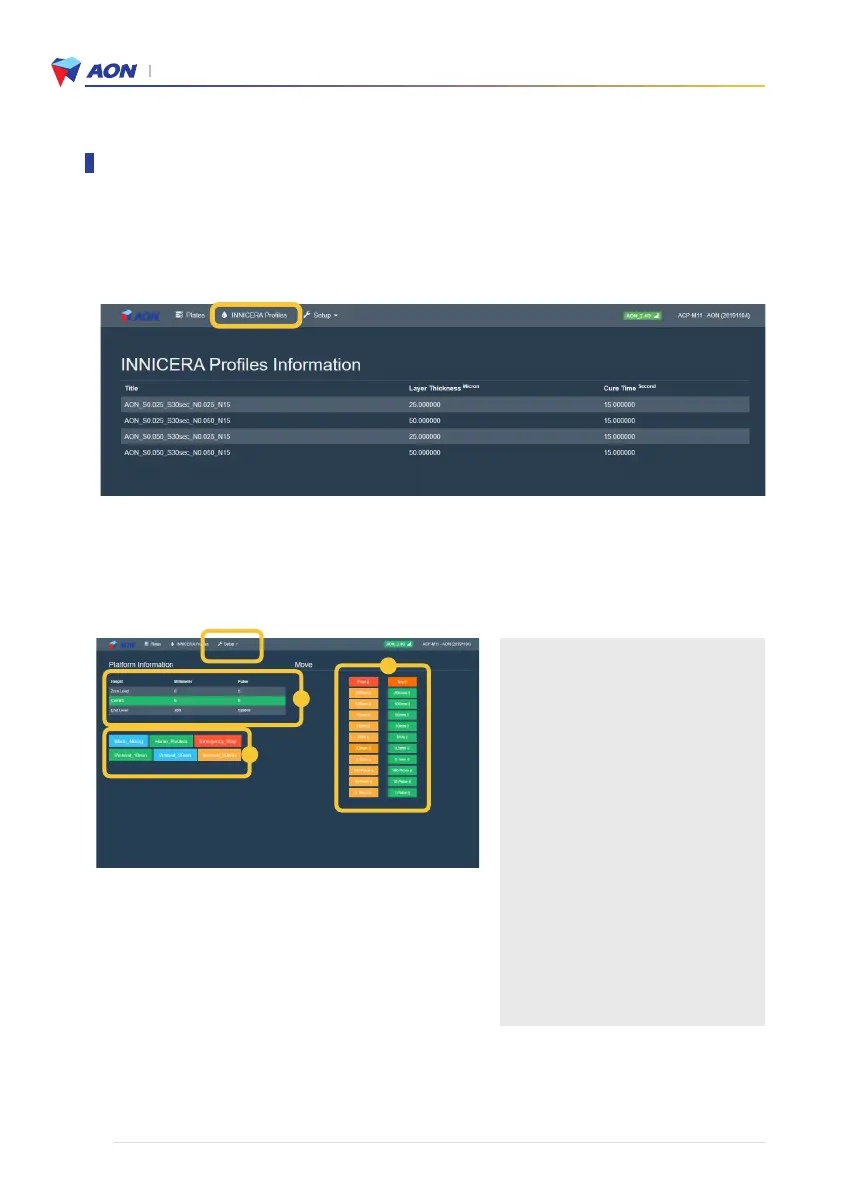
Zone A
• Digitized distance of the z-axis
according to the current position of the
build platform
Zone B
• Preheat : Preheats the zirconia slurry
(BCM-W500) for viscosity control
• Blade : Controls the levelness and
viscosity of the zirconia slurry
• Home_position : Resets the position of
the build platform and modeling bed
• Emergency_Stop : Stops all operations
(turn the printer off and on again when
you want to restart).
Zone C
• Manual controls to move the build
platform to the desired position
1. AON Web Browser :
Click on the ‘INNICERA Profile’ button to bring up the Settings page and check that the printer’s profile.
* DO NOT change these settings or else malfunction may occur.
2. Z-axis controls :
Go to Setup → Position Control. The following screen will appear.
A
C
B
Using the Slicer program


 To Next Page