9
Notes! You may find that your machine has certain functions or some parameters that are not described in this
operating manual. Also, certain illustrations may be very slightly different from the actual controls on your machine.
Howerever, these controls function in exactly the same way.
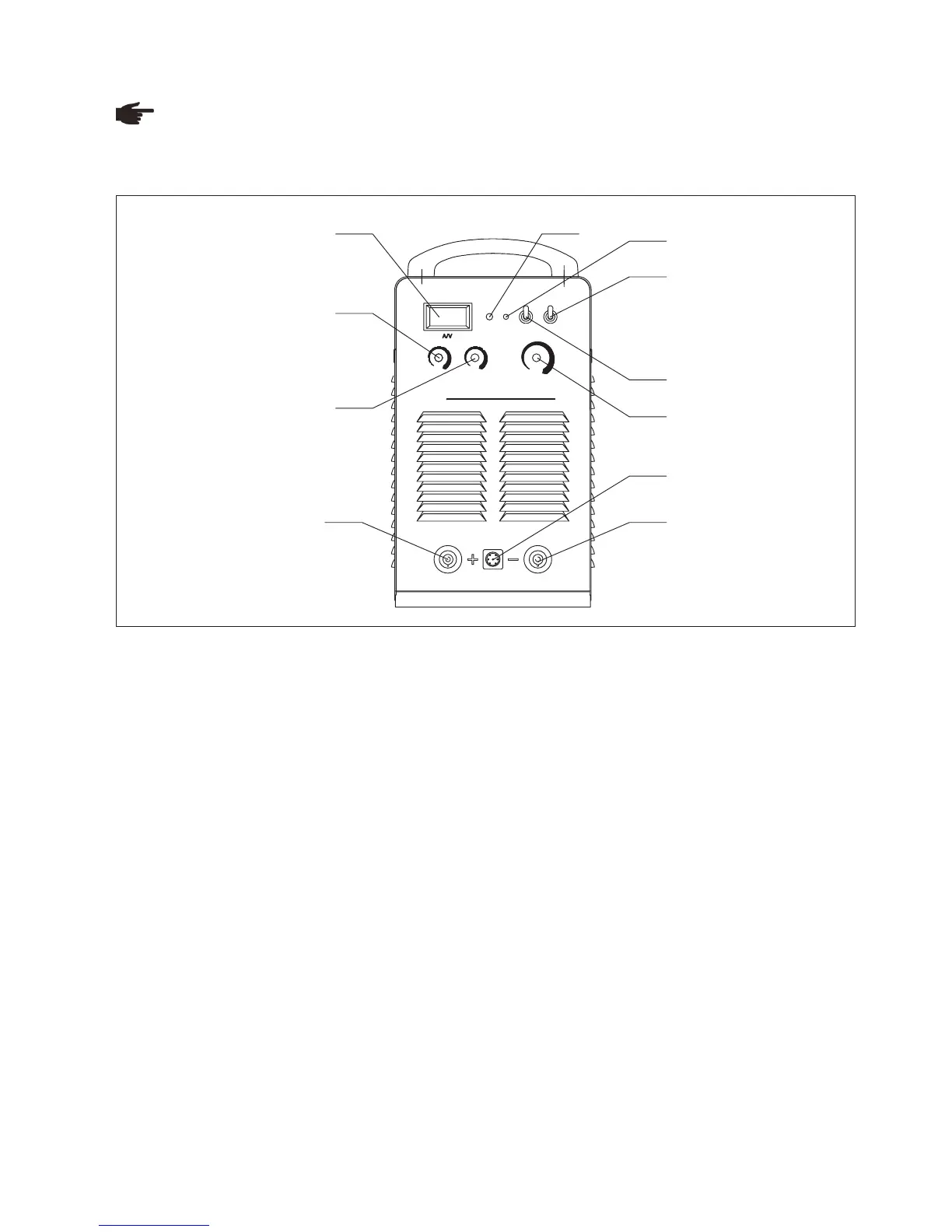
Fig. 4-3-1: Front panel
1.“Amp/Volt” displayer
- When display mode switch indicates to “Amp”:
LCD displays preset current value, Min. current is 20A;
LCD displays real welding current during working.
2.Protection indicator
Welding machine will automatically stop working when it is overheat, and the indicator will light up.
3.Default phase indicator
Indicator indicates when power source is default phase.
4.“Remote control/ Panel control” switch
When it is on “Panel control”, you can adjust welding current, arc force current by the knobs on the machine control panel;
When it is on “Remote control’, you can adjust the above parameters through remote controller in an extended distance from
the welding areas.
5.“Amp/Volt” displayer mode selection switch
6.“Welding current” regulation knob
It is used to adjust welding current on panel control mode.
Preset proper welding current according to work piece thickness, groove shapes, welding position, wire diameter, etc.
Welding current decides welding seam depth and wire molten rates.
7.Remote control socket
It is used to connect to the wire remote controller with remote control cable, then user can adjust welding current, arc force
current on “Remote control” mode. It is convenient to realize welding control in extended distance.
8.Start current regulation knob
It is used to adjust arc starting current under SMAW mode.
Before start arc, work piece is on cold state, increase arc start current so as to improve heat input, which makes the arc start
easier.
- When display mode switch indicates to “Volt”, LCD displays voltage between output terminals of welding machine.
Front panel
4-3 Interface
2
1
3
4
7
8
9
10
2
1
3
4
5
6
7
8
9
10
6
5
Inverter DC ARC Welding Machin e
AR C4 0 0
PRO TECTIO NDEF AUL T P H A SE
PANEL
REM OTE
A
V
ST ART CU R RENT
ARC FO RCE
WEL DING CU RR ENT
1 3
4
2
5
6
8
9
7
1110



 To Next Page