10-3 Interface
Note! You may find that your machine has certain functions or some parameters that are not described in this
operating manual. Also, certain illustrations may be very slightly different from the actual controls on your machine.
However, these controls function in exactly the same way.
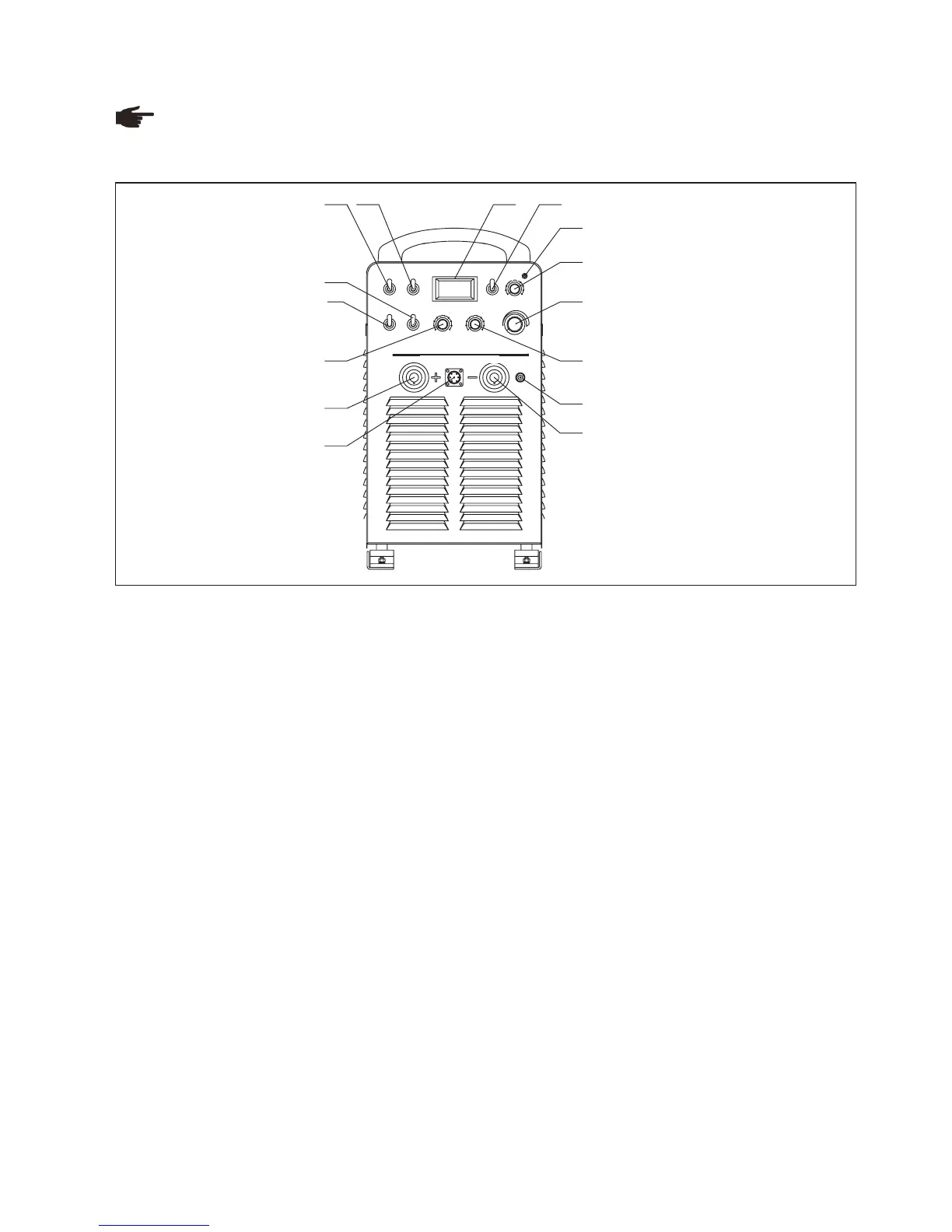
Front panel
Fig. 10-3-1: Front panel
1. Amp/volt LCD
When display mode switch indicates to “Amp”:
LCD displays preset current value, Min. current is 20A;
When display mode switch indicates to “Volt”, LCD displays voltage between output terminals of welding machine.
2. Protection indicator
Welding machine will automatically stop working when it is overheat, and the indicator will light up.
3. “Amp/Volt” displayer mode selection switch
4. ”SMAW/TIG” switch
When it is indicated to “MMA”, the machine is to work on MMA;
When it is on “TIG”, the machine is to work on TIG.
5. 4-step/ 2-step switch (used in TIG welding)
Please refer to TIG315/400/500/630 the relevant “4-step/ 2-step switch” in detail.
7. “Remote control/ Panel control” switch
When it is on “Panel control”, you can adjust welding current, arc force current or down slope time through the
knobs and switches on the panel; when it is on “Remote control’, you can adjust the above parameters through
remote controller in an extended distance from the welding areas.
8. “Welding current” regulation knob
It is used to adjust welding current on panel control mode.
Preset proper welding current according to work piece thickness, groove shapes, welding position, wire diameter,
etc. Welding current decides welding seam depth and wire molten rates.
9. “Arc force current” regulation knob
-
-
6. Arc length “L/S/M” switch
In SMAW mode:
Long: output cable length is more than 25m, less than 40m;
Short: output cable length is less than 10m;
Middle: output cable length is more than 10m, less than 25m;
It is on “Long” position when in carbon arc gouging welding.
LCD displays real welding current during working.
4
3
2
1
5
6
7
8
9
10
4
3
2
1
5 6
7
8
9
10
4
3
2
1
5 6
7
8
9
10
A/ V
4- STEP
2- ST EP
L
S
M
AR C L E N GT H
RE MO TE
PAN EL
TI G
SM AW
A
V
PROT ECTI ON
DO WN- SLOPE T IME
CO NTR OL S O CK ET
TIG400Ⅱ
Inverter DC Arc Welding Ma c hine
AR C F O R CE S TART C U RRENT
WELD ING C U RR ENT
1
2
34 5
7
8
9
10
11
12
13
14
15
6
69



 To Next Page