61
9-TIG1000/1250
9-1 System components
Please refer to “TIG315/400/500/630” the relevant “8-1 System components” in details.
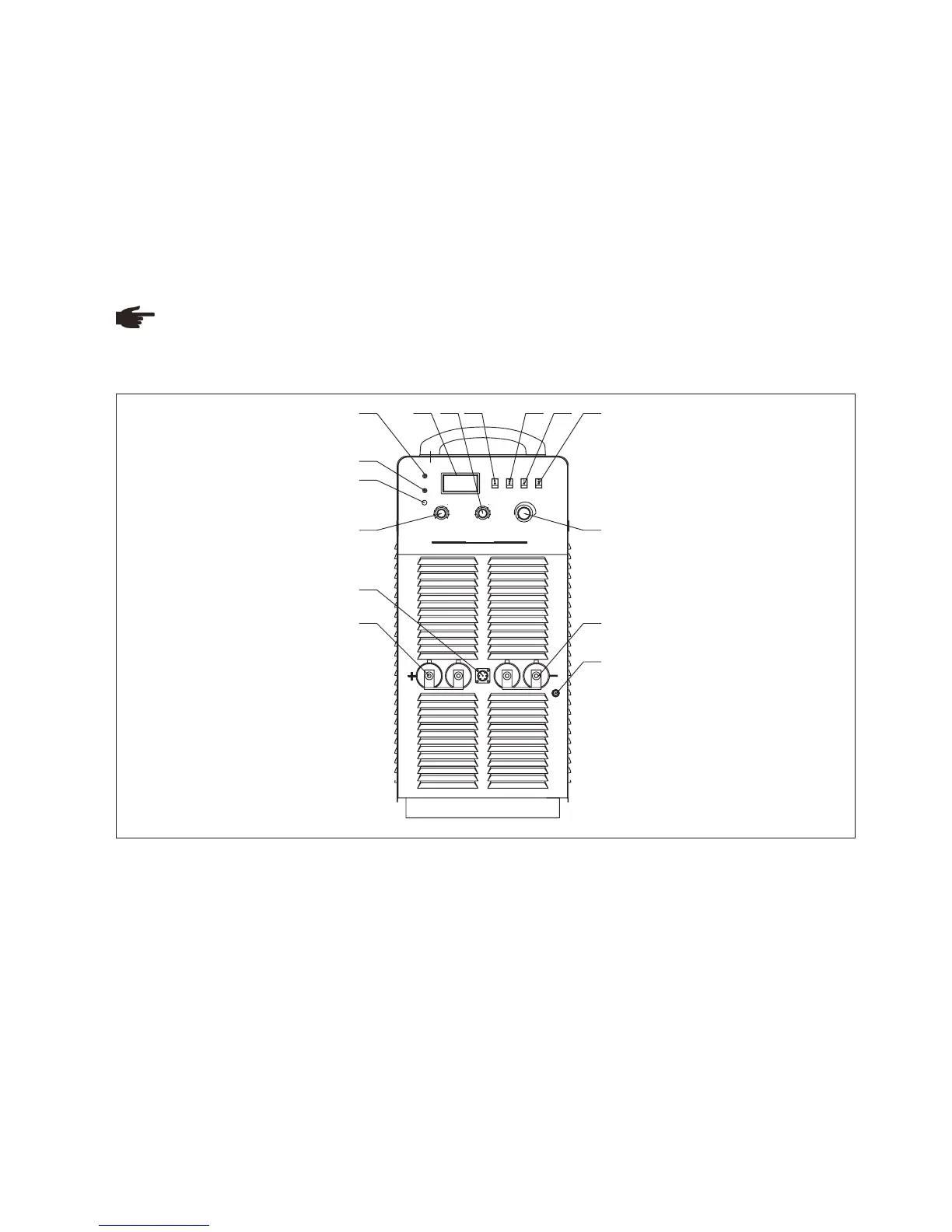
Fig. 9-3-1: Front panel
9-2 Basic equipments for welding
Please refer to “TIG315/400/500/630” the relevant “8-2 System components” in details.
9-3 Interface
Note! You may find that your machine has certain functions or some parameters that are not described in this
operating manual. Also, certain illustrations may be very slightly different from the actual controls on your machine.
However, these controls function in exactly the same way.
Front panel
1.Over heat indicator
Welding machine will automatically stop working when it is overheat, and the indicator will light up.
2.Fault indicator
Welding machine will automatically stop working when it is in fault, and the indicator will light up.
3.Default phase indicator
Indicator indicates when power source is default phase.
4.Amp/Volt displayer
When display mode switch indicates to “Amp”:
LCD displays preset current value, Min. current is 20A;
When display mode switch indicates to “Volt”, LCD displays voltage between output terminals of welding machine.
5.Down-slope time adjustment knob
TIG mode: down slope time is time from welding current to crater filler current. Prolong this time can decrease heat
on crater filler mode, reduce the temperature of welding seam tail, reduce gas hole or sinkhole problems caused
by temperature drop, and decrease crater filler hole.
-
-LCD displays real welding current during working.
4
3
2
1
5 6
7
8
9
10
4
3
2
1
5 6
7
8
9
10
A/ V
Fau lt
SMA W
TIG
A
V
2- STEP
4- STEP
ARC L E NG TH
M
S
L
GOU GIN G
ove r-h eat
DEF AULT
PHA SE
DOW N-SL OPE T I ME
WELD ING C URRE N T
TIG1000
Inverter MMA/TIG A r c WeldingMachine
ARC F O RC E C URRE N T
1
2
3
4 5 6 7 8 9
10 11
12
15
14
13



 To Next Page