42
Front panel
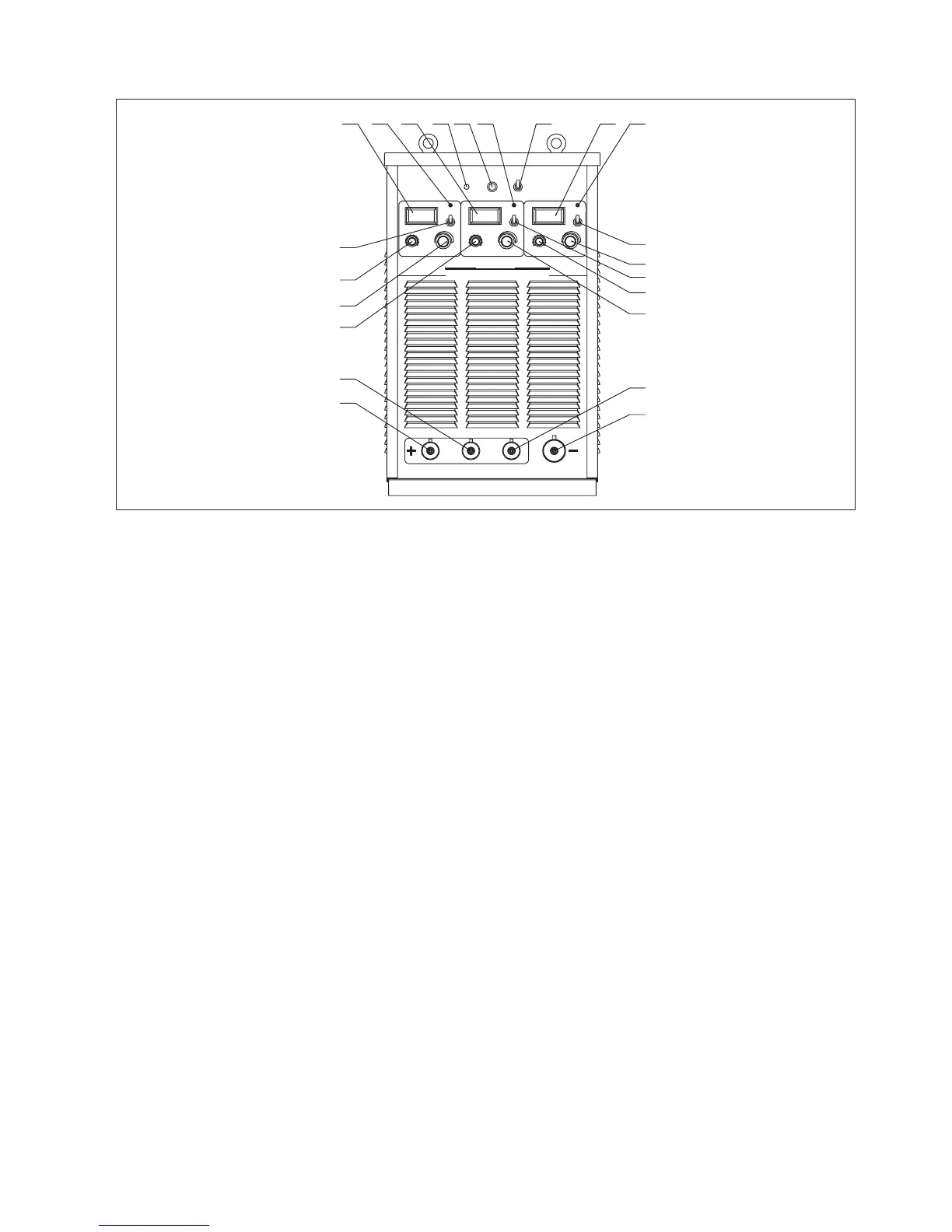
Fig. 7-3-1: Front panel
1-3.“Amp/Volt” displayer
When display mode switch indicates to “Amp”:
- LCD displays preset current value, Min. current is 20A;
- LCD displays real welding current during working.
When display mode switch indicates to “Volt”, LCD displays voltage between output terminals of welding machine.
4-6.Protection indicator
Welding machine will automatically stop working when it is overheat, and the indicator will light up.
7.Default phase indicator
Indicator indicates when power source is default phase.
8.Fan indicator
Indicator indicates whether Fan is on or not.
9.Fan control
Choose Fan on “ON” or “OFF” position. When choose ON, fan runs, choose off, fan stops running. Keep fan running for 20
minutes after finishing welding.
10-12.Amp/Volt displayer mode selection switch
13-15. Start current regulation knob
It is used to adjust arc starting current under SMAW mode.
Before start arc, work piece is on cold state, increase arc start current so as to improve heat input, which makes the arc start
easier.
16-18. “Welding current” regulation knob
It is used to adjust welding current on panel control mode.
Preset proper welding current according to work piece thickness, groove shapes, welding position, wire diameter, etc.
Welding current decides welding seam depth and wire molten rates.
19-21. Positive output terminal (+)
Connect with electrode holder via welding cable.
22. Negative output terminal (-)
Connect with work piece via ground cable.
Ⅱ
I
Ⅱ Ⅲ
I
Ⅲ
A A
A
1
2
3
4
5
6
7
8
9
10
A / VA / V
1
2
3
4
5
6
7
8
9
10
2
1
3
4
5
6
7
8
9
10
A / V
V V V
Inverter DCAr c We ld ing M a c h ine
ARC400-3 T
ST ART CU RR E N T
START C U RRENT
De fault p h as e
WELDI NG CU R REN T
WE LDI NG C U R REN T ST ART C UR R ENT
WE LD ING C UR R E NT
Pr ot ect ionProtectionProtection
OF F
ON
FAN CO N TROL
FAN I N DICATOR
1
22
21
20
19
18
11
17
16
15
14
13
12
10
98 54 2 7 63



 To Next Page