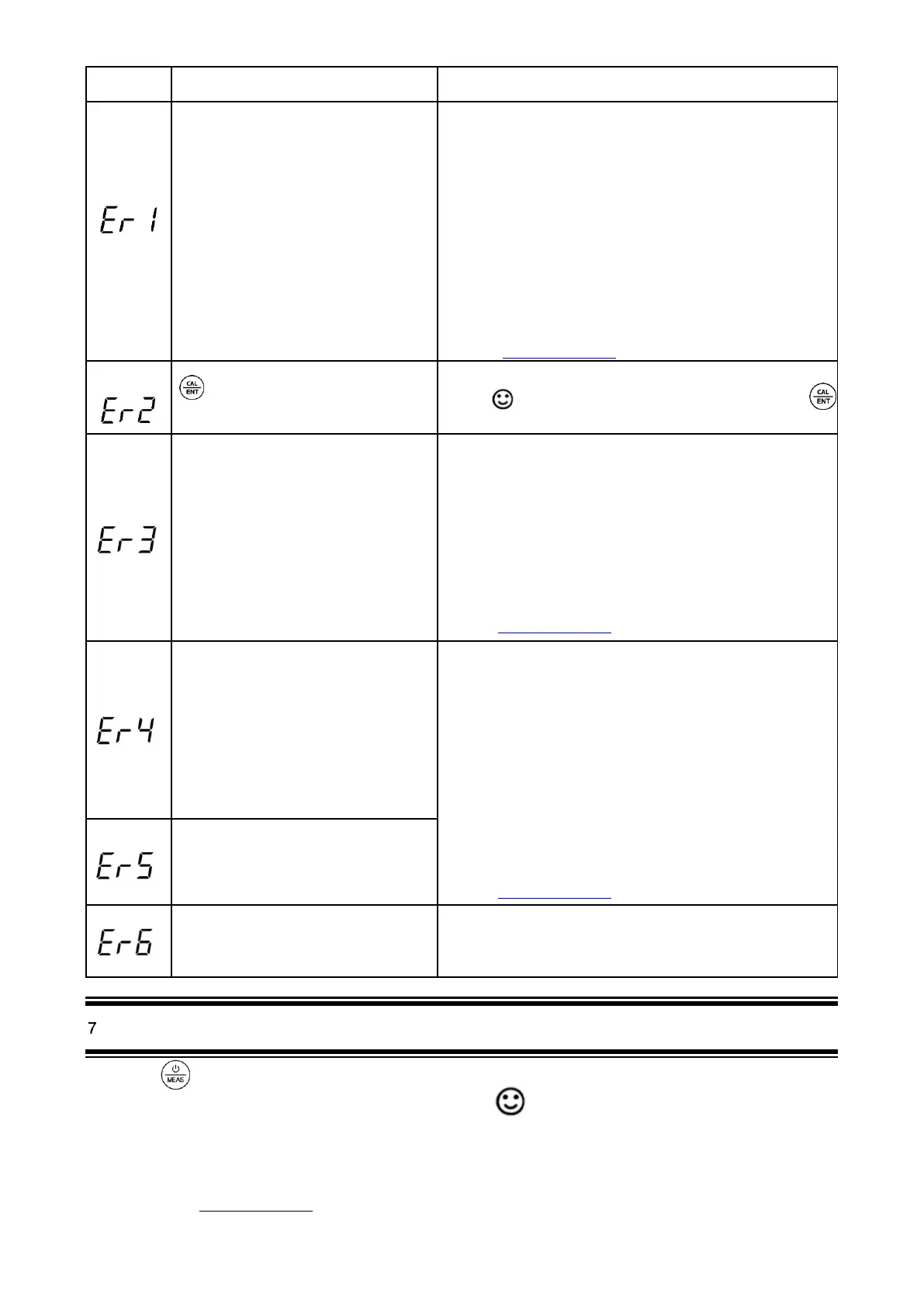
Self-Diagnosis information
Potential problems and how to fix
The pH calibration solution cannot be
recognized by the meter.
1. Make sure the probe is fully immersed in the
calibration solution.
2. Check if calibration solution is expired or polluted.
3. 1st point of pH calibration must be pH 7.00 or 6.86.
See 6.2 (1).
4. Please check whether pH electrode is damaged or
broken. If so, please replace with a new one.
5. The glass bulb or junction is severely contaminated.
Please use a soft brush with soap water to clean it
thoroughly. Then soak it in 3M KCL 3-5 hours before
performing calibration again.
6. If none of the above, please contact us at
info@aperainst.de
Is pressed before measurement is
fully stable
Wait for to come up and stay on screen before pressing
During calibration, readings being unstable
for over 3 minutes
1. Please check whether pH electrode is damaged or
broken. If so, please replace with a new one.
2. The glass bulb or junction is severely contaminated.
Please use a soft brush with soap water to clean it
thoroughly. Then soak it in 3M KCL overnight before
performing calibration again.
3. The electrode is aged (used for over a year and has a
much slower response). A replacement is needed.
4. If none of the above, please contact us at
info@aperainst.de
pH electrode zero electric potential out of
range (<-60mV or >60mV)
1. Check whether pH buffer solutions comply with the
USA or NIST standard.
2. Check whether pH buffers are expired or
contaminated.
3. Please check whether pH electrode is damaged or
broken. If so, please replace with a new one.
4. The electrode is aged (used for over a year and has a
much slower response). A replacement is needed.
5. The electrode is invalidated (Er4/Er5 repetitively
appears, and problems 1, 2, 3 are excluded). A
replacement is needed.
6. If none of the above, please contact us at
info@aperainst.de
pH electrode slope out of range
(<85% or >110%)
The calibration reminder is triggered. It’s
time to perform a new pH calibration
Perform pH calibration or cancel calibration reminder in ZenTest
settings.
pH M ea surem ent
Short press to turn on the tester. Rinse the probe in distilled water and dry it. Dip the probe in sample solution, stir
gently, and allow it to stand still in the solution. Get readings after comes up and stays on screen.
Notes
a) For solutions with low ionic strength (e.g. distilled or deionized water), the pH measurements will be fluctuating and
difficult to get a stable reading. A specialized pure water pH electrode is required. For more information, please
contact us at info@aperainst.de. Likewise, when testing clean water such as drinking water, RO water or tap water,
the test time could be longer, usually 2-4 minutes.



 To Next Page