14 Control
Tuning the PDI Control Algorithm
The controller’s PDI control algorithm (also called PDDI) is used to provide faster response,
most commonly in dual-valve flow and pressure controllers. This algorithm uses typical PI
terms and adds a squared derivative term (D):
• The larger the P gain, the more aggressively the controller will correct errors between
the commanded setpoint and the measured process value.
• The larger the I gain, the faster the controller will correct for osets based on the size
of the errors and the amount of time they have occurred.
• The larger the D gain, the faster the controller will predict future corrections based on
the current rate of change in the system. This often results in slowing the system down
to minimize overshoot and oscillations.
Troubleshooting Valve Performance with PID Tuning
The following issues can often be resolved by adjusting the PID gain values for your pressure
controller.
Fast oscillation around the setpoint
• PD: Reduce the P gain in decrements of 10%.
• PDI: Increase the P gain in increments of 10%, and then adjust the I gain to fine-tune.
Overshot setpoint
• PD: Reduce the P gain in decrements of 10%.
• PDI: If D is not , increase the P gain in increments of 10%.
Delayed or unattained setpoint
•
PD: Increase the P gain in increments of 10%, and then decrease the D gain by small
amounts to fine-tune.
• PDI: Increase the P gain in increments of 10%, and then increase the I gain to fine-tune.
✓
Note: Valve tuning can be complex. Contact support if you need help (page 16).
Using a Control Deadband for Pressure Control
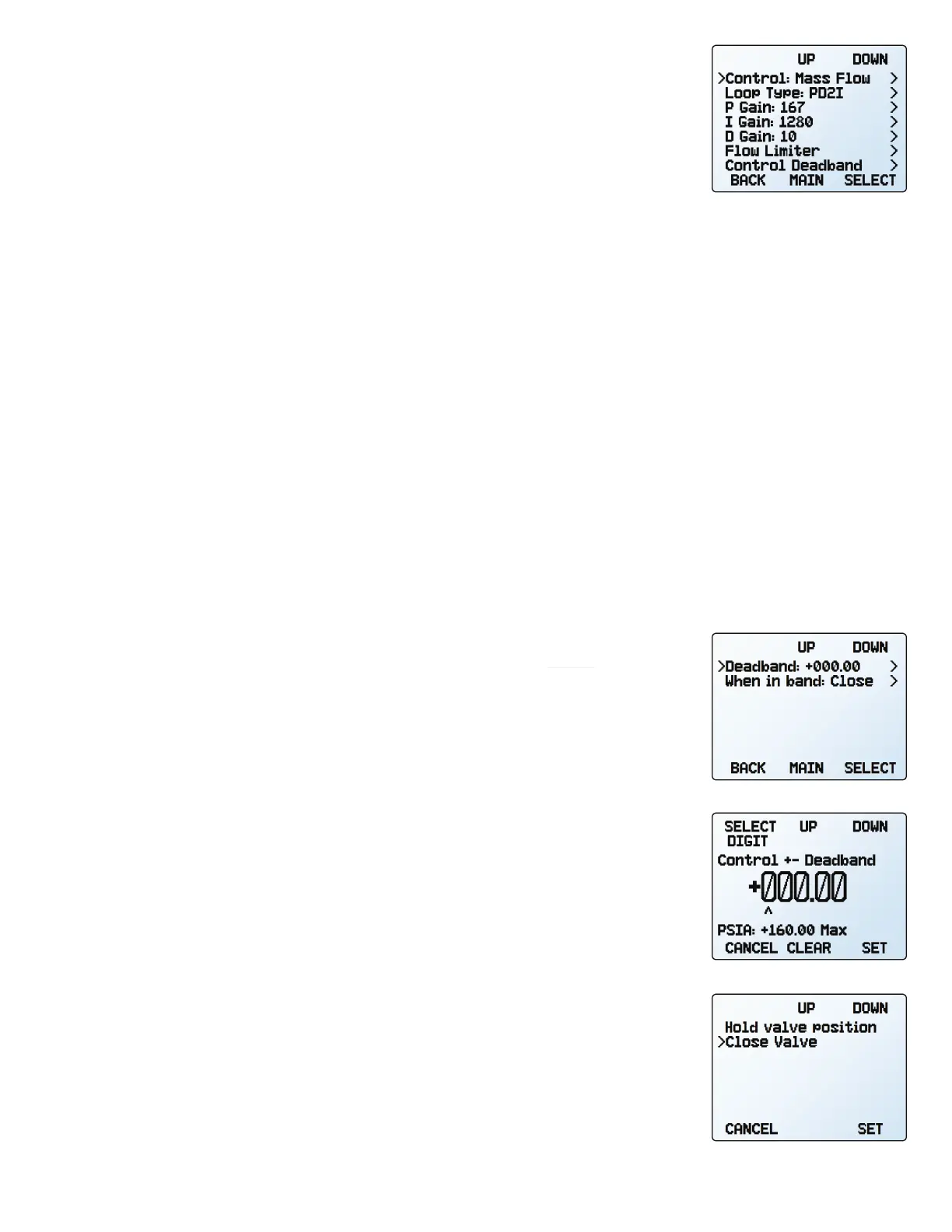
CONTROL → Control Loop → Control Deadband
The control deadband is designed to minimize the amount of gas exhausted and improve
stability. There is no active control within the deadband setting.
To turn on the control deadband, enter a non-zero value in
CONTROL → Control Deadband
→
Deadband. In order for the deadband to activate, the controller must reach the setpoint.
If the process variable drifts to a deadband limit, active control resumes until the setpoint
is reached again.
The controller can be set to either hold the current valve position or close the valve(s) in
CONTROL → Control Loop → Control Deadband → When in Band. It is recommended to hold
the current position on PC-Series controllers.
Example: With a setpoint of 30 , a deadband of ±0.25 allows absolute pressure
to vary between 29.75 and 30.25 . The device will increase pressure until it reaches
the setpoint of 30 . With a setting of
Hold valve position, it will hold the current valve
position until the pressure reading varies outside of the preset deadband.
▲
Caution: PC-Series devices do not have an exhaust valve to reduce pressure when
pressure exceeds the deadband. A dual-valve (PCD-Series) pressure controller with an
exhaust valve is recommended for closed volumes.
The control loop menu in PD²I
control mode.
The deadband menu.
Choosing deadband options.
Choosing deadband size.



 To Next Page