2021.08.19 REV. PRESSURE CONTROLLER OPERATING MANUAL 17
Setup
Sensor Setup
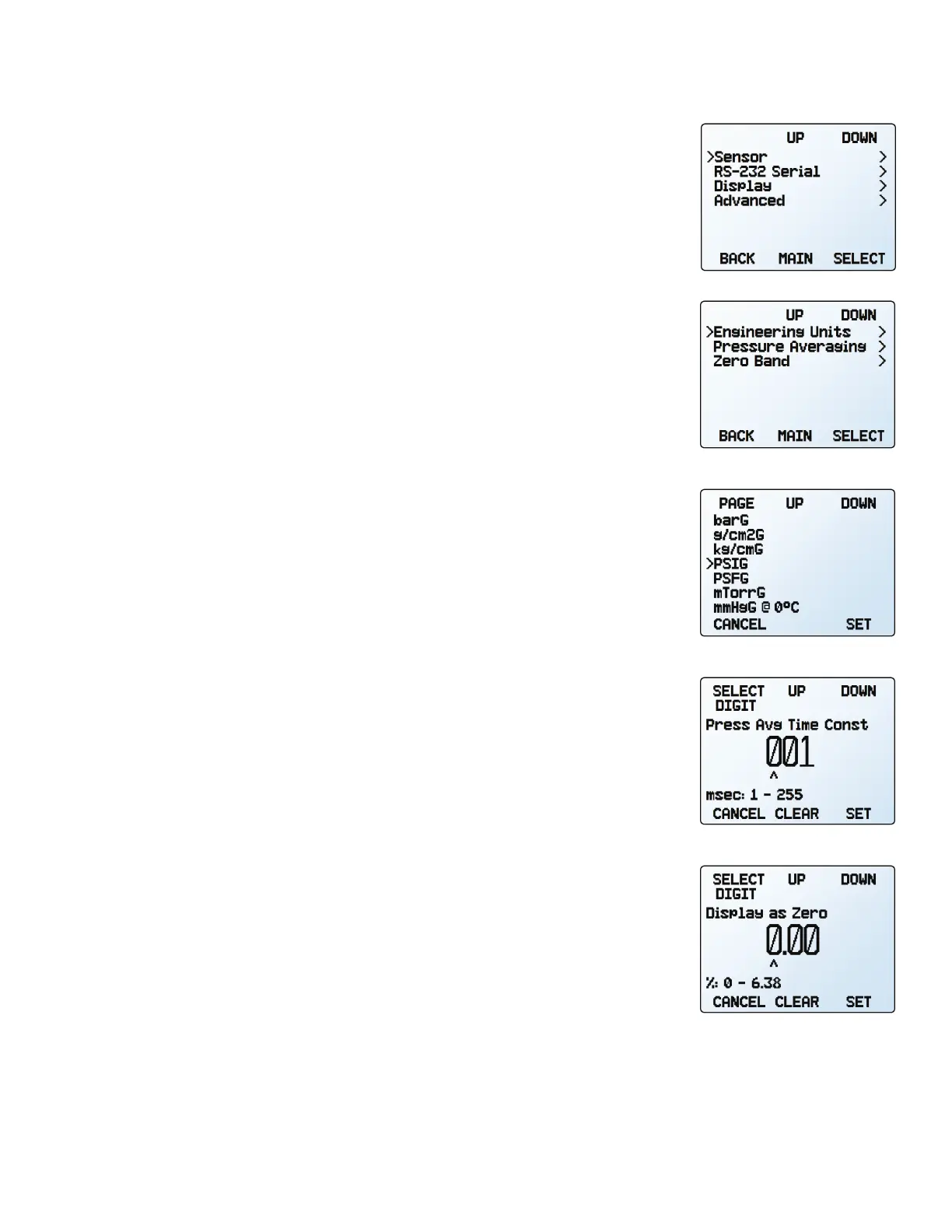
MENU → SETUP → Sensor
Choosing Engineering Units
SETUP → Sensor → Engineering Units
Changing device engineering units alters both the display and the data frame. Choose the
parameter whose unit you want to change, and then select your desired engineering unit,
confirming the change on the last screen.
Pressure Averaging
SETUP → Sensor → Pressure Averaging
Averaging the pressure over a longer time may be useful in smoothing fluctuating readings.
This menu changes the time constant of the geometric running average for pressure. Values
roughly correspond to the time constant (in milliseconds) of the averaged values. Higher
numbers generate a greater smoothing eect, to a maximum of 255 ms.
Zero Band
SETUP → Sensor → Zero Band
The zero band threshold is an amount of pressure under which pressure values are displayed
as 0. The maximum zero band is 6.38%. For example, a 20 setting with a zero band
value of 0.25% would display as 0 for all readings below 0.05 .
Selecting engineering units.
Selecting a pressure average.
Selecting a zero band.
The sensor setup menu.
The setup menu.



 To Next Page