2021.08.19 REV. PRESSURE CONTROLLER OPERATING MANUAL 15
Setpoint Ramping
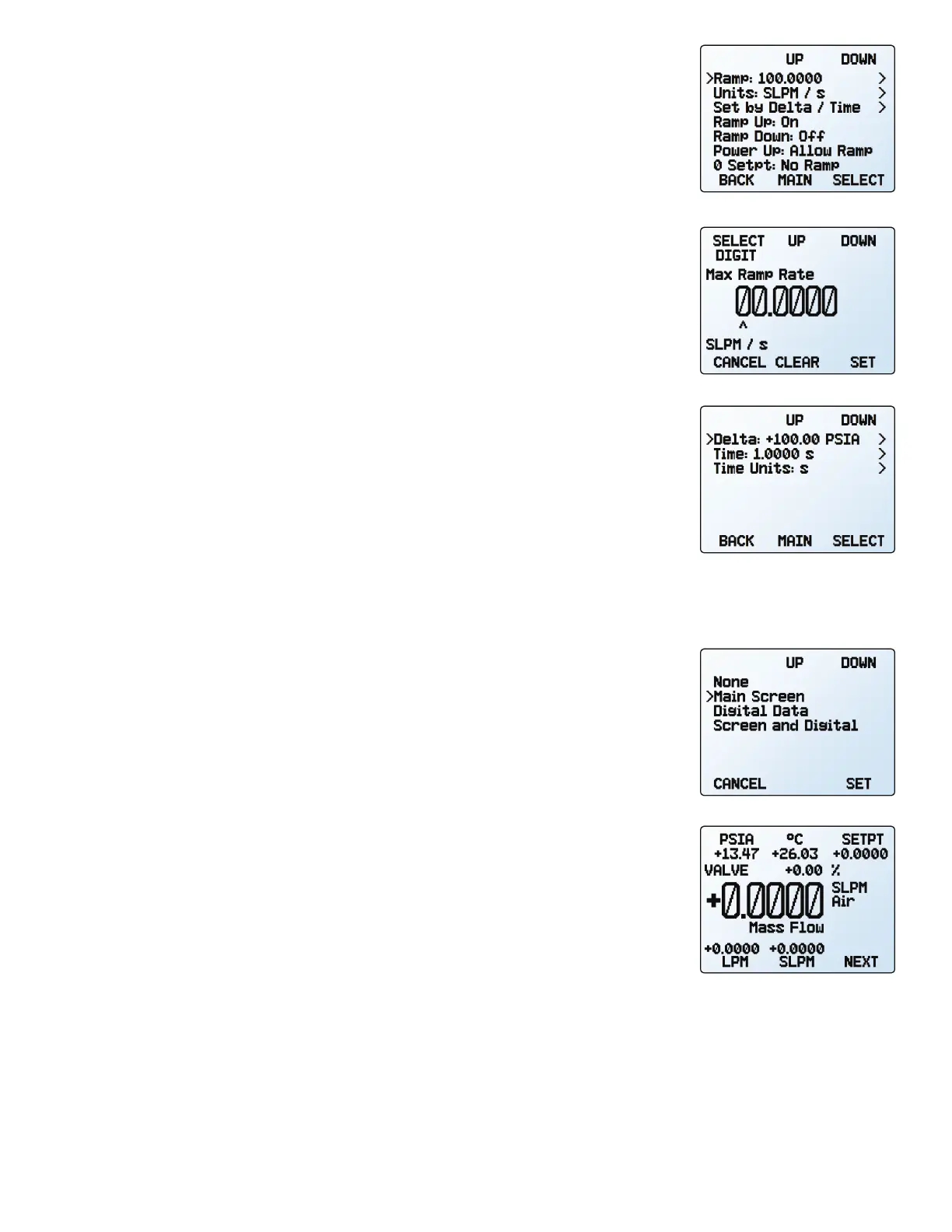
Setpoint ramping regulates how quickly the controller will reach the pressure setpoint. It
is often used to prevent bursts of flow from damaging delicate instruments when starting
a process.
To activate setpoint ramping, you will set a maximum ramp rate and configure when to
enable the ramping function.
Setting the Ramp Rate
• Ramp is a quick way to change the maximum rate of change.
•
Units is a quick way to change the engineering units used.
•
Set By Delta / Time
allows for more detailed control of the ramp rate including changing
the value of the time period
Ramping Options
Changing ramping options allows you to have a ramp in only one direction, increasing
or decreasing. It also allows you to ignore the ramp rate when initially powering on or
commanding a zero setpoint.
•
Ramp Up can toggle between on and o. When o, the ramp rate will not be honored
when increasing pressure to reach a given setpoint.
•
Ramp Down can toggle between on and o. When o, the ramp rate will not be honored
when decreasing pressure to reach a given setpoint.
•
Power Up toggles between Allow Ramp and No Ramp. If set to No Ramp, the device will
ignore the ramp rate just after powering on, otherwise it will honor the ramp rate from
a zero setpoint.
•
0 Setpt determines whether the controller ramps when a zero setpoint has been given.
If this setting is set to No Ramp, when given a zero setpoint, the controller will immediately
snap to the zero setpoint; otherwise it will ramp at the selected rate.
Displaying Valve Drive Percentage
The valve drive is represented as a percentage of the amount of voltage driven to the valve.
Percentages do not directly correlate with percentage open.
Viewing the valve drive percentage is particularly helpful for troubleshooting. An increased
percentage over time likely indicates a clog in the system where more voltage is required
to drive the valve to attain the same amount of flow. A valve percentage of 0% indicates
the valve is closed.
This information may be displayed on the main display and/or as part of transmitted serial
data. There are four valve display options:
• None: No valve information is displayed.
•
Main Screen: Only on the main display.
•
Digital Data: Only in the serial data frame.
•
Screen and Digital: Both the main display and serial data frame.
The setpoint ramping menu.
Setting a maximum ramp rate.
Configuring delta/time ramping.
The valve display menu
Valve percentage on the main
display, above the large numbers.



 To Next Page