MoreSecurity,MoreConveniencewww.apexis.com.cn/www.apexis.cc
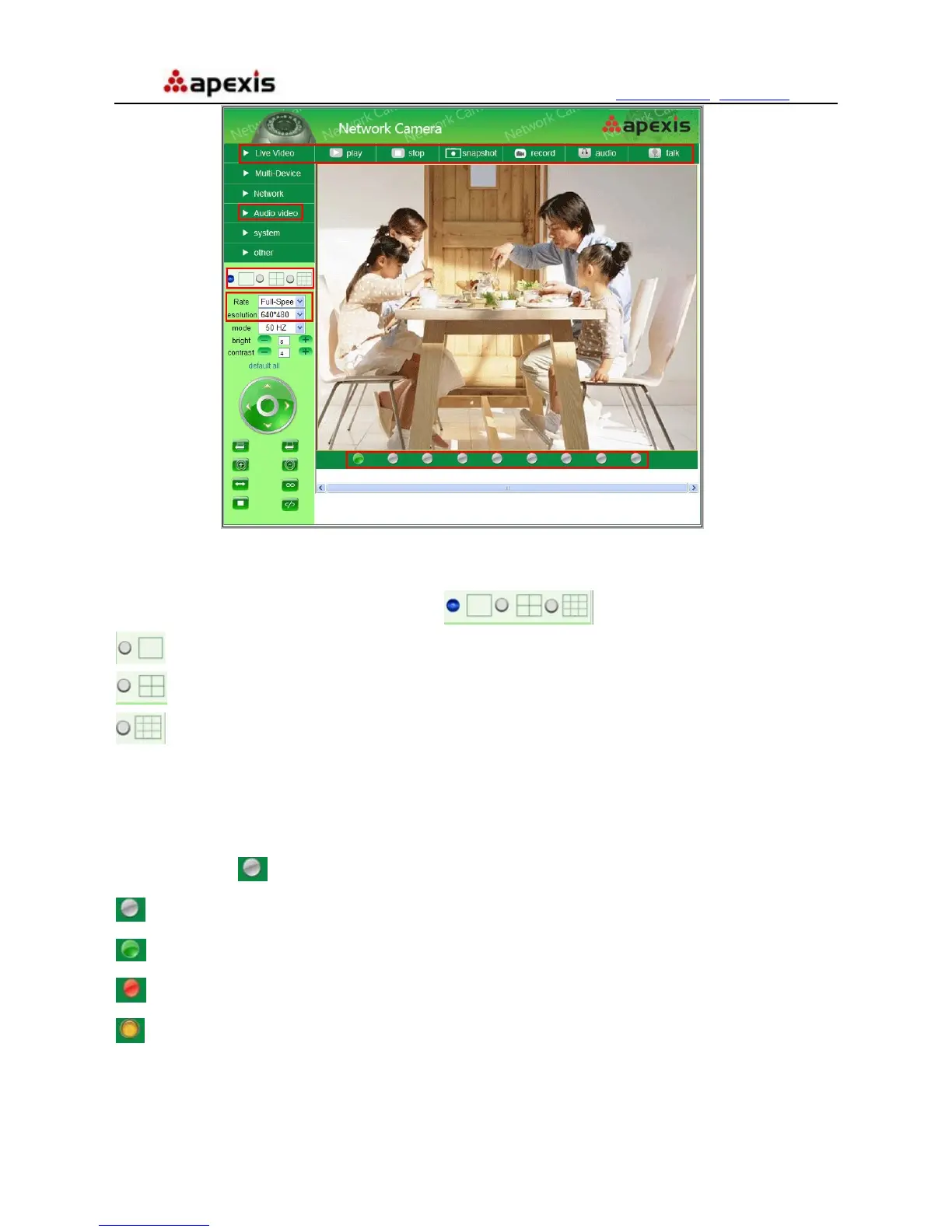
Figure 3.5
hannels:
Our IE software supports 9 channels totally. Click
C
can get different windows.
: Click this one, you can view the main channel of the camera you login.
: Click this one; you can view 4 Channels of cameras which connected, from CH1 to CH4.
: Click this one; you can view 9 Channels of cameras which connected, from CH1 to CH9.
NOTE: i-Device
tatus of Channels:
There are 9 icons
If you want to view 4/9 channels, you should set the Multi-Device firstly (See 3.1 Mult
Settings)
S
at the bottom of the UI which show the status of each channel of the camera.
: Grey color, means there is no device connected to the main device from this channel.
: Green color, means the device connected from this channel, and it works well.
: Red color, means the device of this channel is recording.
: Yellow color, means set this channel in multi-device already, but it fails to connect to the main device.
Shenzhen Apexis Electronic Co., Ltd Tel: +86-755-26509025 Fax: +86-755-26509229
16


 To Next Page