MoreSecurity,MoreConveniencewww.apexis.com.cn/www.apexis.cc
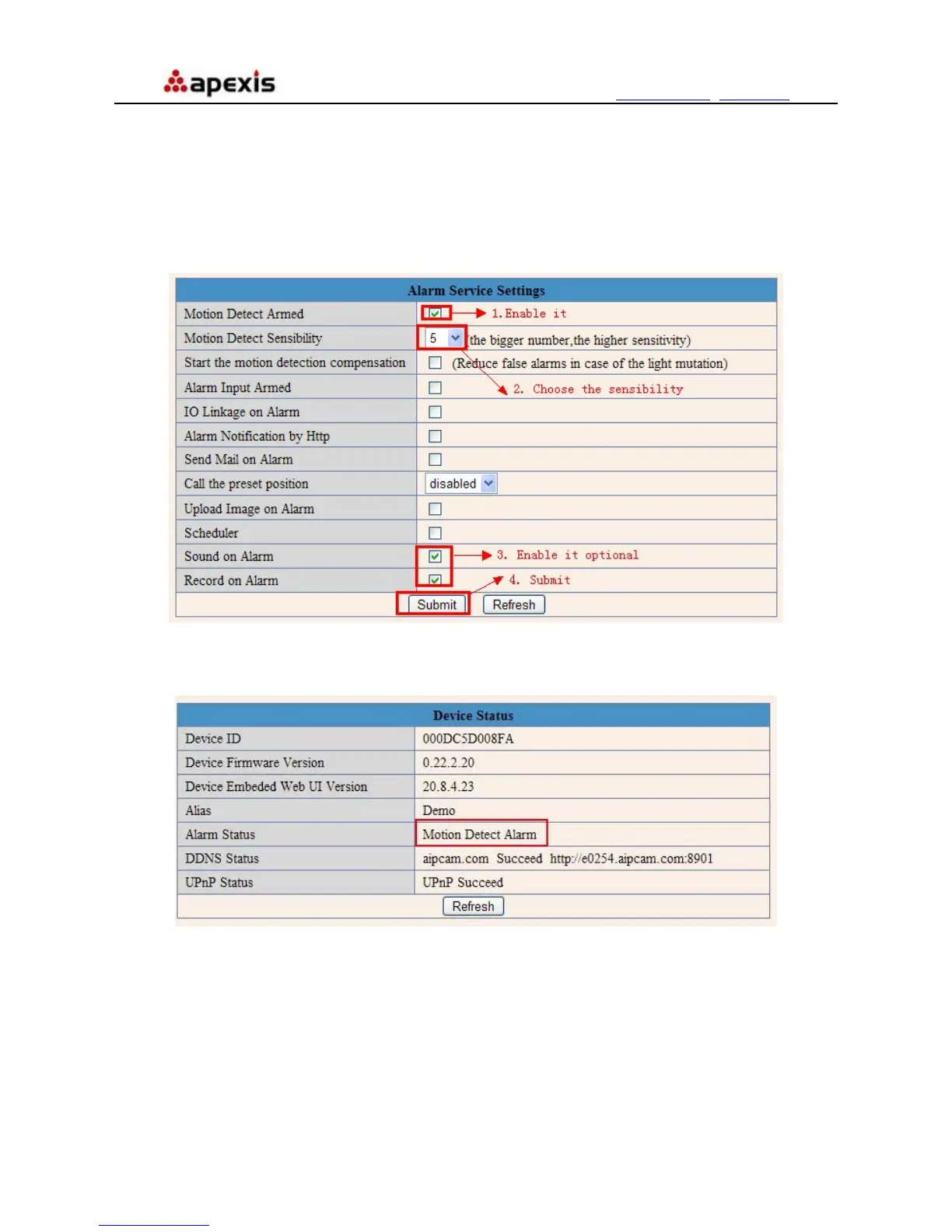
Figure 9.6
Enter Alarm Service Settings page to configure Motion Detection function.
3.18.1 Motion Detect Armed
If enable Motion Detect Armed, it will record and make a sound of alarm when there is motion detection
triggered.
Figure 9.7
After enable motion detect armed, if there is motion triggered, the Alarm Status will turn to Motion Detect
Alarm. (Figure 9.7)
Figure 9.8
3.18.2 Motion Detect Sensibility
You can choose level 1-10; level 10 means the most sensitive, 1 means the least of all.
Shenzhen Apexis Electronic Co., Ltd Tel: +86-755-26509025 Fax: +86-755-26509229
44


 To Next Page