MoreSecurity,MoreConveniencewww.apexis.com.cn/www.apexis.cc
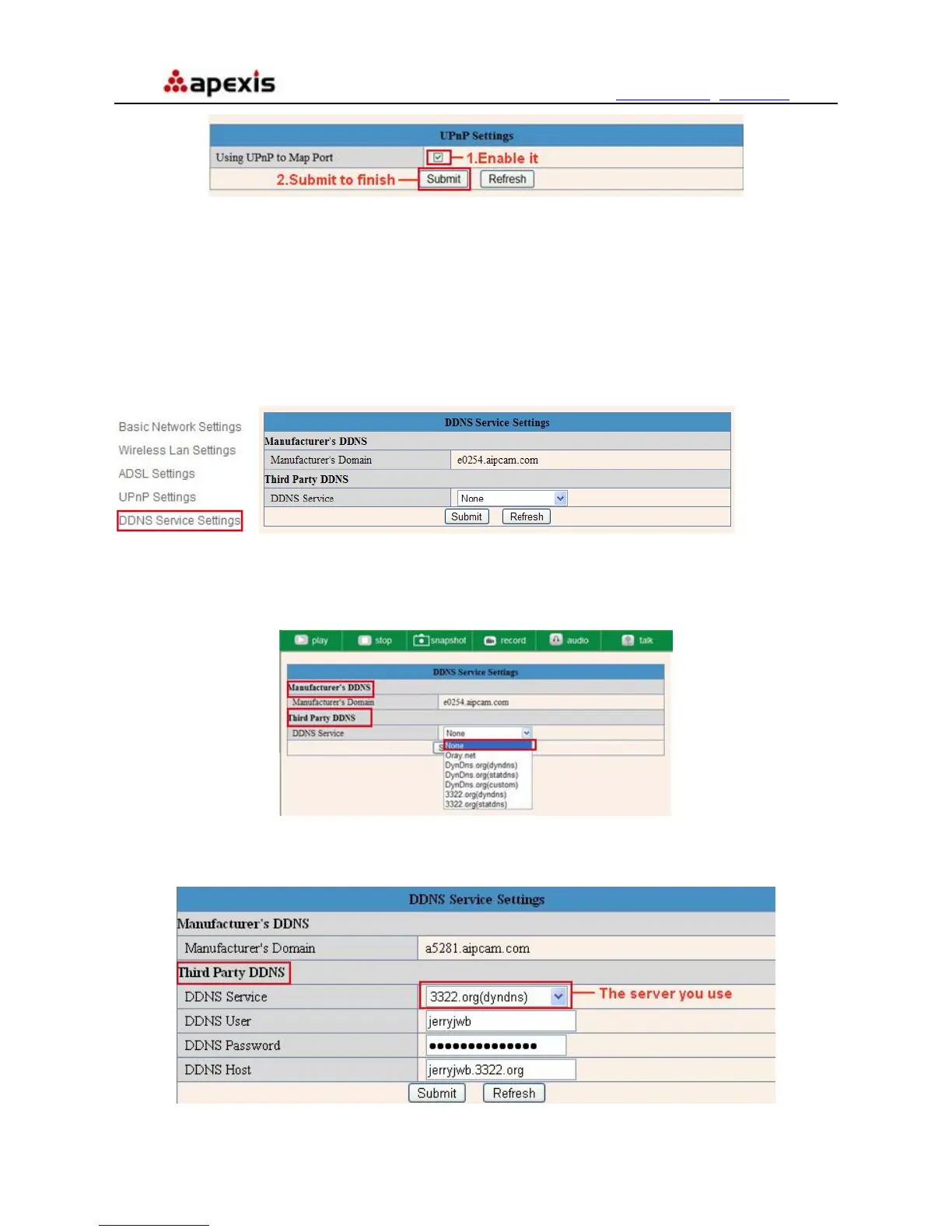
Figure 6.9
NOTE: Here UPnP only for port forwarding now. It has much relation with security settings of your router, make
sure the UPnP function of router is ON.
Attention: If your router doesn’t support UPnP function, it may show error information. So we recommend you
do port forwarding manually in your router. (Details see Figure 7.4-7.9)
3.7 DDNS Service Settings
Î
Figure 7.0
There are 2 options:
Manufacturer’s DDNS: This domain is provided by manufacturer.
Third Party DDNS: This domain is provided by the 3
rd
party, such as Dyndns, Oray, 3322 etc.
Figure 7.1
Third Party DDNS
If you use third party DDNS, please choose the server you use, such as “3322.org” or “dyndns.org” as below:
Figure 7.2
Shenzhen Apexis Electronic Co., Ltd Tel: +86-755-26509025 Fax: +86-755-26509229
32


 To Next Page