MoreSecurity,MoreConveniencewww.apexis.com.cn/www.apexis.cc
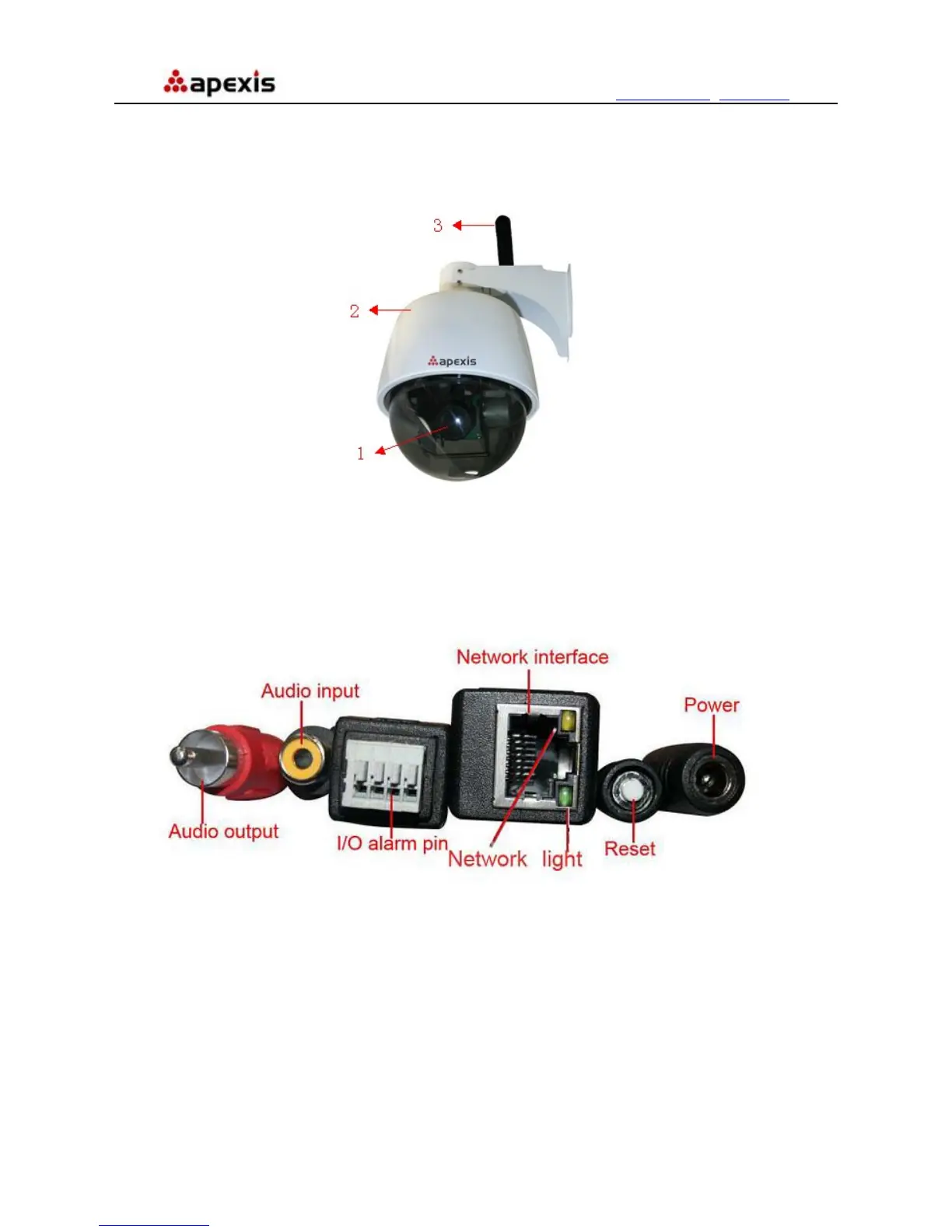
1.3 Product Views
1.3.1 Front View
Figure 1.1
1 LENS: CMOS sensor with fixed zoom lens.
2 Housing: Alloy housing for waterproof
3 Wireless Antenna: WI-FI Antenna (For wireless model only)
1.3.2 Cable Interface
Figure 1.2
Audio Output: The jack is used to plug external speaker or audio output device.
Audio Input: The jack is used to plug external microphone or audio input device.
I/O Alarm Pin: 1 Alarm input(GND) 2 Input 3 Output A 4 Output B
Network Interface: RJ-45/10-100 base T
Network Light: The green LED will on when network connected, the yellow LED will blink when data
transferred
Reset: Press and hold the RESET button for about 15 seconds, all the parameters will be back to the factory
default settings. (Please keep the power on when do RESET)
Power: DC 12V/2A power supply
Shenzhen Apexis Electronic Co., Ltd Tel: +86-755-26509025 Fax: +86-755-26509229
4


 To Next Page