MoreSecurity,MoreConveniencewww.apexis.com.cn/www.apexis.cc
Audio buffer: Click this icon, it will show five numbers, which means 1/2/3/4/5 seconds’ buffer of audio.
Reversal: Click this icon to see the reversal image. Click again, will back to normal.
Mirror: Click this icon to see the mirror image. Click again, will back to normal.
NOTE: You can choose Reversal and Mirror function when you set up the camera in a special position.
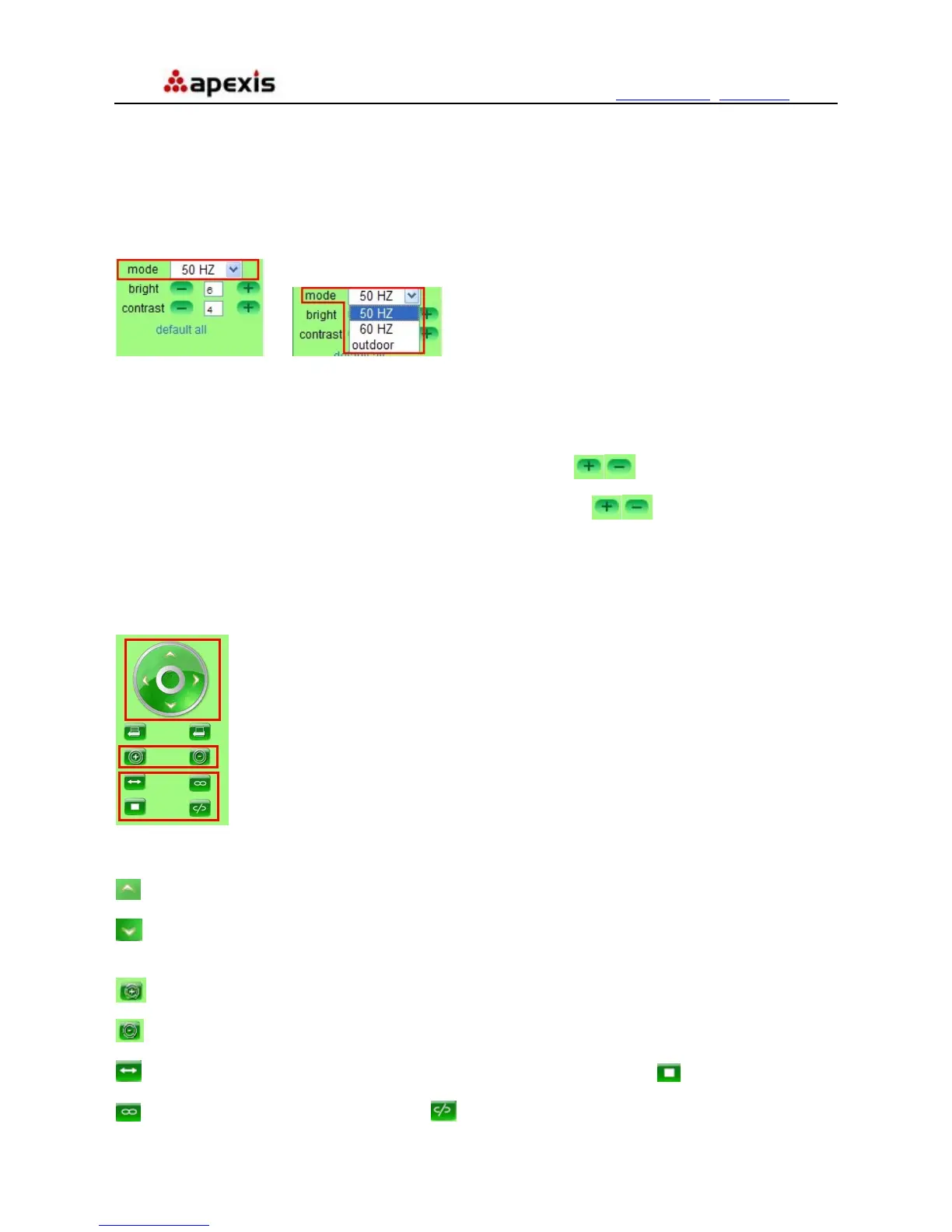
Mode, Bright, Contrast Settings
Î
Figure 4.3
Mode: This is work mode optional, 50HZ/60HZ for the users who use 50HZ/60HZ frequency, outdoor for the
users who want to use this camera to monitor toward outdoor environment
NOTE: This camera normally should be used in a indoor environment
Bright: Set the parameters to adjust the image quality of video. Click
to adjust the value
Contrast: Set the parameters to adjust the image quality of video. Click
to adjust the value
Default all: Click it to set all the parameters back to factory setting.
NOTE: If you login the camera, there is no video displayed, and the parameter of bright/contrast is blank,
maybe you can try to click “default all” to set the parameters back to factory setting to get live video.
Pan/Tilt Control
Figure 4.4
: Click this icon, camera will move up, you can click one by one or hold it to control the movement
: Click this icon, camera will move down, you can click one by one or hold it to control the movement
NOTE: It is the same operation as left, right etc.
: Click this icon, the lens will zoom in, and the previous image will become larger, it supports 3Xzoom.
: Click this icon, the lens will zoom out, and the previous image will become smaller
: Click this icon, camera will rotate left and right, means horizontal patrol, click to stop it.
: Click this icon, IO output Switch ON. Click to set it OFF.
Shenzhen Apexis Electronic Co., Ltd Tel: +86-755-26509025 Fax: +86-755-26509229
20


 To Next Page