Lenni – Lucey Standard Table Manual
Leg Box (Boxes 5 & 6)
1. Tilt each box on its side to make it easier to pull each leg out of the box (opening box so “up” stamped on box is
horizontal). Discard any packing sleeves on the base of each leg.
2. Adjust Leg Height
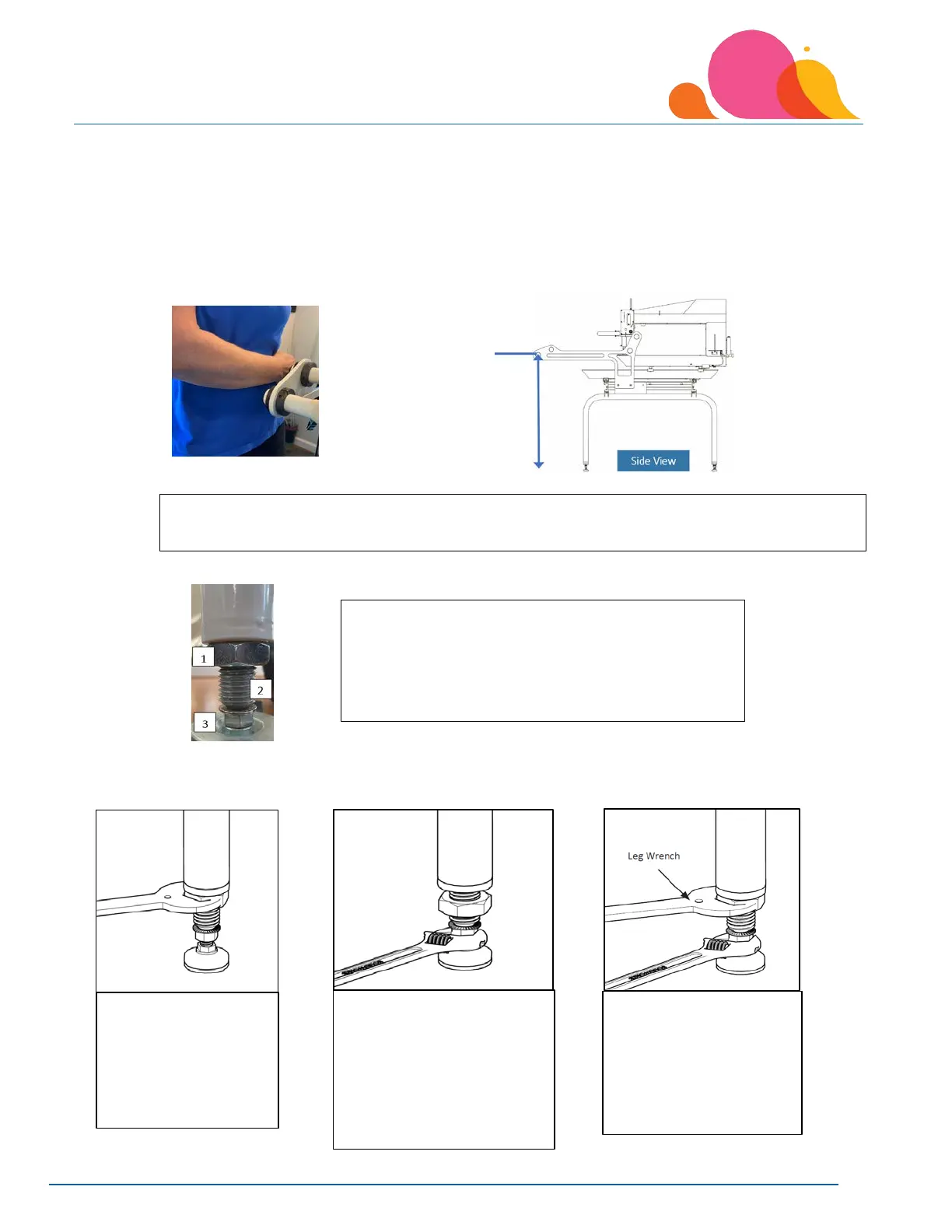
a. Measure the distance between the front roller support to your naval or as your arm is straight across your
body. Each of the four leg adjusting rods should be moved to this height. Once the table is assembled
completely, you can make minor adjustments if needed.
b. Loosen the leg jam nut with the leg wrench, the leg wrench is included in shipping contents.
c. Once you have loosened the leg jam nut with the leg wrench, you can turn the threaded leg
counterclockwise to extend the leg to the correct distance. Re-tighten the jam nut when you are at your
desired height. Repeat the process for each leg.
Measure from the floor to your naval as your arm crosses your mid-section across your body. This
is the height your table legs should be set to on the first roller (Backing Roller).
a. Use large black leg wrench that is included in
your shipping boxes
2. Threaded Leg
3. ¾” Nut
levelers, loosen
the large jam nut
directly
underneath the
4. Place a ¾ - inch open-
end wrench (or crescent
wrench) on the foot pad
nut. Turn the nut
clockwise to lower the
leg; counterclockwise
level in all directions,
tighten the jam nut
against the top of
the leg with the leg
wrench.



 To Next Page