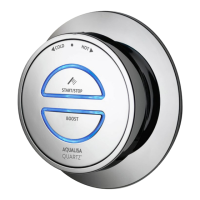
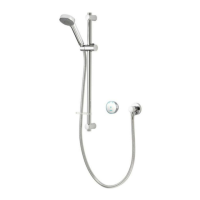
Single Outlet Controller
1. Press the Start/Stop button on the controller to turn the shower on.
2. The temperature can be adjusted during water flow by turning the bezel.
N.B. Each time the shower is turned on, the temperature will be set to 39ºC.
3. The blue LED display will flash until the selected temperature has been reached.
When the LED display is constant, your shower is ready to use.
4. Press the Start/Stop button on the controller to turn the shower o.
TEMPERATURESTART/STOP
Adjust during shower
Dual Outlet (divert) Controller
1. Press the Start/Stop button on the controller to turn the shower on.
2. The temperature can be adjusted during water flow by turning the bezel.
N.B. Each time the shower is turned on, the temperature will be set to 39ºC.
3. The blue LED display will flash until the selected temperature has been reached.
When the LED display is constant, your shower is ready to use.
4. Press the Start/Stop button to turn the shower o.
CHANGE OUTLETTEMPERATURESTART/STOP
Adjust during shower Push and hold for over 3
seconds and release when flow
switches between outlets.
As a safety feature, the Aqualisa SmartValve
TM
has a maximum
run time of 20 minutes. The flow can be stopped and started at
anytime by pressing the ‘Start/Stop’ button.
This can be enhanced by activating and using the free Aqualisa app.
See pages 3 and 9 for details.
As a safety feature, the Aqualisa SmartValve
TM
has a maximum run time
of 20 minutes. The flow can be stopped and started at anytime by
pressing the ‘Start/Stop’ button.
This can be enhanced by activating and using the free Aqualisa app.
See pages 3 and 9 for details.
Whilst the shower is in use, press and hold to divert (the 1
st
outlet will
automatically stop and the 2
nd
outlet will start). Depending on system
pipe runs, there may be a slight outlet temperature change when
switching between outlets.
4 5

 To Next Page
 Loading...