13
started;
3) Current regulation
Operators can choose according to welding current per workpiece thickness.(current range:10-200A)
4) Post-flow time
Post-flow time is the time between arc ending and post-flow. Post-time can be adjusted between
1-10seconds.
5) down slope time
:
to adjust the output current down slope time.
6) 2T/4T :select 4T
【
The up- and down-slopes are switched off
】
.
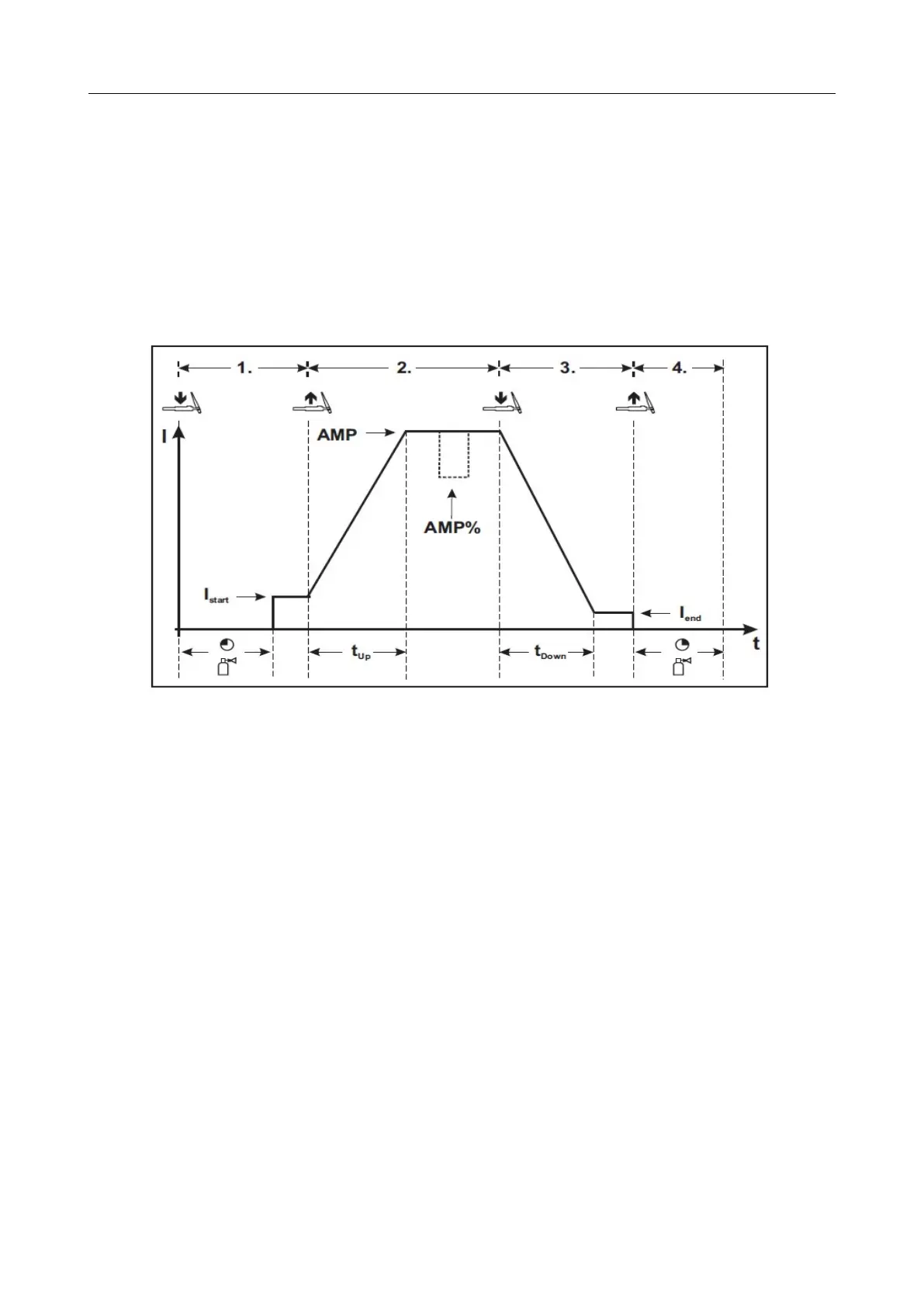
Pic 11 4T welding logic
Step 1
• Press torch trigger 1, there is gas pre-flow time
(
150ms).
• HF ignition pulses from the electrode to the workpiece, the arc ignites.
• Welding current flows and immediately the ignition. HF is switched off.
Step 2
• Release torch trigger 1.
• The welding current increases with the set up-slope time( built-in 0 second) to the main current AMP.
Switching from main current AMP to secondary current AMP%:
Press torch trigger 2 or Tap torch trigger 1 *
Step 3
• Press torch trigger 1.
• The main current drops with the set down-slope time to the end-crater current Iend (minimum current).
Step 4
• Release torch trigger 1, the arc extinguishes.
• The set gas post-flow time begins.
Immediate termination of the welding process in the downslope by releasing torch trigger 1.
Digital Welder Expert, Know You More
https://www.arccaptain.com



 To Next Page