55
DIVISION II - OPERATION/
MAINTENANCE
Previous Main TOC Section TOC Next
NOTE: When the bottom segment
flashes, approximately 3.5 L (0.92
U.S. gal.) of gasoline remains in the
tank.
3. Mode Button - Shifts the gauge
through three set-up modes: speed-
ometer/tachometer, distance, and
time.
NOTE: The Mode Button must be
pressed and released to shift modes.
Approximately two seconds after the
Mode Button is released, the digital
gauge will return to full display.
4. Set/Reset Button - In conjunction
with the Mode Button, sets and resets
various displays on the digital gauge.
Also used to shift from speedometer
function to tachometer function on
the speedometer/tachometer gauge.
5. Odometer/Trip Meter (T1 and T2) -
Odometer registers the total distance
the vehicle has traveled. Trip meters
can register two distances (for
instance, T1 could register trip dis-
tance and T2 could register distance
between stops). The trip meters can be
reset while the odometer only registers
accumulated miles/kilometers and the
odometer cannot be reset to zero.
All distances correspond to speedometer
function selected (MPH or km/h).
NOTE: To select the odometer
(ODO), trip #1 (T1), or trip #2 (T2),
press the Mode Button (3) to select
the distance mode; then press the
Set/Reset Button (4) to select the
desired display. Hold the Set/Reset
button down to reset trip meters.
6. Gear Position Indicator - Indicates
which gear position is selected.
• R (reverse)/N (neutral)/ L (low range)/
H (high range).
NOTE: An E will be displayed if
there is an error caused by a no-shift
position signal.
7. Speedometer/Tachometer - A needle
indicates approximate vehicle speed
in mph or km/h when speedometer
function is selected or rpm when
tachometer function is selected.
8. Needle Indicator Display - Displays
which speedometer function (MPH or
km/h) or tachometer function (RPM)
is selected.
NOTE: The speedometer and
tachometer functions may be
switched by pressing the Set/Reset
Button.
9. 4WD Lock Indicator - Displays
LOCK when the front differential
lock has been engaged.
10. Drive Select Indicator - Displays
4WD when selected by the drive
select switch or when the 4WD lock
is engaged. The display is blank when
in 2WD.
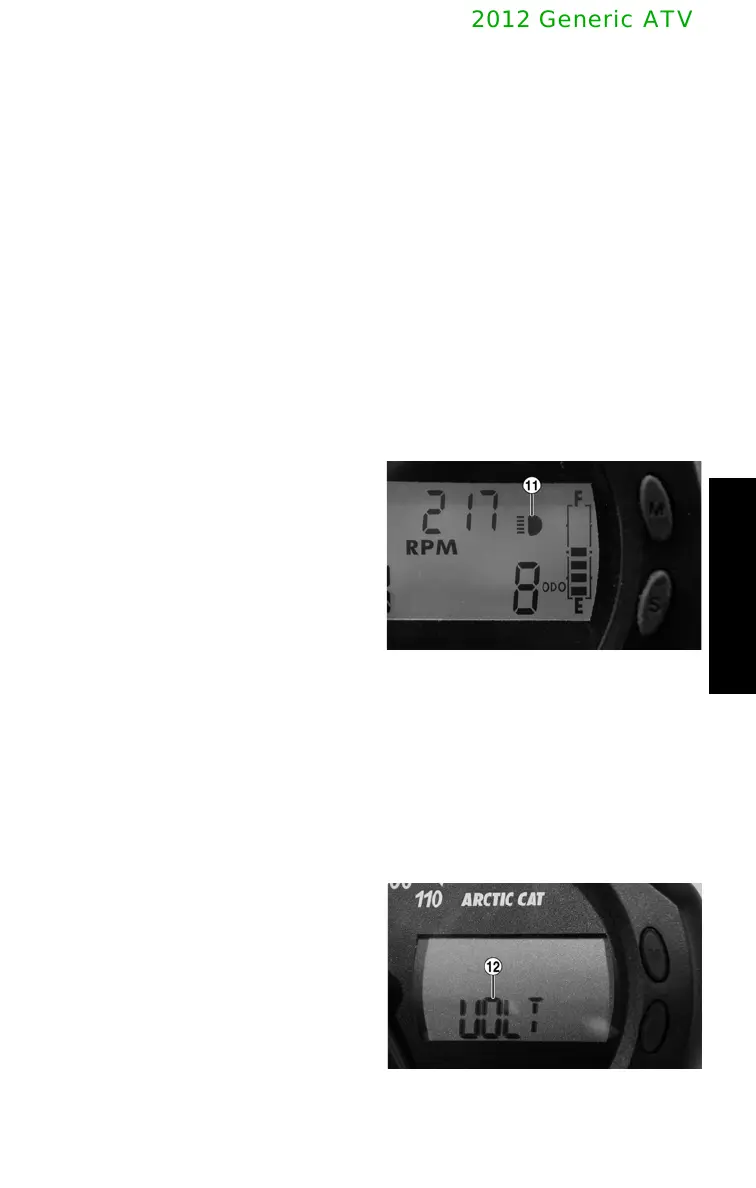
11. High Beam Indicator - The High
Beam icon will appear only when the
headlights are on high beam.
CF101A
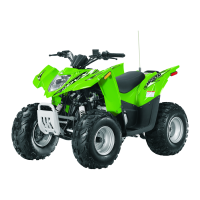
12. Battery Condition Indicator - The
speedometer/tachometer needle will
not function and the LCD will go
blank except the word VOLT will
flash on the LCD whenever a low
voltage (< 9 DC volts) or high voltage
(>16 DC volts) is detected. When
voltage returns to normal, the gauge
must be reset by turning the ignition
key to OFF; then back to ON.
CF098A



 To Next Page