V 11/21 62
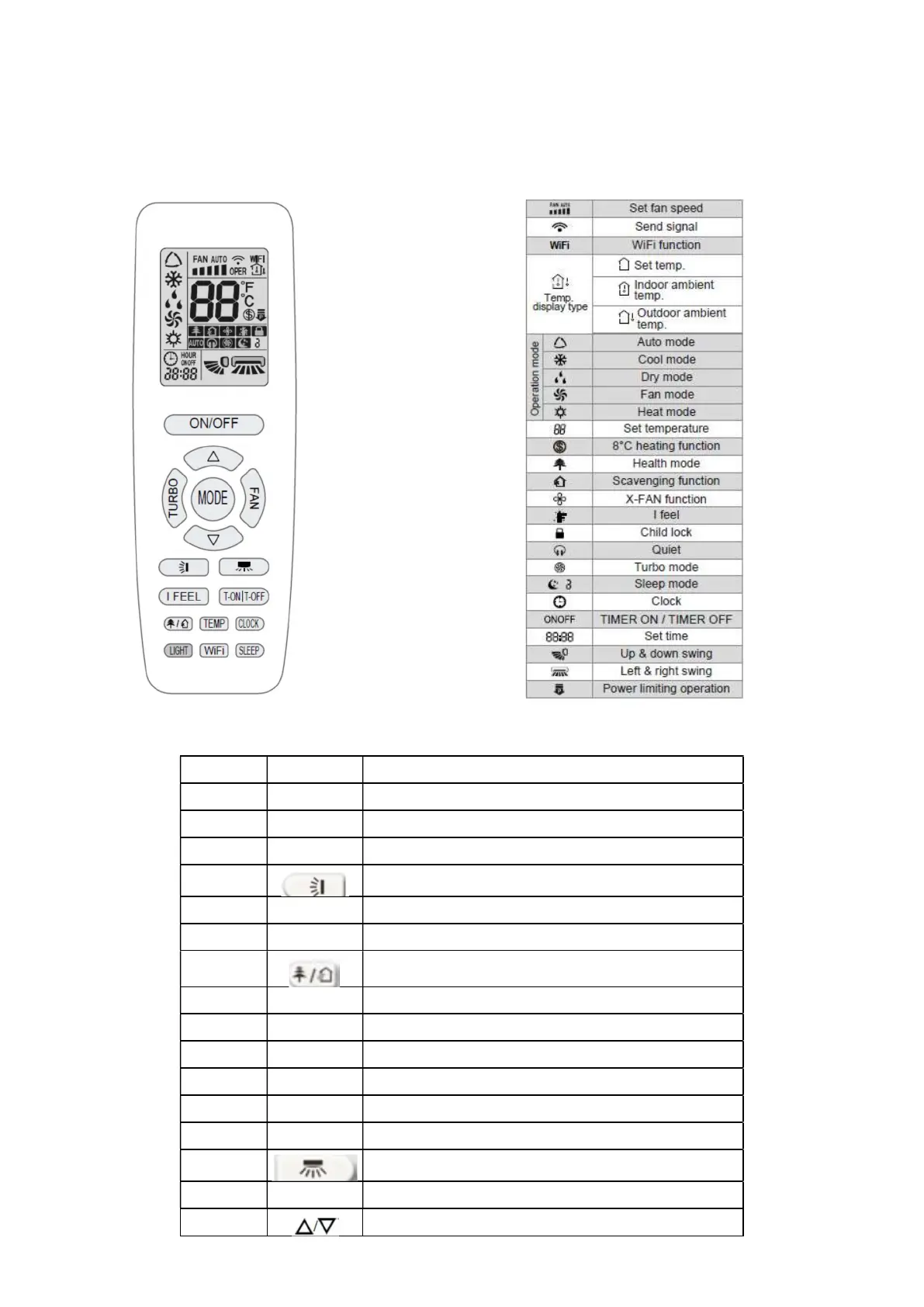
GUIDE TO THE REMOTE CONTROL AND DISPLAY
Remote control buttons
Remote control buttons Icons on display
Introduction to icons on the display
N. Button Function
1 ON/OFF Turns the unit on or off
2 TURBO Set the turbo function
3 MODE Set the operating mode
4
Set the up & down swing mode
5 I FEEL Set the I FEEL function
6 TEMP Switches the type of temperature display on the unit display
7
Set the Health function and the Scavenging function (not available)
8 LIGHT Set the Light function
9 WIFI Set the WIFI function (Optional)
10 SLEEP Set the Sleep function
11 CLOCK Set the clock
12 TOFF Set the Timer off function
13 TON Set the On Timer function
14
Set swing left & right (not available)
15 FAN Set the fan speed
16
Set temperature and time





 To Next Page