ARIESAUTOMOTIVE.COM • NEED ASSISTANCE? • 800.798.0813 • 205041-INS-RB • PAGE 4
Step 7
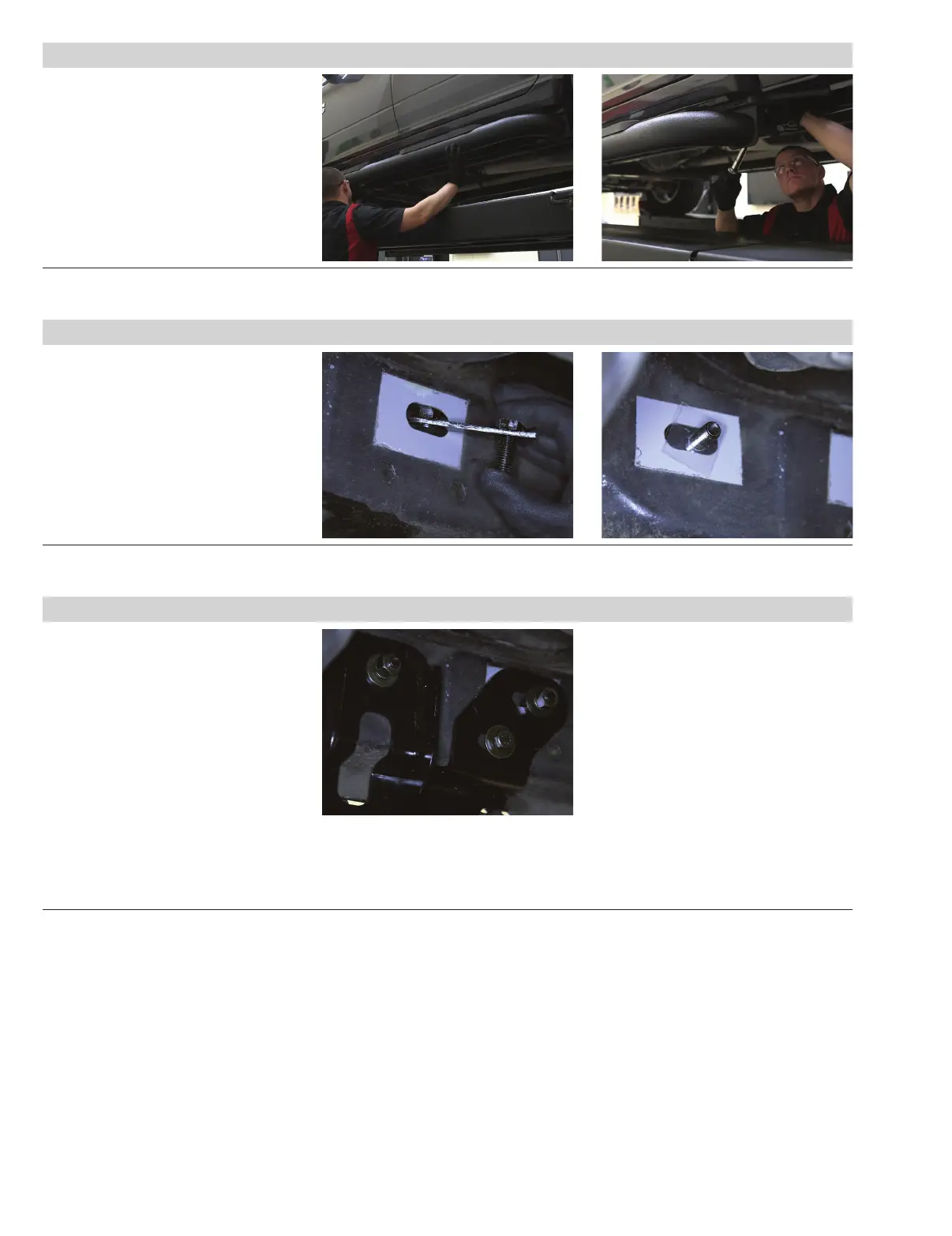
Locate the passenger-side front
mounting location. Insert a M12 bolt /
M10 nut plate into the body panel. Slide
a plastic bolt retainer over the thread of
the bolt to hold it in place.
Insert a second M8 bolt plate into the
remaining top slot on the rocker panel.
Slide a plastic bolt retainer over the
thread of the bolt to hold it in place.
Step 8
Place the passenger-side front mounting
bracket onto the vehicle and secure the
top, front location with an M8 flat washer,
lock washer and nut.
Secure the top rear location with a
M12 flat washer, lock washer, and nut.
On 2015 and newer models (with M8
factory inserts): Secure the bottom of
the bracket with one M8
hex bolt, lock washer and flat washer.
On 2015 and older models (without
M8 factory inserts): Rotate the bolt
plate to position the nut behind the lower
mounting position and secure with a M10
hex bolt, flat washer and lock washer.
Step 6
Adjust and level the side bar.
With the side bar in position, it is
recommended to tighten all brackets to
the vehicle first, followed by the side bar
connections.


 To Next Page