12 Quick S ta rt Guide : 7000 S e rie s 1 RU-Ge n 2 Da ta Ce nte r S witche s
Four-Pos t Rack Mount Rack Mounting the Switch
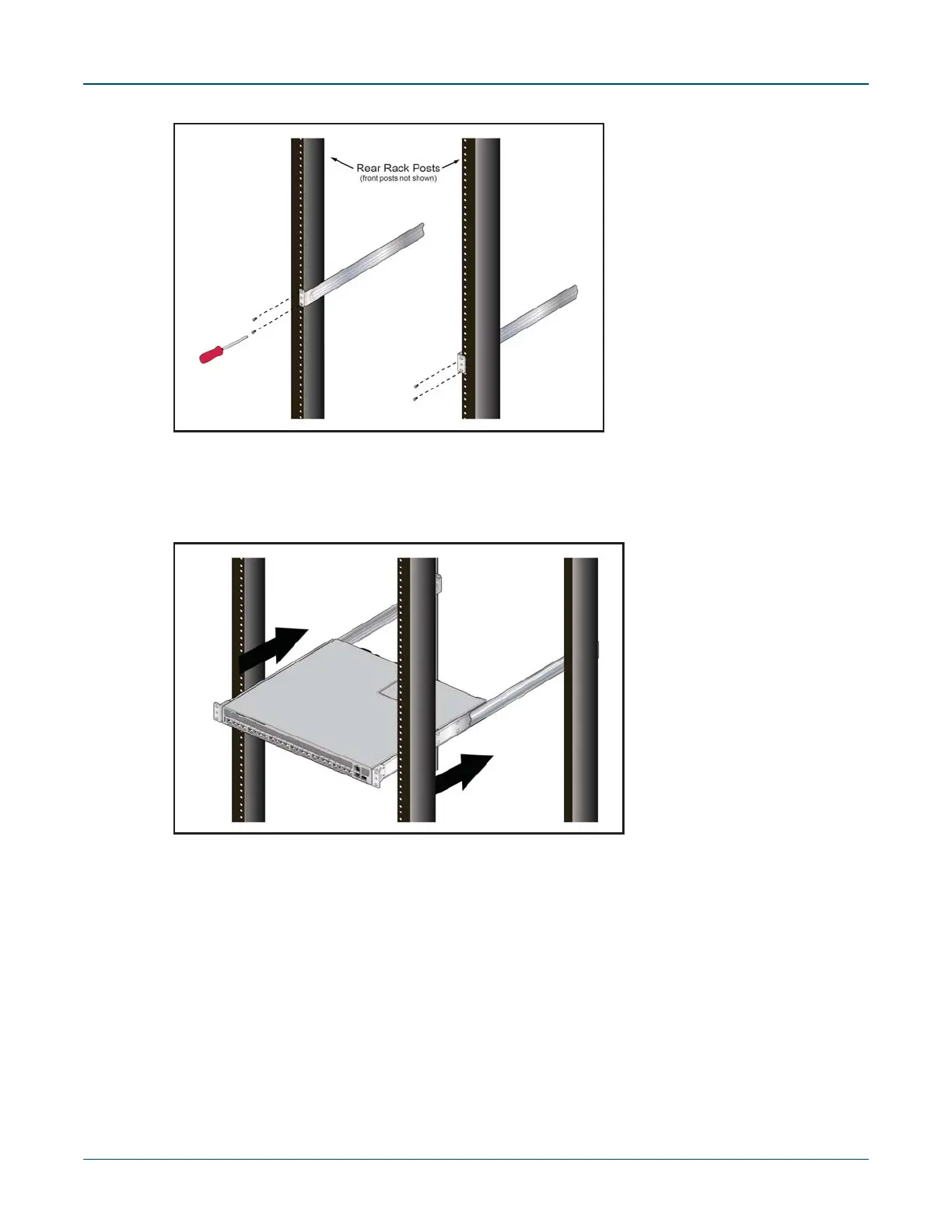
Figure 3-11: Attaching the Rails, as viewed from Rear of Rack
3.2.3 Atta ching the S witch to the Ra ck
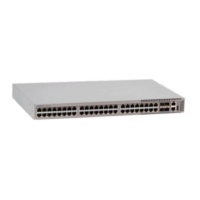
Step 1 Lift the switch into the rack and insert the mounting brackets onto the rails (Figure 3-12).
Figure 3-12: Inserting the Switch onto the Rails
Step 2 Slide the switch on the rails, toward the rear posts, until the mounting bracket flanges are
positioned on the rail posts.
Step 3 Select mounting screws that fit the equipment rack. Each chassis side requires two s cre ws .
Step 4 Verify the distance between the mounting bracket flanges and rail flanges does not exceed
30 inches (Figure 3-10 on page 11).
Step 5 Atta ch the bra cke t fla nge s to the ra ck pos ts (Figure 3-13 on page 13).



 To Next Page