EasyManua.ls Logo

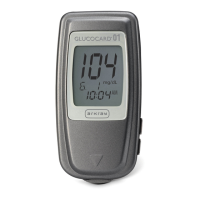
Arkray Glucocard 01 - User Manual

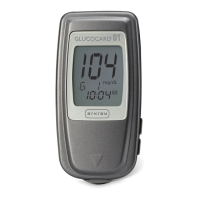
Arkray Glucocard 01
74 pages
Print Icon
To Next Page IconTo Next Page
Loading...
User
Instruction
Manual
Blood Glucose Monitoring System

Other manuals for Arkray Glucocard 01

Questions and Answers

  • A
    aprilkingJul 26, 2025
    What to do if Arkray Blood Glucose Meter shows test strip problem?
    • J
      Joshua TurnerJul 27, 2025
      If the Arkray Blood Glucose Meter displays a test strip problem, it might be due to dirty contact bars on the test strip, using an incorrect test strip, or reinserting a used test strip. Repeat the test using a new test strip.
  • J
    Joyce DonovanAug 2, 2025
    What to do if Arkray Blood Glucose Meter shows not enough blood?
    • M
      Michael WilsonAug 2, 2025
      If the Arkray Blood Glucose Meter indicates that not enough blood was added to the test strip, or the blood application technique was incorrect, retest with a new test strip.
  • K
    Kristin MillerAug 13, 2025
    What to do if the test strip is not inserted firmly into my Arkray Glucocard 01 Blood Glucose Meter?
    • J
      Joshua HerringAug 13, 2025
      If the test strip is not inserted firmly into your Arkray Blood Glucose Meter, ensure that the test strip is fully inserted into the test strip port.
  • A
    astewartAug 20, 2025
    How to fix Arkray Blood Glucose Meter temperature error?
    • J
      jason93Aug 20, 2025
      If the Arkray Blood Glucose Meter shows that the meter temperature is outside the acceptable range (50°F-104°F or 10°C-40°C), allow the meter and test strips to warm up or cool down slowly for about 20 minutes until the temperature warning symbol disappears.
  • A
    Alexandria BellNov 7, 2025
    Why is my Arkray Glucocard 01 Blood Glucose Meter control solution test result out-of-range?
    • J
      joshualevineNov 7, 2025
      If the control solution test result is out-of-range when using your Arkray Blood Glucose Meter, try the following: * Repeat the test, ensuring you insert a test strip and activate control solution mode by pressing the Orange/Up Arrow button until “CONT” appears on the screen. * Verify that neither the test strips nor the control solutions have expired. Check the expiration date on the bottle, and ensure the bottles haven't been opened for more than three months. * Confirm the control solutions are at room temperature (72-82°F or 22-28°C). If not, retest with a new bottle of control solution or allow the solution to reach room temperature. * Ensure that the code on the test strip bottle matches the code displayed on the meter screen. If they don't match, you will need to obtain a n...

Summary

Introduction

Intended Use

The System Includes

Lists the components included in the GLUCOCARD™ 01 Blood Glucose Monitoring System package.

Understanding the GLUCOCARD 01 Blood Glucose Meter

Meter Anatomy

Identifies and illustrates the top and bottom parts of the GLUCOCARD™ 01 Blood Glucose Meter.

Explanation of the Full Display

GLUCOCARD 01 Sensor

Test Strip Components

Describes the test strip bottle and the individual test strip, including contact bars and application tip.

Changing the Battery

METER SET-UP

Basic Rules for Meter Set-up

Outlines the initial steps and requirements before performing meter set-up.

Setting the Audible Beep

Setting the Year

Setting the Month and Day

Setting the Hour and Minute

Setting Test Averaging

Ending Set-up

PERFORM A CONTROL SOLUTION TEST

When to Perform Control Solution Test

Lists conditions and reasons for performing a control solution test on the meter.

BLOOD GLUCOSE TESTING

The Lancing Device

Illustrates and labels the components of the lancing device.

Getting a Drop of Blood

Provides a step-by-step guide on obtaining a blood drop from the fingertip.

Performing a Blood Glucose Test

Detailed instructions on how to perform a blood glucose test using the meter and strip.

Flagging Test Results

Marking Results (DEL, CONT)

Explains how to mark test results as DEL (delete) or CONT (control).

ALTERNATE SITE TESTING (AST)

Important Information About AST

Provides crucial information and potential differences when testing from sites other than the fingertip.

When to Consider AST vs Fingertip Testing

Guidelines on when to use alternate site testing versus fingertip testing.

Preparing to Test Your Blood Glucose From an Alternate Site

Instructions on selecting and preparing an alternate site for blood glucose testing.

Performing a Blood Glucose Test From an Alternate Site

Detailed steps for performing a blood glucose test from an alternate site.

Understanding Test Results

Comparing Meter Results with Lab Results

Guidelines for comparing meter readings with clinical lab results, including pre-comparison steps.

Factors Affecting Test Results

Explains various factors that can cause differences in test results and when to contact a healthcare professional.

Normal and High Blood Glucose Readings

Low Blood Glucose Readings and Diabetes Findings

RECALLING RESULTS - ENTERING MEMORY MODE

Step 1: Accessing Memory Mode

Instructions on how to press the button to enter the memory mode and view initial screen data.

Step 2: Scrolling Through Stored Results

Guidance on scrolling forward and backward through test results stored in the meter's memory.

Step 3: Exiting Memory Mode

Instructions on how to exit memory mode and the conditions for automatic shut-off.

Deleting all test results

Steps to Delete Test Results

Describes the button presses required to delete all test results from the meter's memory.

MAINTENANCE

Cleaning the Meter

Instructions on how to clean the meter, including what to avoid.

Storage and Handling Guidelines

Recommendations for storing and handling the meter and test strips to ensure proper function.

Display Screen and Error Messages

Common Error Indicators (Lo, Hi, Battery, Temp)

Explains common symbols and messages like "Lo", "Hi", low battery, and temperature warnings.

Meter Fault Error Codes (E-1, E-2, E-3, E-5)

Details specific error codes indicating meter faults and recommended actions.

Test Strip and Code Number Error Messages (E-6, E-7, F-4)

Explains error messages related to test strips, blood application, and code numbers.

Control Solution and Test Average Messages

Explains messages related to control solution application and test averaging status.

PRODUCT INFORMATION

Product Specifications

Lists detailed technical specifications for the GLUCOCARD™ 01 meter and sensor.

Warnings, Precautions & Limitations

Precautions and Drug Interactions

Outlines warnings about PAM, oxygen therapy, and grasping the meter near the thermosensor.

Hematocrit, Shock, and Drug Interference

Discusses the impact of hematocrit extremes, shock, and various drugs on test results.

System Limitations and Usage Restrictions

Specifies system limitations, prohibited uses (neonates, serum/plasma), and altitude restrictions.

Warranty

Returns

Arkray Glucocard 01 Specifications

General IconGeneral
Measurement Range20-600 mg/dL
Test Time7 seconds
Measurement MethodElectrochemical
Battery LifeApproximately 1000 tests
Sample Size0.5 µL
Operating Conditions10-40 °C, 20-80% RH
Storage Conditions10-90% RH
Power SourceOne CR2032 lithium battery

Related product manuals