18
Maintenance
When90%ofthesettingservicetimehasaccumulated,the“STATE”LEDonthecontrolpanelwill
blinkinyellow.(RefertoEOLsettings,forbedlifedurationsettings).IftheHumidiCleanisnotserviced
atthistime;theunitwillcontinuetooperatefortheremaining10%oftheservicelifesetting.When
100%ofthebedlifesettinghasbeenreached,the“STATE” LED will be on in red. The unit will drain
the tank and not respond to a call for demand.
Note: Service Life can be adjusted based on water quality. If Ionic Beds are relatively free of scale
deposits or scale is forming on tank walls and elements because beds are saturated with scale, please
consult the factory for Service Life adjustment procedures.
A. Servicing the Unit
1. Save the settings, consult the OPERATION SETUP menu
2. Go to Steam Gen. Menu
a. Drain tank by changing from “STEAM GEN.” to “MANUAL DRAIN” in the Operation
Setup Menu.
b. Once the tank is drained, shut power off to unit and allow the tank to cool.
c. Remove the cabinet access panel and tank access panel, located on left side of
humidifier.
3. Ionic Bed Inspection
Remove and inspect one of the ionic beds and inspect the drain screen at the bottom of the
tank.Ifthebeddoesnotappeartobesaturatedwithmineraldeposit(afullbedwill
weigh1.1kg(2.42lbs)dryandifthedrainscreenisclear,youcanresettheIonicBedlife
timer and either change that timer or leave it as it was. Continue on to Step 4.
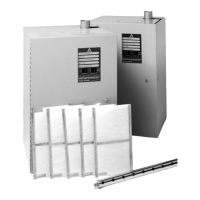
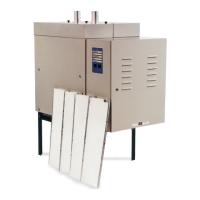
If the beds are saturated, remove all of them. Remove any large pieces of scale from the
tank.SeePage19(ReplacingtheIonicBeds)forcompleteinstructions.
4. Cleaning the Unit
a.ChemicallycleantheunitwithRite-Qwik.(Ifdesired.)
i.Pour3.75L(1gallon)ofRite-Qwikintotankfollowedby3.8L(1gallon)of
freshwater.TheHC-6500/6700modelrequires7.6L(2gallons)ofRite-Qwik
and7.6L(2gallons)ofwater.
ii. Allow the solution to work until the bubbling action ceases, not to exceed 1
hour. While waiting you can proceed with Steps b, c and d.
iii.Fillthetankwithwateranddrain.(Performthisstepseveraltimes.)
b. Clean the water level electrodes, using an emery cloth. See Page 21 for complete
instructions.
c. Ensure drain lines are free of leaks and secure.
d. Check inlet screen on fill valve and remove any debris.
e. Install the new Ionic Beds once you flushed the tank out.



 To Next Page